
Artificial intelligence is changing the way developers write software. From generating code snippets to debugging complex applications, AI coding assistants have become an essential part of modern development. However, one challenge many developers face is the ongoing cost of cloud-based AI services. Every prompt and response consumes API tokens, and for developers who code daily, these costs can add up quickly.
A practical alternative is running an AI coding assistant locally. By combining Claude Code with Ollama, developers can create a local AI coding environment that reduces API expenses while giving them greater privacy and control over their projects. Since the AI model runs directly on your computer, your source code stays on your device instead of being sent to external servers.
Whether you’re a student, freelancer, hobbyist, or professional developer, this setup can help you build software more efficiently without worrying about burning API credits.
What Is Claude Code?
Claude Code is a command-line AI coding assistant that helps developers perform programming tasks using natural language. Instead of manually writing every function or searching through documentation, you can ask the assistant to generate code, explain logic, identify bugs, or improve existing files.
Developers commonly use Claude Code for:
- Writing new code
- Explaining complex functions
- Refactoring projects
- Debugging applications
- Creating documentation
- Generating unit tests
- Improving code quality
- Automating repetitive tasks
Rather than replacing developers, it works like an intelligent programming partner that speeds up everyday development.
What Is Ollama?
Ollama is a lightweight platform that allows users to run large language models locally on their own computers. Instead of sending prompts to cloud servers, the AI model performs inference using your computer’s hardware.
Running models locally offers several advantages:
- No recurring API charges
- Better privacy for sensitive projects
- Faster responses on capable hardware
- Reduced internet dependency
- Greater control over AI models
Once the required model is installed, you can continue working even if your internet connection is unavailable.
Why Combine Claude Code with Ollama?
Using Claude Code together with Ollama creates a powerful local coding workflow.
1. Save Money
Cloud AI services often charge based on token usage. Developers working on large codebases or long debugging sessions may spend a significant amount on API credits each month.
A local setup eliminates these recurring costs after installation.
2. Better Privacy
Many software projects contain confidential business logic or customer information. Running AI locally means your code remains on your own computer instead of being uploaded to third-party servers.
3. Faster Workflow
Modern computers with sufficient RAM and a dedicated GPU can generate responses quickly, making local development smooth and efficient.
4. Unlimited Experimentation
Since there are no token limits, developers can freely test prompts, compare solutions, and explore different programming approaches without worrying about additional expenses.
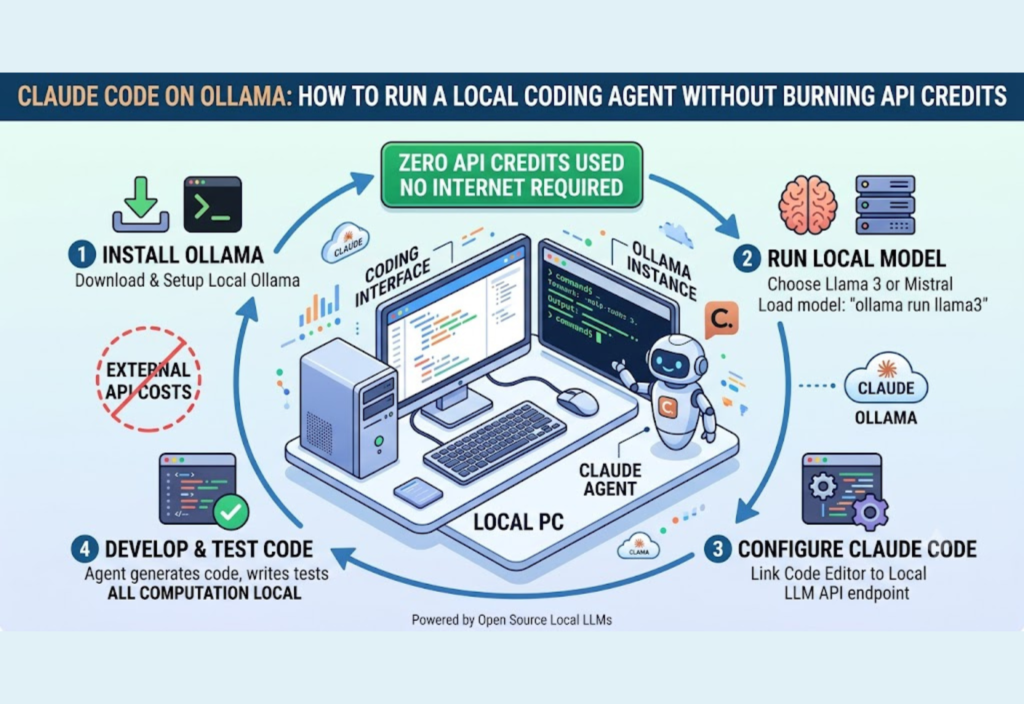
How the Local Workflow Works
The overall process is simple.
- You enter a coding request.
- Claude Code receives your prompt.
- Ollama forwards it to the local AI model.
- The model processes the request using your computer’s hardware.
- Claude Code displays the generated code or explanation.
Because everything runs locally, developers maintain full control over both their code and the AI model.
Recommended Hardware
Although smaller AI models can run on modest systems, better hardware delivers faster performance.
Recommended specifications include:
- Modern multi-core processor
- Minimum 16 GB RAM
- 32 GB RAM for smoother multitasking
- SSD storage
- Dedicated GPU (recommended)
- Apple Silicon or modern NVIDIA graphics for improved inference speed
Choosing hardware that matches the model size ensures a more responsive coding experience.
Common Development Tasks
A local AI coding agent can assist with a wide variety of programming activities.
Examples include:
- Building websites
- Developing REST APIs
- Creating Python automation scripts
- Writing WordPress plugins
- Debugging JavaScript
- Refactoring legacy code
- Generating SQL queries
- Writing documentation
- Creating unit tests
- Explaining unfamiliar codebases
These capabilities help developers reduce repetitive work while improving productivity.
Best Practices for Local AI Coding
To get the most from your local setup:
- Use detailed prompts for better results.
- Review all generated code before deployment.
- Test AI-generated functions carefully.
- Keep your models updated.
- Use version control for every project.
- Regularly back up important files.
AI can accelerate development, but careful human review remains essential for writing reliable software.
Conclusion
Running Claude Code with Ollama is an effective way to build a local AI coding environment without relying on expensive cloud API credits. This approach offers lower operating costs, greater privacy, and the flexibility to experiment freely while keeping your source code on your own computer.
Whether you are learning programming, managing freelance projects, contributing to open-source software, or developing professional applications, a local AI coding setup can improve productivity while giving you complete control over your workflow. As local language models continue to evolve, more developers are expected to adopt this cost-effective and privacy-focused approach, making Claude Code with Ollama an excellent choice for modern AI-assisted software development.

