
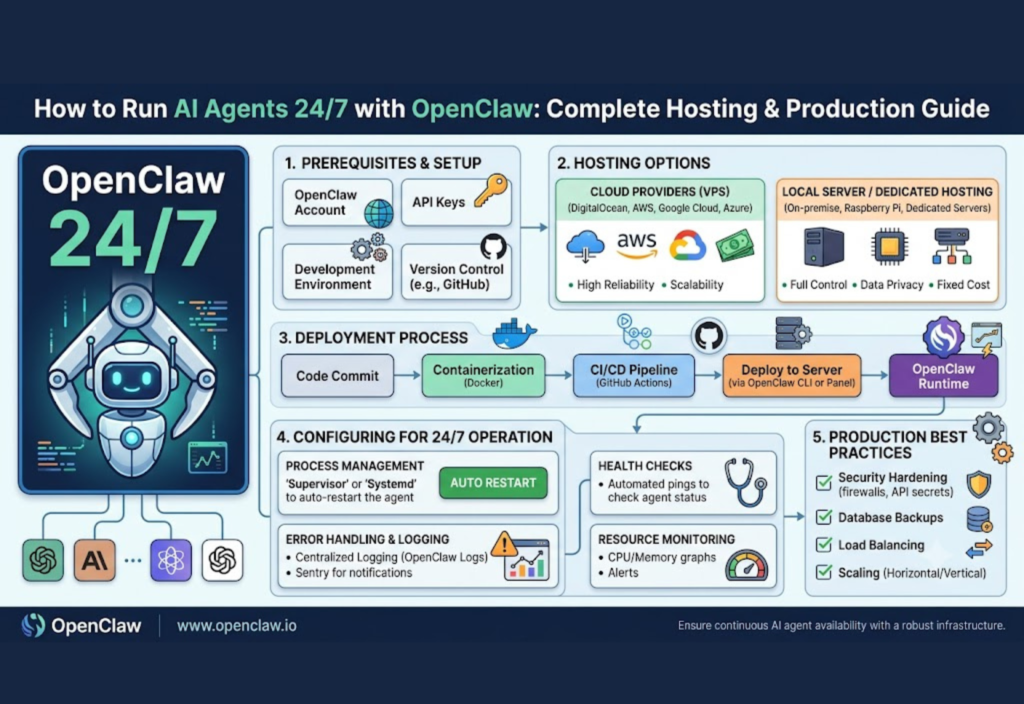
Artificial intelligence has evolved far beyond simple chatbots. In 2026, businesses, developers, and automation enthusiasts are increasingly using AI agents that can work continuously without human supervision. These intelligent systems can answer customer questions, automate workflows, monitor servers, generate reports, write code, and perform complex business tasks around the clock.
To keep an AI agent running reliably, you need more than a powerful computer—you need a stable production environment. Hosting an AI agent on a properly configured server ensures it stays online 24/7, even when your personal device is turned off.
OpenClaw is one of the frameworks making this possible. It helps developers build, deploy, and manage AI agents that can perform real-world tasks with minimal manual intervention.
In this How to Run AI Agents 24/7 with OpenClaw: Complete Hosting & Production Guide, you’ll learn how OpenClaw works, how to choose the right hosting platform, prepare a production server, optimize performance, and keep your AI agents running continuously.
What Is OpenClaw?
OpenClaw is an AI automation framework designed for creating autonomous AI agents capable of performing ongoing tasks rather than responding to a single request.
Unlike traditional chatbots, OpenClaw agents can:
Execute workflows automatically
Connect with external APIs
Process files and documents
Monitor applications
Generate reports
Manage background tasks
Perform intelligent decision-making
This flexibility makes OpenClaw suitable for both personal automation projects and enterprise AI deployments.
Common use cases include:
Customer support automation
AI coding assistants
Workflow automation
Research assistants
Document processing
Monitoring systems
Content generation
Why Run AI Agents 24/7?
Many AI applications must remain available around the clock. If an AI agent only works while your personal computer is running, automation becomes unreliable.
Hosting OpenClaw on a production server offers several important benefits.
Continuous Availability
Users can interact with your AI agent anytime without worrying about your local computer being online.
Automated Background Tasks
Scheduled jobs, monitoring services, and automated workflows continue running without manual intervention.
Faster Response Times
Production servers keep AI models loaded into memory, reducing startup delays.
Better Reliability
Dedicated servers experience fewer interruptions than personal computers.
Easy Scalability
As traffic increases, server resources can be upgraded without rebuilding your application.
Choosing the Right Hosting Environment
Selecting the right hosting platform is one of the most important deployment decisions.
Different environments suit different workloads and budgets.
Local Computer
Running OpenClaw locally is excellent for development and testing.
Advantages
Easy setup
Free to use
Full system control
Limitations
Stops when the computer shuts down
Depends on home internet
Unsuitable for production workloads
Virtual Private Server (VPS)
A VPS is one of the most popular options for hosting AI agents.
Benefits include:
Runs continuously
Affordable monthly pricing
Remote server access
Easy resource upgrades
Suitable for startups and small businesses
Cloud Hosting
Cloud providers offer scalable infrastructure designed for production AI applications.
Advantages include:
High availability
Automatic scaling
Load balancing
Managed backups
Enterprise-grade reliability
For growing businesses, cloud hosting is usually the preferred long-term solution.
Preparing Your Production Server
Before installing OpenClaw, it’s important to prepare a clean and secure production environment.
A typical server setup includes:
Updated Linux operating system
Python installation
AI libraries
Docker (optional)
Reverse proxy
Firewall configuration
SSL certificates
Monitoring tools
A well-organized server simplifies maintenance, upgrades, and troubleshooting.
Installing OpenClaw
Installing OpenClaw usually starts by downloading the project and installing all required dependencies.
Typical preparation includes:
Creating a Python virtual environment
Installing required packages
Configuring environment variables
Downloading AI models
Testing locally before deployment
Always verify that every component works correctly before moving into production.
Configuring AI Models
OpenClaw supports multiple AI models depending on your hardware and project goals.
When choosing a model, consider:
Available RAM
GPU memory (VRAM)
CPU performance
Response speed
Model size
Inference quality
Smaller models provide faster responses with lower hardware requirements, while larger models generally offer stronger reasoning and higher-quality outputs.
For most production deployments, balanced models provide the best mix of speed, quality, and cost.
Setting Up Environment Variables
Never store sensitive credentials directly inside your application code.
Instead, keep configuration settings inside environment variables.
Common examples include:
API keys
Database credentials
Authentication tokens
Server settings
Logging configuration
Using environment variables improves both security and maintainability.
Testing Before Deployment
Never deploy an AI agent without thorough testing.
Verify important workflows such as:
AI responses
Database connectivity
File operations
External API integrations
Error handling
Performance under load
Finding issues before deployment significantly reduces production failures.
Deploying Your AI Agent for Continuous Operation
Once your AI agent works correctly on your local machine, the next step is deploying it to a production server where it can run continuously. A production environment ensures your AI remains online 24/7, even when your personal computer is turned off.
Popular deployment options include:
- Virtual Private Servers (VPS)
- Dedicated servers
- Cloud virtual machines
- Docker containers
- Kubernetes clusters
For beginners, a VPS is usually the easiest and most affordable solution. As your project grows, you can migrate to Docker or Kubernetes for improved scalability, reliability, and resource management.
Running OpenClaw with Docker
Docker simplifies deployment by packaging OpenClaw and all its dependencies into a single container. This eliminates compatibility issues between different operating systems and makes updates much easier.
A typical Docker deployment involves:
- Installing Docker on the server
- Pulling or building the OpenClaw image
- Configuring environment variables
- Mounting configuration files and storage volumes
- Starting the container
- Verifying that the AI service is running correctly
Docker also makes backups, migrations, and application updates much simpler because the environment remains consistent across different servers.
Monitoring Your AI Agent
Hosting an AI agent 24/7 requires continuous monitoring. Without proper monitoring, crashes, memory leaks, or hardware issues may go unnoticed until users begin experiencing problems.
Monitor important system metrics such as:
- CPU usage
- RAM usage
- GPU utilization
- Disk space
- Network traffic
- Response times
- Application logs
- System uptime
Monitoring tools allow administrators to detect problems early and maintain high availability.
Security Best Practices
Security should always be a priority when deploying OpenClaw in production.
Follow these best practices:
- Enable HTTPS encryption.
- Use strong and unique passwords.
- Store API keys securely using environment variables.
- Restrict SSH access.
- Configure a firewall.
- Keep the operating system updated.
- Enable automatic security patches.
- Back up important configuration files regularly.
Implementing these security measures reduces the risk of unauthorized access while improving the overall reliability of your deployment.
Scaling OpenClaw for More Users
As your AI application becomes more popular, a single server may no longer provide enough resources.
Common scaling strategies include:
- Load balancing
- Running multiple application instances
- GPU acceleration
- Distributed databases
- Response caching
- Horizontal scaling across multiple servers
A scalable architecture helps maintain fast response times even during periods of heavy traffic.
Automating Restarts
Even reliable applications may occasionally stop because of software updates, unexpected errors, or server maintenance.
To maximize uptime:
- Configure automatic service restarts.
- Enable startup on system boot.
- Monitor process health.
- Restart failed Docker containers automatically.
- Schedule regular maintenance windows.
Automation reduces downtime and ensures your AI agent remains available around the clock.
Performance Optimization Tips
Several optimizations can improve both performance and operating costs.
Recommended best practices include:
- Use optimized AI models.
- Enable model quantization when supported.
- Cache frequently requested responses.
- Minimize unnecessary logging.
- Optimize database queries.
- Store data on SSD drives.
- Keep software and dependencies updated.
- Allocate sufficient RAM and CPU resources.
These improvements help OpenClaw respond faster while using fewer system resources.
Common Problems and Solutions
Even well-configured production environments occasionally experience issues.
High Memory Usage
Large AI models consume significant RAM.
Solution: Use smaller models or quantized versions to reduce memory requirements.
Slow Responses
Performance bottlenecks often result from insufficient hardware resources.
Solution: Monitor CPU and GPU utilization, optimize prompts, and upgrade hardware when necessary.
Server Crashes
Unexpected crashes may occur because of outdated software or insufficient memory.
Solution: Review application logs, update dependencies, and ensure enough free RAM is available.
Connection Errors
Network issues can prevent users from accessing your AI agent.
Solution: Verify firewall settings, reverse proxy configuration, DNS records, and network connectivity.
Storage Running Out
Log files and AI model data can consume storage over time.
Solution: Rotate logs regularly, remove unnecessary files, and monitor disk usage.
Who Should Use OpenClaw?
OpenClaw is suitable for many different users and organizations.
It is especially useful for:
- AI developers
- Software engineers
- Startups
- Small businesses
- Researchers
- DevOps professionals
- Automation enthusiasts
- Educational institutions
Whether you’re building an AI chatbot, workflow automation platform, coding assistant, or research tool, OpenClaw provides a flexible foundation for production deployments.
Future of Self-Hosted AI Agents
Self-hosted AI continues to gain popularity as organizations seek greater privacy, customization, and cost control.
Future developments are expected to include:
- More intelligent autonomous agents
- Better long-term memory systems
- Improved multi-agent collaboration
- Faster local AI inference
- Advanced workflow automation
- Better GPU utilization
- Easier deployment tools
As these technologies mature, deploying AI agents on private infrastructure will become even more practical and accessible.
Frequently Asked Questions
Can OpenClaw run without a GPU?
Yes. Smaller AI models can run entirely on CPUs, although a dedicated GPU significantly improves performance and response speed.
Is Docker required?
No. OpenClaw can run directly on Linux or Windows. However, Docker simplifies deployment, maintenance, updates, and server migration.
Can I host OpenClaw on a VPS?
Yes. Many developers host OpenClaw on affordable VPS providers to keep AI agents running continuously.
Is OpenClaw suitable for production?
Yes. With proper security, monitoring, backups, and scaling strategies, OpenClaw is capable of supporting reliable production workloads.
Final Thoughts
Running AI agents continuously has become much easier thanks to modern hosting frameworks like OpenClaw. By following this How to Run AI Agents 24/7 with OpenClaw: Complete Hosting & Production Guide, you can build reliable AI services that remain online day and night with minimal manual intervention.
Whether you’re creating an intelligent chatbot, automating business workflows, developing research assistants, or experimenting with autonomous AI systems, OpenClaw offers a flexible and scalable platform for production deployments. Start with a simple VPS or cloud server, monitor your system regularly, optimize performance as your workload grows, and gradually scale your infrastructure. With the right setup and maintenance, your AI agent can operate securely, efficiently, and reliably 24 hours a day, 7 days a week.

