
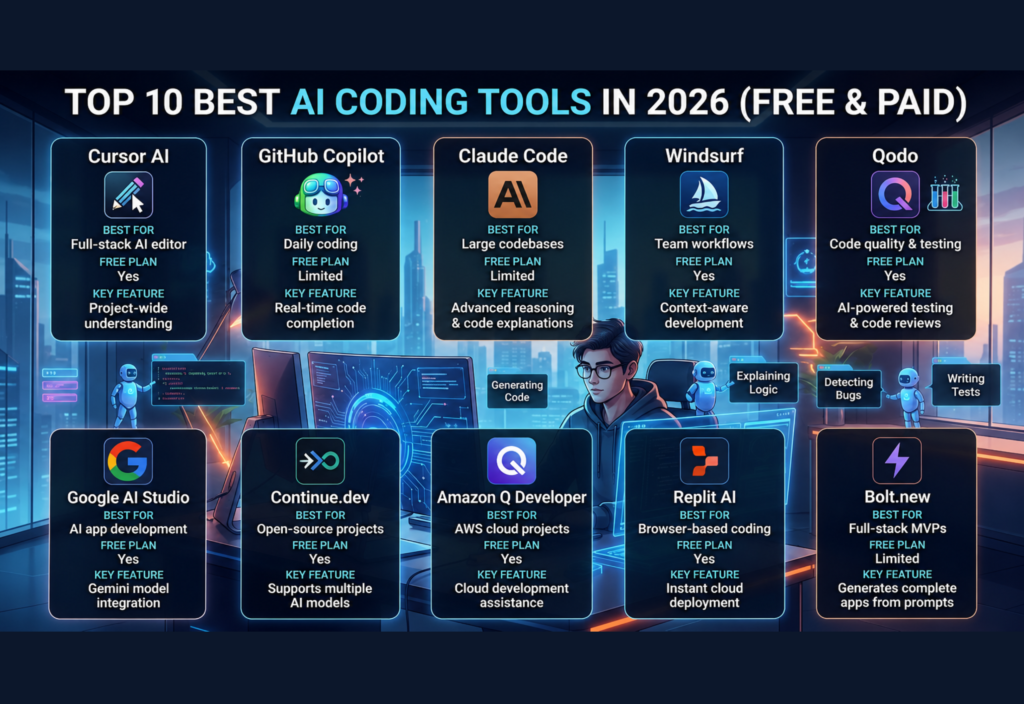
Writing software has changed dramatically over the past few years. Instead of spending hours searching documentation, debugging errors, or writing repetitive code, developers now use AI-powered coding assistants to work faster and more efficiently. In 2026, the Best AI Coding Tools can generate code, explain complex logic, detect bugs, write tests, refactor projects, and even help developers understand unfamiliar codebases.
These tools are no longer useful only for experienced programmers. Students, freelancers, startup founders, and professional software engineers are all using AI to increase productivity and reduce development time.
In this guide, we’ll explore the Top 10 Best AI Coding Tools in 2026, comparing their features, strengths, pricing, and ideal use cases so you can choose the right assistant for your workflow.
Why AI Coding Tools Are Essential in 2026
Modern software development involves much more than writing code. Developers spend significant time debugging, reviewing pull requests, documenting projects, learning frameworks, and maintaining existing applications.
AI coding assistants help by:
- Generating code from natural language prompts
- Explaining existing code
- Detecting bugs before deployment
- Suggesting improvements
- Writing unit tests
- Refactoring large codebases
- Creating documentation
- Speeding up development workflows
Rather than replacing developers, these tools reduce repetitive work and allow programmers to focus on solving real problems.
How We Selected These AI Coding Tools
The tools in this list were selected based on several important factors:
- Code quality and accuracy
- Support for multiple programming languages
- IDE compatibility
- AI-assisted debugging
- Code explanation features
- Productivity improvements
- Community adoption
- Free and paid plans
- Continuous updates and innovation
Whether you’re building websites, AI applications, mobile apps, or enterprise software, these tools can help improve your workflow.
1. Cursor AI
Cursor AI has become one of the most popular AI-first code editors for developers in 2026. Built on Visual Studio Code, it combines a familiar interface with advanced AI capabilities.
Instead of acting as a simple autocomplete tool, Cursor understands your project, edits multiple files, explains code, and helps solve programming problems across your entire workspace.
Key Features
- AI code generation
- Project-wide code understanding
- Multi-file editing
- Smart debugging
- Natural language instructions
- Fast code refactoring
Best For
- Full-stack developers
- AI engineers
- Startup teams
- Professional programmers
Free or Paid?
Both free and premium plans are available, with additional AI usage included in paid subscriptions.
2. GitHub Copilot
GitHub Copilot remains one of the most widely used AI coding assistants. Integrated into popular editors such as Visual Studio Code, JetBrains IDEs, and Visual Studio, it provides intelligent code suggestions as you type.
Copilot is especially useful for writing repetitive code, generating functions, and speeding up software development.
Key Features
- Real-time code completion
- Function generation
- Multiple language support
- Documentation assistance
- Code suggestions based on project context
Best For
- Beginners
- Professional developers
- Open-source contributors
- Enterprise development teams
Free or Paid?
A limited free option is available for eligible users, while advanced features require a paid subscription.
3. Claude Code
Claude Code has become a favorite among developers who work with large projects and complex codebases. It excels at reasoning through complicated programming tasks and producing well-structured, readable code.
Many developers also use it to review pull requests, explain unfamiliar code, and improve software architecture.
Key Features
- Large context window
- Advanced code explanations
- Intelligent debugging
- Refactoring suggestions
- Architecture guidance
Best For
- Backend developers
- Enterprise applications
- Large software projects
- Technical documentation
Free or Paid?
Claude Code offers free access with usage limits, while premium plans provide higher limits and additional capabilities.
4. Windsurf
Windsurf is an AI-powered development environment designed to make coding feel more collaborative. Rather than simply suggesting snippets, it helps developers plan, write, edit, and improve code across entire projects.
Its workflow-focused approach makes it particularly useful for teams building modern applications.
Key Features
- AI-assisted coding
- Multi-file editing
- Project understanding
- Intelligent code generation
- Context-aware suggestions
Best For
- Web developers
- SaaS startups
- Software teams
- Freelancers
Free or Paid?
Windsurf offers both free and paid plans depending on AI usage requirements.
5. Qodo (Formerly Codium)
Qodo is designed to help developers improve software quality through AI-assisted testing and code review. Unlike tools focused only on code generation, Qodo emphasizes writing reliable, maintainable applications.
It can automatically suggest tests, identify potential issues, and improve overall code quality before deployment.
Key Features
- AI-generated unit tests
- Smart code reviews
- Bug detection
- Refactoring assistance
- Quality analysis
Best For
- Software teams
- QA engineers
- Enterprise developers
- Continuous integration workflows
Free or Paid?
Qodo provides free features for individual developers, with advanced capabilities available through paid plans.
Choosing the Right Tool
Each AI coding assistant serves a slightly different purpose.
- Cursor AI is ideal for developers who want an AI-first coding experience.
- GitHub Copilot is perfect for fast code completion and daily programming tasks.
- Claude Code excels at understanding large projects and explaining complex code.
- Windsurf focuses on collaborative, context-aware development.
- Qodo helps teams improve testing and software quality.
The best choice depends on your programming language, workflow, project size, and budget.
6. Google AI Studio
Google AI Studio has become one of the easiest platforms for developers who want to build AI-powered applications using Google’s latest Gemini models. It provides a browser-based environment where you can test prompts, generate code, and experiment with AI APIs before integrating them into real projects.
Unlike traditional development tools, Google AI Studio focuses on rapid AI prototyping, making it an excellent choice for developers building chatbots, AI assistants, and automation workflows.
Key Features
- Browser-based development
- Gemini model integration
- Prompt testing
- API key management
- Code generation
- Quick AI prototyping
Best For
- AI developers
- Web developers
- Mobile app developers
- Beginners learning generative AI
Free or Paid?
A free tier is available, while advanced usage depends on the selected API plan.
7. Continue.dev
Continue.dev is an open-source AI coding assistant that integrates directly into Visual Studio Code and JetBrains IDEs. It gives developers the flexibility to work with different AI models instead of being locked into a single provider.
This makes it popular among developers who want greater control over their coding workflow.
Key Features
- Open-source
- Multiple AI model support
- IDE integration
- Code generation
- Smart editing
- Local AI compatibility
Best For
- Open-source developers
- Privacy-focused teams
- Advanced programmers
- AI experimentation
Free or Paid?
Continue.dev is free and open source. API costs depend on the AI model you connect.
8. Amazon Q Developer
Amazon Q Developer is Amazon’s AI assistant designed for software development and cloud applications. It helps developers write code, troubleshoot issues, generate documentation, and work more efficiently with AWS services.
For organizations already using Amazon Web Services, it can significantly simplify cloud development.
Key Features
- AWS integration
- Code generation
- Cloud troubleshooting
- Documentation assistance
- Security recommendations
- Infrastructure guidance
Best For
- Cloud engineers
- DevOps teams
- AWS developers
- Enterprise software projects
Free or Paid?
Amazon Q Developer offers a free tier with additional enterprise features available in paid plans.
9. Replit AI
Replit AI combines coding, collaboration, and cloud development in one platform. Developers can write, test, and deploy applications directly from their browser without configuring a local environment.
Its AI assistant helps generate code, explain errors, and speed up development, making it especially useful for beginners and educators.
Key Features
- Browser-based coding
- AI code generation
- Instant project deployment
- Team collaboration
- Debugging assistance
- Learning support
Best For
- Students
- Freelancers
- Educators
- Rapid prototyping
Free or Paid?
Replit offers both free and paid plans with different AI usage limits.
10. Bolt.new
Bolt.new is one of the fastest-growing AI development platforms in 2026. It enables developers to generate complete full-stack web applications from natural language prompts.
Instead of manually creating project files, configuring frameworks, and writing boilerplate code, developers can describe what they want to build and receive a working application within minutes.
Key Features
- Full-stack application generation
- Natural language coding
- Instant project setup
- Modern framework support
- Rapid prototyping
- Browser-based development
Best For
- Startup founders
- Indie developers
- MVP development
- Web application prototyping
Free or Paid?
Bolt.new provides limited free usage, with premium plans offering higher generation limits and advanced capabilities.
Comparison of the Top AI Coding Tools
Best AI Coding Tools Comparison
Cursor AI
- Best For: AI-first coding
- Free Plan: ✅ Yes
- Standout Feature: Project-wide code understanding
GitHub Copilot
- Best For: Daily coding
- Free Plan: Limited
- Standout Feature: Real-time code completion
Claude Code
- Best For: Large codebases
- Free Plan: Limited
- Standout Feature: Advanced reasoning and code explanations
Windsurf
- Best For: Team workflows
- Free Plan: ✅ Yes
- Standout Feature: Context-aware development
Qodo
- Best For: Code quality
- Free Plan: ✅ Yes
- Standout Feature: AI-powered testing and code reviews
Google AI Studio
- Best For: AI application development
- Free Plan: ✅ Yes
- Standout Feature: Gemini integration
Continue.dev
- Best For: Open-source development
- Free Plan: ✅ Yes
- Standout Feature: Supports multiple AI models
Amazon Q Developer
- Best For: AWS projects
- Free Plan: ✅ Yes
- Standout Feature: Cloud development assistance
Replit AI
- Best For: Browser-based coding
- Free Plan: ✅ Yes
- Standout Feature: Instant cloud development
Bolt.new
- Best For: Full-stack application development
- Free Plan: Limited
- Standout Feature: Generates complete apps from prompts
Which AI Coding Tool Should You Choose?
The right tool depends on your goals and development workflow.
- Beginners: Replit AI or GitHub Copilot
- Professional Developers: Cursor AI or Claude Code
- Open-Source Enthusiasts: Continue.dev
- AWS Developers: Amazon Q Developer
- AI Application Builders: Google AI Studio
- Rapid MVP Development: Bolt.new
- Software Testing: Qodo
Many developers combine multiple tools to take advantage of each platform’s strengths.
Frequently Asked Questions
Are AI coding tools replacing programmers?
No. AI coding tools assist developers by automating repetitive tasks, suggesting code, and improving productivity. Human developers are still responsible for designing software, solving complex problems, and reviewing generated code.
Which AI coding tool is best for beginners?
GitHub Copilot and Replit AI are excellent starting points because they are easy to use and integrate well into common development workflows.
Can AI coding tools write complete applications?
Some tools, such as Bolt.new and Cursor AI, can generate significant portions of an application. However, developers should always review, test, and customize the generated code.
Are free AI coding tools worth using?
Yes. Many free plans provide enough features for learning, personal projects, and small applications. Paid plans are typically more suitable for professional development and higher usage.
Which AI coding tool supports multiple programming languages?
Most modern AI coding tools support popular languages, including Python, JavaScript, TypeScript, Java, C++, Go, PHP, and more.
Conclusion
AI coding assistants have become an essential part of modern software development. They help developers write cleaner code, debug faster, understand unfamiliar projects, and automate repetitive programming tasks.
Whether you’re a beginner learning your first programming language or an experienced engineer building enterprise software, choosing the right AI coding tool can significantly improve your productivity. Explore a few options, compare their strengths, and select the one that best fits your workflow and development goals.

