
Artificial Intelligence (AI) is evolving rapidly, and modern AI applications are becoming smarter every day. Whether you’re using AI chatbots, semantic search engines, recommendation systems, or Retrieval-Augmented Generation (RAG), one technology works behind the scenes to make these systems faster and more accurate: vector databases.
Traditional databases are excellent at storing structured data such as names, email addresses, product prices, and order details. However, they struggle to understand the meaning behind text, images, audio, or videos. AI applications need more than exact keyword matching—they need to understand context, similarity, and intent.
This is where vector databases come in.
A vector database stores AI-generated embeddings instead of plain text. These embeddings allow AI models to search based on meaning rather than exact words. As a result, users receive more relevant, context-aware, and intelligent responses.
In this beginner-friendly guide, you’ll learn what vector databases are, how they work, why they are essential for modern AI applications, and compare four of the most popular vector databases in 2026: Pinecone, Weaviate, Chroma, and Qdrant.
What Is a Vector Database?
A vector database is a specialized database designed to store, index, and search vector embeddings generated by AI models.
Instead of storing only text or numbers, it stores mathematical representations of data that capture meaning and relationships.
For example, consider these sentences:
- The cat is sleeping on the sofa.
- A kitten is resting on the couch.
- The stock market crashed today.
A traditional SQL database compares exact words. It may not recognize that “cat” and “kitten” or “sofa” and “couch” have similar meanings.
A vector database, however, understands that the first two sentences are semantically similar while the third is completely different.
This ability makes vector databases ideal for AI-powered search and question-answering systems.
Why Do AI Applications Need Vector Databases?
Modern AI models such as large language models (LLMs) generate responses based on patterns they learned during training. However, they don’t automatically know your company’s documents, research papers, or newly published content.
A vector database solves this problem by storing embeddings of your custom data and retrieving the most relevant information whenever users ask questions.
Instead of searching for exact keywords, AI searches for the closest meaning.
This significantly improves:
- AI chatbots
- Enterprise search
- Customer support assistants
- AI-powered recommendation systems
- Document search
- Knowledge bases
- Legal document retrieval
- Medical information systems
Without vector databases, many AI assistants would return incomplete or inaccurate answers.
What Are Embeddings?
To understand vector databases, you first need to understand embeddings.
An embedding is a numerical representation of data generated by an AI model.
Think of embeddings as coordinates that place similar pieces of information close together in a mathematical space.
For example:
Sentence A
I love playing football.
Sentence B
Soccer is my favorite sport.
Although these sentences use different words, they have nearly the same meaning.
The embedding model converts both sentences into vectors that are very close to each other.
Meanwhile,
I enjoy cooking pasta.
would produce an embedding much farther away.
This enables AI to understand context instead of relying on identical words.
How Vector Databases Work
A vector database follows several simple steps.
Step 1: Data Collection
The system gathers information such as:
- PDFs
- Documents
- Articles
- Emails
- Product descriptions
- Customer support tickets
- Images
- Audio transcripts
Step 2: Create Embeddings
An embedding model converts every piece of data into numerical vectors.
For example:
Article

↓

Embedding Model

↓

Vector
Each vector represents the meaning of the original content.
Step 3: Store the Vectors
The generated vectors are stored inside the vector database together with metadata like:
- Document title
- Source
- Author
- Date
- Category
- URL
This metadata helps filter search results.
Step 4: User Asks a Question
Example:
“How can I improve website SEO?”
The question is also converted into a vector.
Step 5: Similarity Search
The vector database compares the user’s vector with millions of stored vectors.
Instead of looking for identical words, it searches for similar meanings.
It quickly retrieves the most relevant documents.
Step 6: AI Generates the Answer
The retrieved information is sent to the language model.
The AI now answers using both its existing knowledge and your documents.
This process is known as Retrieval-Augmented Generation (RAG).
What Is Similarity Search?
Similarity search is one of the biggest advantages of vector databases.
Instead of asking,
Does this sentence contain the same keyword?
the system asks,
Does this sentence have the same meaning?
For example:
User searches:
Best laptop for programming
The database may also retrieve documents containing:
- Best coding laptop
- Laptop for software developers
- Computer for programmers
- Developer notebook recommendations
Even though the keywords differ, the meaning remains similar.
This produces significantly better search results than traditional databases.
Why Vector Databases Matter for RAG
Retrieval-Augmented Generation (RAG) has become one of the most important AI techniques in 2026.
Instead of relying only on pre-trained knowledge, an AI model first retrieves relevant information from a vector database.
The workflow looks like this:
- User asks a question.
- The question is converted into an embedding.
- The vector database finds the most relevant documents.
- Those documents are added to the AI prompt.
- The AI generates a more accurate and up-to-date answer.
Because of this process, RAG systems can:
- Reduce AI hallucinations
- Improve factual accuracy
- Answer questions using private company data
- Access newly updated information
- Support enterprise knowledge bases
This is why vector databases have become a core component of modern AI applications.
Pinecone Overview
Pinecone is one of the most popular managed vector databases available today. It is designed specifically for AI applications and provides a fully managed cloud service, allowing developers to focus on building AI products instead of managing infrastructure.
One of Pinecone’s biggest strengths is its scalability. It can efficiently handle millions or even billions of vectors while maintaining fast search performance.
Key Features
- Fully managed cloud platform
- High-speed similarity search
- Automatic scaling
- Built-in indexing
- Metadata filtering
- Easy API integration
- Enterprise-grade security
Advantages
- Beginner-friendly
- Excellent documentation
- Minimal maintenance
- Highly scalable
- Ideal for production AI systems
Limitations
- Mostly cloud-based
- Costs can increase as data grows
- Less suitable for developers who prefer complete local control
Best For
- AI SaaS products
- Enterprise search
- Large-scale RAG applications
- Customer support chatbots
- Production AI deployments
Weaviate Overview
Weaviate is an open-source vector database that combines vector search with structured data management. It is highly flexible and can be deployed either on your own infrastructure or in the cloud.
One of Weaviate’s standout features is its support for hybrid search, which combines traditional keyword search with semantic vector search. This allows applications to return highly relevant results by considering both exact matches and contextual meaning.
Weaviate also supports modular integrations with popular AI models, making it a strong choice for developers building advanced AI systems.
Key Features
- Open-source
- Hybrid search (keyword + vector)
- GraphQL API support
- Metadata filtering
- Cloud and self-hosted deployment
- Modular AI integrations
Advantages
- Highly customizable
- Strong community support
- Flexible deployment options
- Excellent for enterprise AI applications
- Supports complex search scenarios
Limitations
- More complex to configure than fully managed services
- Requires infrastructure management when self-hosted
- Learning curve for beginners
Best For
- Enterprise knowledge bases
- AI-powered search engines
- Research platforms
- Recommendation systems
- Organizations that require flexibility and full control
Chroma Overview
Chroma is a lightweight, open-source vector database designed primarily for developers who are building AI applications locally. It has become especially popular among developers working with Python, LangChain, and LlamaIndex because it is easy to install and requires very little configuration.
Unlike enterprise-focused databases, Chroma is optimized for rapid prototyping and experimentation. If you’re building your first Retrieval-Augmented Generation (RAG) application or testing an AI chatbot on your computer, Chroma is often one of the easiest options to get started with.
Although it is simple to use, Chroma still supports powerful vector search capabilities and integrates well with modern AI frameworks.
Key Features
- Open-source
- Simple installation
- Python-first design
- Fast local development
- Easy integration with LangChain
- Works well with LlamaIndex
- Metadata filtering
- Lightweight architecture
Advantages
- Completely free to use
- Perfect for beginners
- Excellent for local AI development
- Fast setup process
- Large developer community
Limitations
- Not designed for massive enterprise workloads
- Limited cloud management features
- Scaling requires additional planning
Best For
- Personal AI projects
- AI chatbot prototypes
- Local RAG applications
- Students learning AI
- Python developers
Qdrant Overview
Qdrant is another powerful open-source vector database that has gained significant popularity in AI development. It focuses on high performance, efficient filtering, and production-ready deployments.
One of Qdrant’s strongest features is its ability to combine semantic search with advanced metadata filtering. This makes it ideal for applications where search results must satisfy both meaning and structured conditions.
For example, an e-commerce AI assistant can search for products that are semantically similar while also filtering by price, category, or availability.
Qdrant supports both cloud deployment and self-hosting, giving developers flexibility depending on their infrastructure requirements.
Key Features
- Open-source
- High-performance vector search
- Advanced metadata filtering
- REST API
- gRPC support
- Cloud and self-hosted deployment
- Scalable architecture
- Production-ready performance
Advantages
- Very fast similarity search
- Excellent filtering capabilities
- Active development community
- Good scalability
- Suitable for enterprise applications
Limitations
- More technical setup than managed platforms
- Requires infrastructure management if self-hosted
- Beginners may need time to learn configuration
Best For
- Enterprise AI systems
- Recommendation engines
- AI-powered search
- Large RAG deployments
- Production machine learning applications
Pinecone vs Weaviate vs Chroma vs Qdrant
Pinecone
- Open Source: ❌
- Managed Cloud: ✅
- Self Hosting: ❌
- Beginner Friendly: ⭐⭐⭐⭐⭐
- Enterprise Ready: ⭐⭐⭐⭐⭐
- Local Development: ⭐⭐
- Metadata Filtering: ✅
- Scalability: Excellent
- Best For: Production AI
Weaviate
- Open Source: ✅
- Managed Cloud: ✅
- Self Hosting: ✅
- Beginner Friendly: ⭐⭐⭐
- Enterprise Ready: ⭐⭐⭐⭐⭐
- Local Development: ⭐⭐⭐⭐
- Metadata Filtering: ✅
- Scalability: Excellent
- Best For: Enterprise Search
Chroma
- Open Source: ✅
- Managed Cloud: Limited
- Self Hosting: ✅
- Beginner Friendly: ⭐⭐⭐⭐⭐
- Enterprise Ready: ⭐⭐
- Local Development: ⭐⭐⭐⭐⭐
- Metadata Filtering: ✅
- Scalability: Moderate
- Best For: Local AI Projects
Qdrant
- Open Source: ✅
- Managed Cloud: ✅
- Self Hosting: ✅
- Beginner Friendly: ⭐⭐⭐⭐
- Enterprise Ready: ⭐⭐⭐⭐⭐
- Local Development: ⭐⭐⭐⭐
- Metadata Filtering: ✅
- Scalability: Excellent
- Best For: Large AI Systems
Which Vector Database Should You Choose?
There is no single “best” vector database for everyone. The right choice depends on your project, budget, and deployment requirements.
Choose Pinecone if:
- You need a fully managed cloud service.
- You’re building a commercial AI product.
- You don’t want to manage servers.
- You require enterprise-level scalability.
Choose Weaviate if:
- You prefer open-source software.
- You need hybrid search.
- You want both cloud and self-hosted deployment.
- Your application requires structured and semantic search together.
Choose Chroma if:
- You’re learning AI.
- You’re building your first RAG application.
- You develop locally.
- You use LangChain or LlamaIndex.
Choose Qdrant if:
- You need high performance.
- Your application requires advanced filtering.
- You’re building large production AI systems.
- You want an open-source enterprise solution.
Real-World Applications of Vector Databases
Vector databases are used across many industries because they enable AI to understand meaning rather than relying only on keywords.
AI Chatbots
Modern chatbots retrieve company documents before generating responses.
Customer Support
Support systems quickly search thousands of help articles to answer customer questions.
Enterprise Search
Employees can search internal documents using natural language instead of exact keywords.
E-commerce
Online stores recommend products based on customer interests and previous searches.
Healthcare
Medical AI systems retrieve research papers, clinical guidelines, and patient-related knowledge more efficiently.
Legal Industry
Law firms search contracts and legal documents using semantic search.
Education
AI tutors retrieve relevant learning materials and explain concepts using trusted educational resources.
Advantages of Vector Databases
Vector databases provide several benefits over traditional databases for AI applications.
- Understand semantic meaning instead of exact keywords
- Enable Retrieval-Augmented Generation (RAG)
- Improve AI accuracy
- Reduce hallucinations
- Support multimodal AI
- Handle millions of embeddings efficiently
- Scale for enterprise applications
- Deliver fast similarity search
Limitations of Vector Databases
Despite their advantages, vector databases also have some limitations.
- Additional infrastructure may be required.
- Embedding generation increases computational cost.
- Performance depends on embedding quality.
- Some platforms require advanced technical knowledge.
- Enterprise deployments can become expensive.
Frequently Asked Questions (FAQs)
What is a vector database?
A vector database stores AI-generated embeddings and enables semantic search based on meaning rather than exact keyword matching.
Why are vector databases important for AI?
They allow AI applications to retrieve relevant information quickly, improving the accuracy of chatbots, search engines, and Retrieval-Augmented Generation (RAG) systems.
Is Pinecone free?
Pinecone offers a free tier for learning and small projects, while larger production deployments require paid plans.
Which vector database is best for beginners?
Chroma is one of the easiest vector databases for beginners because it is lightweight, open-source, and simple to set up locally.
Can I use vector databases with ChatGPT?
Yes. Many developers connect vector databases with large language models to build Retrieval-Augmented Generation (RAG) applications that provide more accurate and context-aware responses.
What is the difference between SQL databases and vector databases?
SQL databases search structured data using exact values or keywords, while vector databases search embeddings based on semantic similarity and contextual meaning.
Final Verdict
Vector databases have become one of the most important building blocks of modern AI systems. As applications increasingly rely on semantic understanding, traditional keyword-based databases are no longer enough for many AI use cases.
Whether you’re creating an AI chatbot, enterprise search engine, recommendation system, or Retrieval-Augmented Generation (RAG) application, choosing the right vector database can significantly improve speed, relevance, and user experience.
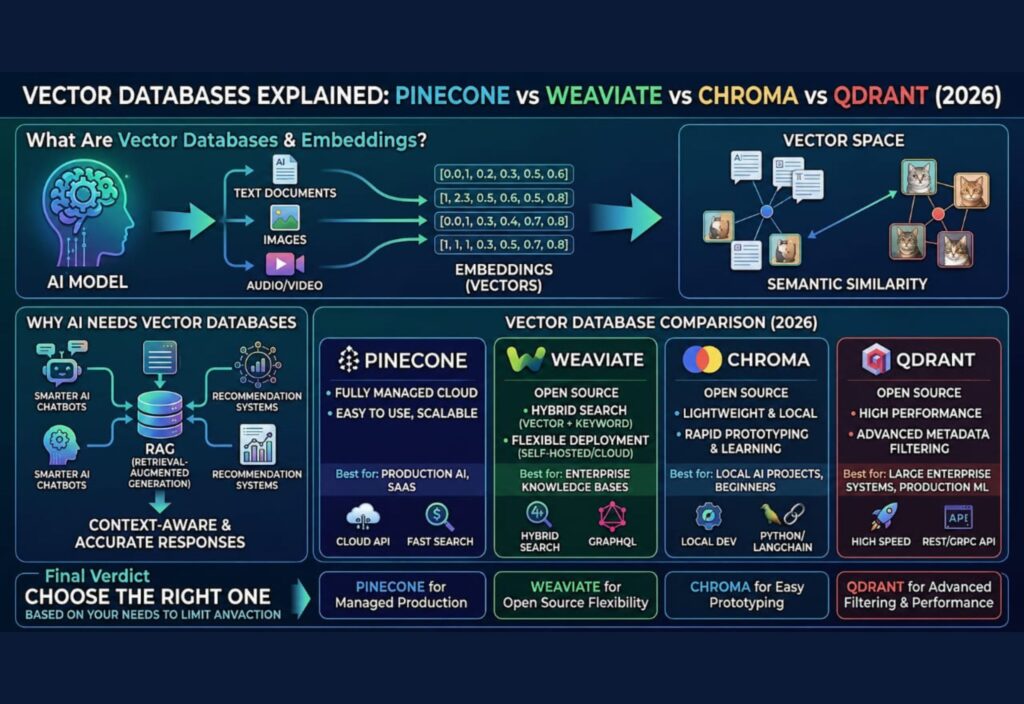
- Pinecone is ideal for managed, production-scale AI applications.
- Weaviate offers flexibility with open-source deployment and hybrid search.
- Chroma is perfect for learning, prototyping, and local development.
- Qdrant provides high performance and advanced filtering for enterprise AI.
As AI continues to evolve in 2026 and beyond, understanding vector databases will become an essential skill for developers, businesses, and anyone building intelligent applications.

