
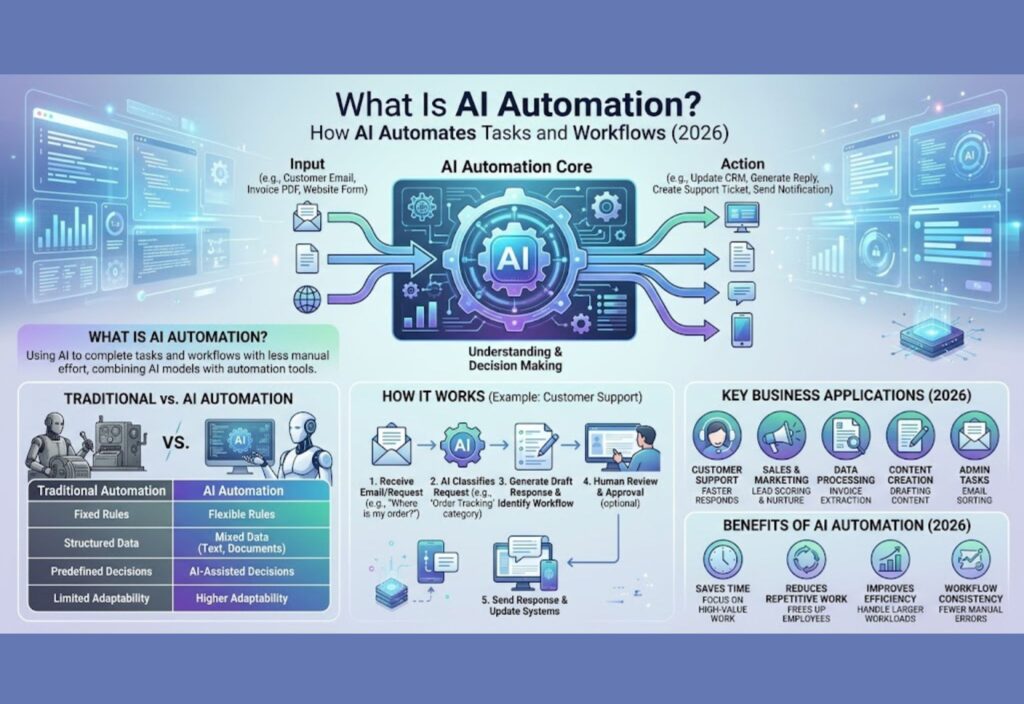
Artificial intelligence is changing the way people and businesses do everyday work. One of the most useful applications is AI automation. It combines AI with automated workflows to complete tasks with less manual effort.
Traditional automation usually follows fixed rules. In contrast, AI automation can understand information, find patterns, make decisions, and take action based on the situation.
For example, a traditional system may move an email into a folder when it finds a specific word. An AI-powered system can understand the email, identify the customer’s request, and send it to the right workflow.
As a result, businesses can use AI automation for customer support, marketing, sales, data processing, content creation, and many other tasks.
In this guide, you will learn what AI automation is, how it works, how it differs from traditional automation and AI agents, and how to build a useful workflow.
What Is AI Automation?
AI automation is the use of artificial intelligence to complete tasks and workflows with less human effort.
It combines AI models with automation tools. The AI helps understand information or make decisions. Meanwhile, the automation system moves information between different apps and performs actions.
For example, an AI automation workflow could:
Receive a customer email.
Understand the message.
Identify the type of request.
Create a support ticket.
Prepare a possible reply.
Send the reply for approval.
Save the information.
Without automation, an employee may need to complete each step manually.
Therefore, AI automation is most useful when a task happens often and involves information that AI can understand.
A Simple Example of AI Automation
Imagine that an online store receives hundreds of customer messages every day.
Instead of asking an employee to read every message, an AI system can sort the messages automatically.
For example:
“Where is my order?” → Order Tracking
“I want to return this product.” → Return Request
“My product arrived damaged.” → Complaint
“Do you have this item in blue?” → Product Question
After that, the automation can send each message to the correct team or system.
This process saves time. More importantly, employees can focus on difficult customer problems instead of sorting simple requests.
How Does AI Automation Work?
AI automation usually works through several connected steps. Although workflows can be different, the basic process is often similar.
1. Receive the Input
First, the automation receives information from a source.
The input may come from:
Email
Website forms
Chat messages
Documents
Spreadsheets
Customer databases
APIs
Online stores
For instance, a customer may send a question through a website form.
2. Understand the Information
Next, an AI model analyzes the information.
For text-based tasks, the model can understand the meaning of a message instead of looking only for exact words.
For example, the message:
“My package still hasn’t arrived.”
can be understood as a delivery problem even though it does not contain the exact phrase “order tracking.”
Because of this, AI can handle many requests that are difficult to manage with simple rules.
3. Make a Decision
After understanding the information, the system decides what should happen next.
For example, it may decide that:
The customer needs order information.
The message is a complaint.
The lead is interested in a product.
The document contains an invoice.
The request needs human review.
The result can then control the next step in the workflow.
4. Take Action
Once a decision is made, the automation performs an action.
It may:
Send an email
Update a CRM
Create a support ticket
Add information to a spreadsheet
Generate a document
Notify an employee
Update a database
Call an API
As a result, several apps can work together without someone manually moving information between them.
5. Check the Result
A reliable workflow should also check whether the action worked correctly.
For example, if AI extracts information from an invoice, another step can check whether important fields are missing.
This extra check can reduce errors. It can also stop incorrect information from moving to the next step.
AI Automation vs Traditional Automation
AI automation and traditional automation have the same basic goal: reduce manual work.
However, they handle information in different ways.
Traditional Automation
- Rules: Fixed
- Data: Structured
- Decisions: Predefined
- Text: Limited
- Adaptability: Lower
- Content: Limited
AI Automation
- Rules: Flexible
- Data: Mixed data
- Decisions: AI-assisted
- Text: Strong
- Adaptability: Higher
- Content: Can generate
Traditional automation works well when a process is predictable. For example, a system can automatically send an email after a form is submitted.
On the other hand, AI automation is more useful when the system needs to understand text, documents, images, or changing information.
Therefore, businesses can use both types of automation in the same workflow.
AI Automation vs AI Agents
AI automation and AI agents are connected technologies. However, they are not exactly the same.
AI automation usually follows a workflow designed by a person. The steps, rules, tools, and conditions are defined in advance.
AI agents can have more freedom to decide how to reach a goal.
For example, a simple AI automation may follow this process:
Email → AI classification → CRM update → Employee notification
An AI agent may receive a broader goal such as:
“Research this customer and prepare a sales summary.”
The agent may then decide what information to collect and which tools to use.
When Should You Use AI Automation?
AI automation is a good choice when:
The workflow is predictable.
The same task happens often.
You know the required steps.
You want clear control.
Human approval is needed at certain points.
When Should You Use AI Agents?
AI agents can be useful when:
The task needs several decisions.
The process can change.
Multiple tools are required.
The system needs to work toward a larger goal.
In many cases, AI automation and AI agents can work together.
What Tasks Can AI Automate?
AI automation can support many business and personal tasks. In particular, it works well for repetitive processes that involve large amounts of information.
Email Automation
AI can read and classify incoming emails.
For example, it can identify:
Customer complaints
Sales inquiries
Support requests
Job applications
Newsletter emails
Important business messages
The workflow can then send each email to the correct person or system.
As a result, employees spend less time sorting messages.
Customer Support Automation
AI can help support teams answer common questions.
First, it can understand the customer’s message. Then, it can find useful information and prepare a reply.
For simple requests, the system may send the answer automatically. However, complex or sensitive cases can be sent to a human employee.
This approach provides faster support while keeping human help available when needed.
Marketing Automation
Marketing teams can use AI automation for many repeated tasks.
Examples include:
Creating content drafts
Categorizing leads
Reviewing customer feedback
Personalizing messages
Summarizing campaign data
Preparing reports
Therefore, marketers can spend more time on planning and creative work.
Sales Automation
AI can also help sales teams manage leads.
For example, it can review information about a new lead and identify:
Industry
Company size
Customer interest
Lead quality
Possible buying intent
Afterward, the workflow can update the CRM and notify the sales team.
Data Processing
Businesses receive information from documents, forms, emails, and spreadsheets.
AI can extract useful details from this information. Then, automation can place the data into a structured system.
For example, an invoice workflow can identify:
Invoice number
Customer name
Date
Total amount
Due date
The information can then be stored in a database or accounting system.
Content Creation
AI automation can support content teams as well.
For example, a workflow may look like this:
Topic → AI draft → SEO check → Human review → WordPress → Social media
The AI can handle repetitive parts of the process. Meanwhile, a person can review the content before publishing.
Real-World Examples of AI Automation
AI automation becomes easier to understand when we look at real-world workflows.
Example 1: Customer Email Workflow
A company may receive hundreds of customer emails every day.
An AI workflow can:
Receive the email.
Understand the request.
Classify the message.
Find customer information.
Create a support ticket.
Prepare a response.
Send complex cases to a human.
Consequently, the support team does not need to sort every message manually.
Example 2: Invoice Processing
A business may receive invoices as PDF files.
Instead of entering the information by hand, AI can extract important details.
The workflow could be:
Invoice received → Information extracted → Data checked → Accounting system updated → Employee notified
This can reduce repetitive data-entry work.
Example 3: Lead Management
A website may collect new leads through a contact form.
AI can review the submitted information and assign a lead category.
For example:
High priority
Medium priority
Low priority
The automation can then save the result in the CRM. At the same time, it can notify the sales team.
Example 4: Content Workflow
A content team can use AI automation to manage repeated publishing tasks.
A workflow may look like this:
Topic selected → Draft created → SEO check → Human review → WordPress draft → Social post
This reduces manual work while keeping a human involved in the final review.
Benefits of AI Automation
AI automation can provide several benefits when it is planned and managed correctly.
1. Saves Time
One major benefit is time savings.
Employees do not have to repeat the same simple tasks throughout the day. Instead, automation can complete those tasks in the background.
As a result, employees can use their time for more valuable work.
2. Reduces Repetitive Work
Repetitive tasks can take up a large part of a workday.
AI automation can help with:
Sorting
Copying information
Categorizing
Summarizing
Data extraction
Notifications
Therefore, employees can focus more on tasks that require creativity and judgment.
3. Speeds Up Workflows
Automated systems can process information quickly.
For example, a company may receive hundreds of messages at once. An AI system can classify them and send them to the right workflow much faster than manual sorting.
4. Handles Large Amounts of Data
AI automation can help process large amounts of information.
This is especially useful for businesses that deal with:
Many emails
Large document collections
Customer records
Product information
Support tickets
Marketing data
Because the system can process information automatically, teams can manage larger workloads.
5. Supports Business Growth
Automation can help a business handle more work without increasing manual effort at the same rate.
For example, a small support team can use AI to handle common customer questions. Employees can then focus on difficult cases.
As the business grows, the same workflow can continue supporting the team.
6. Improves Workflow Consistency
A well-designed workflow follows the same basic process each time.
This can reduce the chance of missing small steps during repetitive work.
Still, consistency depends on good instructions, testing, and regular monitoring.
Limitations of AI Automation
Although AI automation has many advantages, it also has limitations.
Understanding these problems is important before automating important business processes.
AI Can Make Mistakes
AI systems can misunderstand information or produce incorrect results.
For example, an AI system might classify a customer complaint incorrectly. It may also extract the wrong number from a document.
For this reason, important workflows should include checks and human review.
Errors Can Spread Quickly
Automation can process large amounts of information very quickly.
That is helpful when everything works correctly. However, the same speed can become a problem when the workflow contains a mistake.
For example, one incorrect rule could affect hundreds of records.
Therefore, testing should always happen before a workflow is launched.
Setup Can Be Complex
A simple workflow may be easy to build. However, advanced systems can require several components.
These may include:
AI models
APIs
Databases
Automation tools
Authentication
Error handling
Monitoring
Because of this, advanced AI automation may require technical knowledge.
Security Can Become a Concern
AI automation may handle customer information, business files, or other private data.
For that reason, businesses should carefully control what each system can access.
Strong permissions, secure connections, data protection, and activity logs can help reduce risk.
Human Review May Still Be Needed
Not every decision should be fully automated.
For example, financial actions, legal documents, account changes, and sensitive customer issues may need human approval.
Therefore, a human-in-the-loop approach can be useful for important workflows.
What Is Human-in-the-Loop AI Automation?
Human-in-the-loop AI automation means that people remain involved in important parts of an automated workflow.
The AI handles routine work. Meanwhile, a human reviews decisions that require judgment.
For example:
Customer message → AI analysis → Suggested response → Human approval → Send
This approach creates a balance between speed and control.
It is especially useful when an incorrect decision could cause financial, legal, security, or customer-service problems.
AI Automation Tools
AI automation usually combines several types of tools.
Workflow Automation Platforms
Workflow platforms connect different applications and services.
They can trigger an action when something happens.
For example:
New email → AI analysis → Spreadsheet update → Team notification
These platforms can make workflow building easier, especially for users who do not want to code every connection.
AI Models
AI models provide the intelligence inside the workflow.
Depending on the task, AI can be used for:
Text classification
Summarization
Content generation
Data extraction
Translation
Image analysis
Reasoning
The right model depends on the type of work and the required level of accuracy.
APIs
APIs allow different software systems to communicate with each other.
For example, an automation can send information to an AI service through an API. The AI result can then be used in the next step.
This makes it possible to connect AI with websites, databases, CRMs, and other applications.
Databases
Databases store information used by automated workflows.
For example, a workflow may read customer information from a database. After processing the information, it can save the updated result.
Consequently, AI automation can become part of a larger business system.
How to Build an AI Automation Workflow
You do not need to automate an entire business at once.
Instead, start with one repetitive task and improve it step by step.
Step 1: Choose a Repetitive Task
Look for a task that:
Happens frequently
Takes a lot of time
Follows a similar process
Does not always require human judgment
Email classification is one simple example.
Step 2: Write Down the Workflow
Before building the automation, write the process in simple steps.
For example:
Receive email → Understand email → Categorize → Save information → Notify employee
This makes it easier to see which parts can be automated.
Step 3: Decide Where AI Is Needed
Not every step needs AI.
For example, moving information from one database to another may only require normal automation.
AI is more useful when the workflow needs to understand, classify, summarize, or generate information.
Step 4: Connect Your Tools
Next, connect the applications required by the workflow.
Depending on the project, these may include:
Email
CRM
Database
AI model
Spreadsheet
Website
Communication platform
Once the tools are connected, information can move between them automatically.
Step 5: Add Rules and Safety Controls
Do not allow AI to perform every action without limits.
Instead, add controls such as:
Required fields
Approval steps
Spending limits
Access restrictions
Validation checks
Error conditions
These controls can make the workflow safer and easier to manage.
Step 6: Test Different Situations
Test both normal and unusual cases.
For example, check what happens when there is:
Missing information
Incorrect information
An empty message
A long document
An unexpected request
A duplicate record
Testing helps identify problems before users depend on the workflow.
Step 7: Monitor the Results
After launching the workflow, continue checking its performance.
Monitor:
AI accuracy
Failed tasks
Incorrect classifications
API errors
Processing costs
Human corrections
Regular monitoring can help you find problems early and improve the workflow over time.
AI Automation in Different Industries
AI automation can support many industries.
Healthcare
Healthcare organizations can use automation for administrative work such as document processing, scheduling support, and information organization.
However, healthcare workflows can involve sensitive information. Therefore, strong privacy controls and human oversight are important.
Finance
Financial organizations can use AI automation for document processing, customer communication, reporting support, and other routine tasks.
Because financial decisions can be high-risk, these workflows often need strict controls and human review.
E-Commerce
Online stores can use AI automation for:
Customer support
Product categorization
Order communication
Review analysis
Marketing workflows
Inventory-related tasks
As a result, online businesses can respond to customers more quickly.
Education
Educational organizations can use AI automation for administrative tasks, content organization, student communication, and document processing.
Teachers may also use automation to reduce repetitive work.
This gives educators more time to focus on teaching and students.
Software Development
AI automation can support software teams with:
Code documentation
Issue classification
Test generation
Pull request summaries
Error analysis
Development workflows
However, developers should still review important code and security-related decisions.
Digital Marketing
Marketing teams can automate several repetitive activities.
For example:
New article published → Create social posts → Schedule posts → Collect data → Prepare report
This can reduce manual marketing work.
At the same time, marketers can spend more time on strategy and creative planning.
AI Automation and the Future of Work
AI automation is changing how people work.
It does not necessarily mean that every human job will disappear. Instead, many jobs may include fewer repetitive tasks and more work that requires judgment, creativity, communication, and problem-solving.
For example, a marketing employee may spend less time preparing reports. Instead, they may spend more time planning campaigns.
Similarly, a customer support employee may spend less time answering basic questions. As a result, they can focus on difficult customer problems.
In the future, people will likely work more closely with AI systems, automation tools, and AI agents.
AI Automation vs Manual Work
The difference becomes clearer when we compare common tasks.
Email Sorting
Manual Work: Read emails manually
AI Automation: AI classifies emails
Data Entry
Manual Work: Enter information by hand
AI Automation: AI extracts information
Reports
Manual Work: Create reports manually
AI Automation: AI drafts reports
Customer Support
Manual Work: Handle each case manually
AI Automation: AI handles routine cases
Lead Management
Manual Work: Review leads individually
AI Automation: AI categorizes leads
Content Creation
Manual Work: Complete many steps manually
AI Automation: AI supports the workflow
Manual work can still be useful for tasks that need human judgment.
However, AI automation is valuable when a process contains many repeated steps.
Therefore, the best approach is often a combination of automation and human work.
How to Make AI Automation Reliable
Reliable AI automation requires more than connecting an AI model to an app.
A good workflow should be clear, tested, secure, and easy to monitor.
Use Clear Instructions
Give the AI clear instructions about what it should do.
Unclear instructions can lead to inconsistent results.
Instead, explain:
The task
The expected output
Important rules
What to do when information is missing
Clear instructions usually make workflows easier to test and improve.
Limit Access
Give each automation only the permissions it needs.
For example, a workflow that only needs to read customer information should not automatically have permission to delete records.
This simple rule can reduce unnecessary risk.
Add Verification
Important AI outputs should be checked before they are used.
For example, an AI-generated invoice could be checked for missing or unusual information.
Similarly, important customer messages can be reviewed before they are sent.
Keep Records
Logging important actions can help you understand what happened when something goes wrong.
A useful log may contain:
Input
AI result
Action taken
Time
Error message
Human approval
These records can also help improve the workflow later.
Create Error Handling
Every workflow should have a plan for failures.
For example, if an AI service stops responding, the workflow can notify an employee instead of silently stopping.
This makes the system easier to manage.
Review High-Risk Actions
High-risk actions should usually require human approval.
Examples include:
Financial transactions
Account deletion
Legal documents
Sensitive customer information
Important business decisions
As a result, automation can provide speed without removing important human control.
Is AI Automation the Same as Generative AI?
No. AI automation and generative AI have different purposes.
Generative AI focuses mainly on creating new content, such as:
Text
Images
Audio
Video
Code
AI automation focuses on using AI inside workflows to complete tasks or support decisions.
However, the two technologies can work together.
For example, a content workflow may use generative AI to create an article draft. Afterward, automation can save the draft in WordPress and notify the editor.
Therefore, generative AI can be one part of a larger AI automation system.
Is AI Automation the Same as AI Agents?
No. Although the technologies can overlap, they work differently.
AI automation generally follows a defined workflow.
AI agents can have more freedom to decide which steps and tools they need to reach a goal.
A simple way to understand the difference is:
AI automation = defined workflow
AI agent = goal-based system with more decision-making freedom
In practice, businesses can combine both approaches.
For example, an AI agent can work inside an automated business process while other steps remain rule-based.
Is AI Automation Expensive?
The cost depends on the size and complexity of the workflow.
A simple workflow may require only a few tools and a small amount of AI usage.
On the other hand, an advanced system may need:
Multiple AI models
Several APIs
Large amounts of data
Databases
Cloud services
Monitoring
Development work
Therefore, businesses should compare the cost with the time and money the automation can save.
For example, if a workflow saves many hours every week, the investment may be worthwhile.
However, automating a task that takes only a few minutes each month may not provide much value.
What Does the Future of AI Automation Look Like?
AI automation is expected to become more capable as AI models and software tools improve.
In addition, businesses are increasingly combining AI models, workflow systems, and AI agents.
More Autonomous Workflows
Future systems may handle longer workflows with less human input.
Instead of completing only one task, they may manage several connected steps.
Better AI Agents
AI agents are expected to become better at using tools, following instructions, and handling complex tasks.
As a result, they may become useful for more business processes.
Multi-Agent Systems
Some advanced workflows may use several specialized AI agents.
For example:
One agent researches information.
Another analyzes the data.
A third prepares a report.
A human reviews the result.
This approach can divide a complex task into smaller parts.
Better Human Oversight
As AI automation becomes more powerful, human oversight will remain important.
Businesses will need clear ways to understand what automated systems are doing.
They will also need rules that define when a human should take control.
More Personalized Automation
AI may also make automation more personalized.
For example, a system could adjust customer messages based on previous conversations and available customer information.
As a result, automated communication may become more useful and relevant.
Frequently Asked Questions About AI Automation
What Is AI Automation?
AI automation uses artificial intelligence and automated workflows to complete tasks, process information, make decisions, and perform actions with less manual work.
How Is AI Automation Different From Traditional Automation?
Traditional automation usually follows fixed rules. In contrast, AI automation can understand less structured information and make AI-assisted decisions.
Can AI Automate an Entire Workflow?
Yes, some workflows can be automated from beginning to end. However, complex or high-risk processes may still need human review.
Can Small Businesses Use AI Automation?
Yes. Small businesses can start with simple tasks such as email classification, lead management, customer support, content workflows, and data processing.
Does AI Automation Replace Human Workers?
AI automation can reduce repetitive work, but it does not automatically replace every human role.
Instead, it can help employees spend more time on creativity, communication, strategy, and problem-solving.
Is AI Automation Safe?
AI automation can be safe when it is properly designed and monitored.
Businesses should use access controls, data protection, testing, logging, and human review for important tasks.
What Skills Are Needed for AI Automation?
Basic automation can often be built with no-code or low-code tools.
More advanced systems may require knowledge of APIs, databases, AI models, workflow design, programming, and security.
Conclusion
AI automation is changing the way businesses and individuals handle repetitive tasks and workflows.
Unlike traditional automation, which mainly follows fixed rules, AI automation can understand information, classify data, generate content, and support decisions.
For example, businesses can use it for email management, customer support, sales, marketing, document processing, data entry, and content workflows.
However, successful AI automation is not simply about connecting an AI model to an application. A reliable system also needs clear instructions, testing, security controls, error handling, monitoring, and human oversight.
The best approach is to start small. Choose one repetitive task, build a simple workflow, test it carefully, and then improve it over time.
As AI technology continues to develop, automation will become an increasingly important part of digital work. Businesses that combine AI with human judgment can save time, improve workflows, and handle growing workloads more efficiently.

