
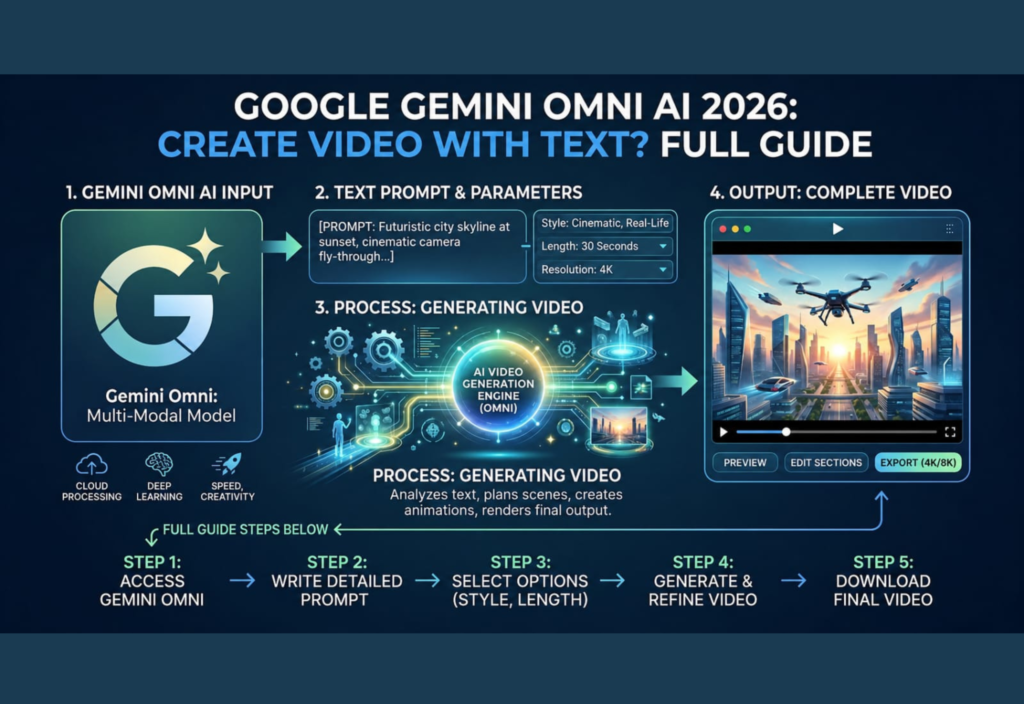
Artificial intelligence is transforming the way people create digital content. In 2026, one of the most exciting AI advancements is the ability to generate videos simply by typing a text prompt. As Google’s AI ecosystem continues to evolve, many users are searching for Google Gemini Omni AI to understand whether it can create videos from text and how its AI-powered features work.
Whether you are a content creator, digital marketer, student, teacher, or business owner, learning about Google Gemini Omni AI can help you produce content faster and streamline your creative workflow.
This guide explains everything you need to know about Google Gemini Omni AI 2026, including its text-to-video capabilities, key features, benefits, limitations, and tips for writing better AI prompts.
What Is Google Gemini Omni AI?
Google Gemini Omni AI is Google’s latest multimodal artificial intelligence assistant. It combines advanced language understanding with the ability to process different types of content, including text, images, audio, documents, and video-related tasks.
Instead of switching between multiple AI tools, users can complete many creative and professional tasks from a single platform. Gemini can help write articles, summarize long documents, generate ideas, create marketing content, assist with coding, analyze images, and support video production workflows.
The main objective of Google Gemini Omni AI is to make content creation faster, smarter, and more accessible for everyone.
Can Google Gemini Omni AI Create Videos from Text?
Yes—but there is an important distinction.
Google Gemini Omni AI can support text-to-video creation when connected with Google’s compatible AI video generation technologies and supported creative services. Depending on your country, Google account, subscription plan, and feature availability, you may be able to create AI-generated videos or use Gemini to simplify the entire video production process.
For example, you can enter a prompt such as:
“A futuristic smart city at sunrise with flying vehicles, clean energy technology, cinematic lighting, and smooth aerial camera movement.”
Gemini can use this description to assist in generating a short AI video or integrate with Google’s video generation tools.
Since Google regularly updates its AI services, available features may change over time.
How Text-to-Video AI Works
Text-to-video AI relies on advanced machine learning models trained using millions of videos, images, and written descriptions.
The process generally follows four simple steps.
Step 1: Write Your Prompt
Begin by describing exactly what you want the AI to generate.
Example:
“A golden retriever running across a green field during sunset with cinematic lighting and slow-motion camera movement.”
The more detailed your prompt, the better the final result.
Step 2: AI Understands the Scene
Gemini analyzes your prompt and identifies important visual details, including:
- Objects
- Characters
- Background scenery
- Lighting
- Camera movement
- Visual style
- Motion effects
Step 3: AI Generates the Video
The AI creates multiple frames based on your prompt and combines them into a smooth video sequence.
Step 4: Refine the Output
Users can modify the prompt, regenerate scenes, change the style, or improve specific elements until the final video meets their expectations.
Main Features of Google Gemini Omni AI in 2026
Google continues expanding Gemini’s capabilities with powerful AI features designed for productivity and creativity.
Natural Language Understanding
Users can communicate with Gemini using everyday language instead of complicated technical commands.
Smart Content Creation
Gemini can assist with creating:
- Blog articles
- Email drafts
- Marketing copy
- Social media content
- Story ideas
- Video scripts
Image Understanding
Users can upload images and ask Gemini to analyze, explain, summarize, or describe their contents.
Coding Assistance
Developers can generate, debug, explain, and optimize code in multiple programming languages.
Multimodal AI Support
Gemini works across multiple content formats, including:
- Text
- Images
- Audio
- PDF files
- Documents
- Video-related tasks
Benefits of Creating Videos with Text
AI-powered video generation provides several advantages for individuals and businesses.
Saves Time
Traditional video production often requires hours or even days. AI dramatically reduces production time by automating much of the creative process.
No Editing Experience Required
Even beginners can create professional-looking videos without learning complicated editing software.
Lower Production Costs
Businesses can reduce expenses related to filming, editing, equipment, and production teams for many projects.
Faster Content Creation
Marketing teams can quickly produce advertisements, educational videos, promotional content, and social media clips.
More Creative Freedom
Users can experiment with different ideas simply by changing prompts instead of rebuilding projects from scratch.
Who Can Use Google Gemini Omni AI?
Google Gemini Omni AI is useful for many different users and industries.
It is especially beneficial for:
- Content creators
- Digital marketers
- Students
- Teachers
- Small business owners
- Freelancers
- Software developers
- Researchers
Each group can use AI to improve productivity while reducing repetitive work.
Tips for Writing Better AI Video Prompts
The quality of AI-generated videos depends heavily on the prompt you provide.
For better results:
- Clearly describe the subject.
- Explain the background.
- Mention lighting conditions.
- Include camera movements.
- Specify the artistic style.
- Describe the overall mood.
- Keep your instructions detailed and organized.
Basic Prompt
“A car.”
Better Prompt
“A modern electric sports car driving along a coastal highway during sunset with cinematic drone footage, realistic reflections, and warm golden lighting.”
Detailed prompts usually produce much more realistic AI-generated videos.
Limitations of Google Gemini Omni AI
Although AI video generation has improved significantly, there are still some limitations.
Users may encounter:
- Short video durations
- Limited editing options
- Minor frame inconsistencies
- Regional feature availability
- Longer processing times for complex prompts
As Google’s AI models continue improving, these limitations are expected to become less noticeable.
Is Google Gemini Omni AI Worth Using in 2026?
For most users, the answer is yes.
Google Gemini Omni AI combines advanced language understanding with multimodal capabilities that simplify many creative tasks.
Whether you need help writing articles, brainstorming ideas, generating scripts, analyzing documents, or creating AI-assisted videos, Gemini can improve productivity while saving valuable time.
Final Thoughts
Artificial intelligence is transforming digital content creation, and Google Gemini Omni AI represents another major step forward.
Its ability to understand natural language, support creative projects, and assist with text-to-video workflows makes it a valuable tool for creators, educators, businesses, students, and developers.
As Google continues expanding its AI ecosystem, users can expect more powerful video generation capabilities and even smarter creative tools.
If you want to create engaging videos using only text descriptions, Google Gemini Omni AI is definitely worth exploring. By learning how to write effective prompts and understanding the platform’s capabilities, you can produce impressive AI-assisted content while saving both time and effort.

