
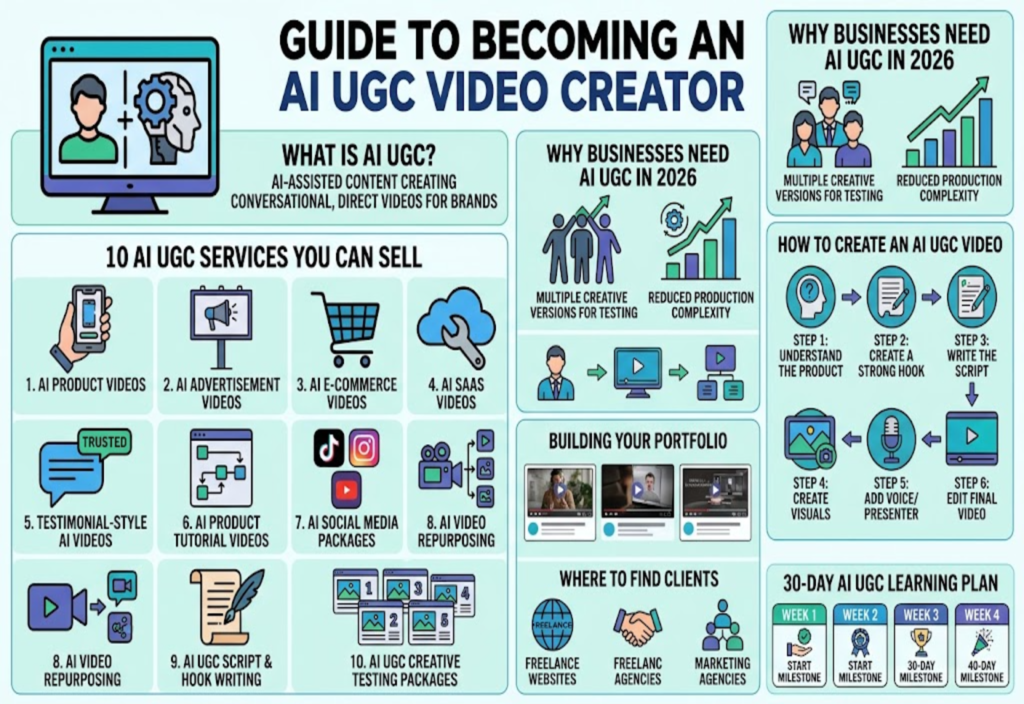
AI is changing the way businesses create video content. In the past, creating product videos often required cameras, locations, lighting, actors, editors, and a complete production setup. Today, AI tools can help creators produce product demonstrations, social media videos, advertisements, tutorials, and promotional content with a much simpler workflow.
This has created a new freelance opportunity: AI UGC video creation.
UGC stands for User-Generated Content. Traditional UGC usually involves a real person creating a video about a product or service. AI UGC uses artificial intelligence to assist with parts of the production, such as scripts, voices, avatars, visuals, captions, and editing.
For freelancers, the opportunity is not simply to generate AI videos. Businesses need content that looks natural, communicates a clear message, matches their brand, and works for the platform where it will be published.
This guide explains how AI UGC works, what services you can sell, how to build a portfolio, where to find clients, how to price your services, and how to turn AI UGC into a freelance income stream.
What Is AI UGC?
AI UGC is content created with the help of artificial intelligence in a style similar to traditional user-generated content.
What Can an AI UGC Video Include?
Depending on the project, an AI UGC video may include:
AI-generated scripts
AI avatars
AI-assisted voiceovers
Product images
AI-generated scenes
Stock footage
Screen recordings
Captions
Background music
AI-assisted editing
The final video can be designed as a product recommendation, demonstration, tutorial, review-style advertisement, or short promotional video.
Why UGC-Style Content Is Different
Traditional advertisements often look highly polished and commercial.
UGC-style videos are generally more conversational and direct. They can be designed to feel like content that naturally fits into a social media feed.
This makes UGC-style content useful for brands that want to communicate with viewers in a more casual format.
Why Businesses Need AI UGC Videos in 2026
Businesses increasingly need a steady supply of short-form content.
Businesses Need Multiple Creative Versions
One product may require several different videos because businesses want to test different:
Hooks
Messages
Audiences
Benefits
Visual styles
Calls to action
For example, one product could have:
A problem-focused video
A product demonstration
A benefits video
A tutorial
A comparison video
A frequently asked questions video
AI-assisted production can make it easier to create multiple variations.
AI Can Reduce Production Complexity
Traditional video production may require:
Camera equipment
Physical locations
Actors
Scheduling
Lighting
Editing
AI tools can reduce some of these requirements, especially for simple short-form content.
However, AI does not remove the need for creative planning and quality control.
AI UGC vs Traditional UGC
The two approaches can serve similar marketing purposes but use different production methods.
Traditional UGC
Traditional UGC usually involves a real creator who records themselves using or discussing a product.
The creator may need to:
Receive the product
Record the video
Speak on camera
Film demonstrations
Edit the footage
AI UGC
AI UGC can use artificial intelligence for some or all production elements.
It may use:
AI presenters
AI voices
Generated visuals
Product images
Screen recordings
AI-assisted editing
The right approach depends on the brand, product, audience, and campaign.
How to Create an AI UGC Video
Creating a good AI UGC video involves more than generating an avatar.
Step 1: Understand the Product
Before creating the script, learn:
What the product does
Who uses it
What problem it solves
Its main benefits
Important features
Customer objections
The desired action
This information helps you create a useful video instead of generic AI content.
Step 2: Create a Strong Hook
The hook is the opening part of the video that introduces the main idea.
Possible hook styles include:
Problem hook:
“Still spending hours doing this manually?”
Curiosity hook:
“I found a much simpler way to do this.”
Demonstration hook:
“Here is how this works in less than 30 seconds.”
Comparison hook:
“Before using this, I had to do everything manually.”
The hook should be relevant to the product and should not make unsupported claims.
Step 3: Write the Script
A simple AI UGC structure can be:
Hook → Problem → Product → Demonstration → Benefit → Call to Action
Keep the language conversational.
Avoid making every sentence sound like a corporate advertisement.
Step 4: Create the Visuals
Depending on the product, you can use:
Product images
Screen recordings
AI-generated scenes
Stock footage
Product mockups
AI avatars
Text overlays
For software products, screen recordings may be more useful than an AI-generated environment.
Step 5: Add Voice or Presenter
Different projects require different presentation styles.
You can use:
AI avatar
AI voiceover
Human voiceover
Screen-only video
Product-focused video
An AI presenter is not necessary for every project.
Step 6: Edit the Final Video
Editing can include:
Captions
Product overlays
Scene changes
Text highlights
Background music
Timing adjustments
Calls to action
The finished video should be easy to understand on a mobile screen.
10 AI UGC Services You Can Sell in 2026
There are several ways to turn AI UGC skills into freelance services.
1. AI UGC Product Videos
Create short videos that explain or demonstrate a product.
You can focus on:
Product benefits
Features
How the product works
Common problems
Product use cases
You can sell individual videos or bundles.
2. AI UGC Advertisement Videos
Businesses often need several versions of an advertisement.
You can create different versions using:
Different hooks
Different scripts
Different presenters
Different visuals
Different calls to action
Instead of selling one advertisement, you can offer a package containing several creative variations.
3. AI UGC Videos for E-Commerce
Online stores need video content for products and social media.
Potential categories include:
Gadgets
Clothing
Accessories
Beauty products
Home products
Digital products
A client can provide product information and images while you turn them into short promotional videos.
4. AI UGC Videos for SaaS Companies
Software businesses can use UGC-style videos to explain their products.
You can create videos showing:
How the software works
Main features
Common problems
Product benefits
Getting-started instructions
Screen recordings combined with AI voiceovers can work well for this type of content.
5. Testimonial-Style AI Videos
This service requires extra care.
Do not invent a customer experience and present it as a genuine testimonial.
Instead, a business can provide real customer feedback that you transform into an approved video format.
For example:
Real customer feedback → Approved script → AI-assisted presentation → Editing → Final video
This keeps the underlying message connected to a genuine customer experience.
6. AI Product Tutorial Videos
Tutorial videos can show customers how to use a product.
Examples include:
How to install software
How to use a feature
How to set up an account
How to use a gadget
How to complete a task
These videos can also help businesses reduce repetitive customer questions.
7. AI Social Media Video Packages
Instead of selling individual videos, you can offer monthly content packages.
A package might include:
8–12 short videos
Different hooks
Different content angles
Captions
Platform-ready formats
This can become a recurring service for brands that regularly need fresh content.
8. AI Video Repurposing
Businesses already have content that can be reused.
You can transform:
Long videos into short clips
Blog posts into video scripts
Podcasts into short videos
Product pages into promotional videos
Webinars into social clips
AI can help with script creation, captions, summaries, and content organization.
9. AI UGC Script and Hook Writing
Some businesses already have video editors but need more creative ideas.
You can sell a script-focused service that includes:
Video hooks
Short scripts
Product angles
Calls to action
Video concepts
This can also be added to a full AI UGC package.
10. AI UGC Creative Testing Packages
Instead of creating one video, create several creative variations for the same product.
For example:
One product → 5 hooks → 5 scripts → 5 videos
The business can then test different creative approaches.
The freelancer should not guarantee a specific advertising result. The service is about producing organized creative options for testing.
What Tools Do You Need for AI UGC?
You do not need to learn every AI video tool.
AI Writing Tools
These can help with:
Hooks
Scripts
Content ideas
Product explanations
Video variations
AI Avatar Tools
These can create presenter-style videos using digital avatars.
AI Voice Tools
These can generate voiceovers for videos where a human recording is not required.
AI Video Generation Tools
These can help create scenes, animations, and supporting visual content.
Video Editing Tools
Editing remains important for:
Captions
Timing
Transitions
Product overlays
Branding
Music
Final formatting
The important skill is knowing how to combine these tools into a reliable workflow.
How to Start AI UGC Without Clients
You can create portfolio samples before getting your first customer.
Create a Sample E-Commerce Video
Choose a fictional or publicly available product and create:
A short hook
Product introduction
Benefits
Demonstration
CTA
Clearly label the project as a sample.
Create a SaaS Video
Choose a software concept and demonstrate:
The problem
The software
One important feature
The benefit
This shows potential clients that you can create content for digital products too.
Create Multiple Versions
Create three different hooks for the same product.
This demonstrates that you understand creative variation rather than simply producing one video template.
How to Build an AI UGC Portfolio
You do not need dozens of examples.
What to Include
Aim for around five to eight strong samples covering different styles.
Include categories such as:
Product videos
UGC advertisements
SaaS videos
Tutorials
Social media videos
Explain Every Project
For each sample, explain:
The problem
The target audience
The creative idea
The production process
The final deliverable
If it is a fictional project, say that it is a sample.
Never present fictional clients or results as real work.
Where to Find AI UGC Clients
There are several places where freelancers can look for potential clients.
Freelance Platforms
Search for projects related to:
UGC videos
AI video creation
Short-form videos
Product videos
Reels
TikTok content
Video advertisements
Create a profile around a specific service instead of listing every AI skill.
Direct Outreach
Find businesses that already sell products online and publish social media content.
Look for brands that may benefit from:
More video content
Better product demonstrations
More creative variations
Short-form advertisements
Personalize your outreach instead of sending the same message to every business.
Marketing Agencies
Digital agencies may need video content for multiple clients.
You can offer AI UGC production as a white-label service where the agency handles the customer relationship and you handle video production.
How Much Should You Charge for AI UGC Videos?
There is no universal price for an AI UGC video.
Factors That Affect Pricing
Your price can depend on:
Video length
Script complexity
Number of scenes
Avatar usage
Voice generation
Editing
Number of revisions
Number of variations
Commercial usage
Turnaround time
A short video can still require significant work if it includes multiple scenes, custom visuals, several versions, and detailed editing.
Use Different Pricing Models
You can offer:
Per-video pricing: Useful for individual projects.
Package pricing: Useful when clients need multiple videos.
Monthly pricing: Useful for businesses that need ongoing content.
Create AI UGC Service Packages
Packages make your service easier for clients to understand.
Starter Package
Possible deliverables:
2 short videos
2 scripts
Captions
Basic editing
One revision
Growth Package
Possible deliverables:
5–10 videos
Multiple hooks
Different creative angles
Captions
Platform-ready formats
Monthly Package
Possible deliverables:
Weekly videos
New concepts
Product variations
Content repurposing
Monthly creative planning
Adjust the package according to the client’s actual requirements.
How to Make AI UGC Videos Look Natural
One challenge with AI-generated videos is that some can feel artificial.
Write Conversational Scripts
Avoid complicated sentences and corporate language.
Write as people naturally speak.
Show the Product Early
Viewers should quickly understand what the video is about.
Use Natural Pacing
Do not make every scene move too quickly.
Allow important information to breathe.
Avoid Unnecessary Effects
Too many transitions and visual effects can make a simple UGC-style video feel artificial.
Match the Brand
A software company, fashion brand, local business, and luxury product may need completely different styles.
AI UGC Does Not Mean Fake Reviews
This is an important distinction for freelancers.
AI can help create a presenter-style advertisement without claiming that the presenter is a real customer.
However, creating a fictional customer and presenting an invented experience as a genuine review can mislead viewers.
How to Handle Real Testimonials
If a business provides genuine customer feedback, you can turn approved feedback into a video while keeping the original meaning.
Always use accurate product information and avoid unsupported claims.
How to Get Your First AI UGC Client
Start with one specific service.
For example:
“I create short AI UGC product videos for e-commerce brands.”
This is clearer than simply calling yourself an AI expert.
Follow a Simple Process
Choose one niche
Create three to five samples
Build a portfolio
Create a freelance profile
Search for relevant projects
Contact suitable businesses
Offer a small starter package
Collect genuine client feedback
Improve your workflow
Introduce larger packages
The first goal should be building a reliable production process.
30-Day AI UGC Learning Plan
Week 1: Learn Short-Form Video
Focus on:
Hooks
Scripts
Story structure
Captions
Basic editing
Video formats
Do not focus only on AI tools.
Week 2: Practice AI Production
Experiment with:
AI scripts
AI voices
AI avatars
AI visuals
Product scenes
Editing workflows
Create several short videos.
Week 3: Build Your Portfolio
Create at least five sample videos.
Try different categories such as:
E-commerce
SaaS
Digital products
Local businesses
Consumer products
Week 4: Start Selling
Create your freelance profiles and publish your portfolio.
Search for relevant projects and contact suitable businesses.
Start with a service you can deliver consistently.
How to Turn AI UGC Into Recurring Income
One-time video projects can become ongoing relationships.
Why Businesses Need New Videos
Brands regularly need new content because:
Products change
Offers change
Campaigns change
Seasonal promotions appear
New audiences need different messages
Different creative concepts need testing
This creates an opportunity for monthly content packages.
Example Monthly Workflow
A client provides:
Product information
Offers
Brand guidelines
Approved claims
You provide:
Video concepts
Hooks
Scripts
AI UGC videos
Captions
Creative variations
This can turn AI UGC into a repeatable freelance service.
Advanced Opportunity: Start an AI UGC Agency
After gaining experience, you can expand beyond individual projects.
Services an AI UGC Agency Could Offer
Scriptwriting
AI presenters
Product videos
Social media videos
Advertisement creatives
Editing
Content repurposing
Creative planning
Monthly production
You can eventually work with other writers, editors, and creators as your client base grows.
However, learning the production process yourself first can help you understand quality requirements and client expectations.
Common AI UGC Mistakes to Avoid
Using the Same Template for Every Brand
Different brands need different messaging and visual styles.
Focusing Only on AI Tools
Clients care about useful content, not how many tools you know.
Making Unsupported Claims
Do not invent product benefits, statistics, reviews, or results.
Ignoring Platform Rules
Check current platform requirements for advertising, synthetic media, disclosures, commercial content, music, and other relevant policies.
Offering Unlimited Revisions
Define your revision policy before starting the project.
Ignoring Commercial Usage Rights
AI tools can have different licensing and commercial-use conditions.
Check the relevant terms before using generated assets for client work.
Is AI UGC Worth Learning in 2026?
AI UGC combines several useful skills:
AI tools
Video production
Copywriting
Marketing
Editing
Creative strategy
The opportunity is therefore bigger than simply creating an AI avatar.
A freelancer who understands the product, audience, script, creative concept, production process, and final editing can offer a complete service.
Final Thoughts
AI UGC videos are creating a new way for freelancers to help businesses produce short-form content.
You do not need a professional studio to start. You can learn the workflow, create portfolio samples, choose a specific niche, and offer a focused service to businesses that need more video content.
Start with one category such as e-commerce or SaaS.
Create several strong examples.
Learn how to write better hooks and scripts.
Understand the client’s audience.
Then turn those skills into a clear freelance service.
The goal is not to create the most complicated AI video.
The goal is to create useful, honest, natural-looking, and brand-appropriate content that helps a business communicate its product effectively.
As AI video technology continues to develop, combining AI tools with creative thinking, marketing knowledge, editing skills, and responsible content practices can create practical freelance opportunities in 2026.

