Run LLMs Locally has become one of the biggest trends in artificial intelligence development. Millions of developers now use Large Language Models (LLMs) like ChatGPT, Llama, Gemma, and Mistral for coding, content creation, automation, and research. Instead of relying entirely on cloud-based services, many developers and businesses choose to run LLMs locally using tools like Ollama and Docker for better privacy, lower costs, and complete control over their AI environment.
Running LLMs locally offers several advantages. It improves privacy, reduces dependence on internet connectivity, eliminates recurring API costs, and gives developers full control over their AI setup. As open-source language models continue to improve, local AI has become a practical solution for developers, researchers, and businesses.
Two technologies have made this process much easier in 2026: Ollama and Docker. Ollama simplifies downloading and running open-source language models, while Docker provides an isolated environment that makes deployment more reliable across different operating systems.
In this guide, you’ll learn how to run LLMs locally with Ollama and Docker, understand how these tools work together, complete the installation process, and build a reliable local AI development environment.
What Does It Mean to Run an LLM Locally?
Running an LLM locally means the AI model executes directly on your own computer or server instead of sending requests to a cloud provider.
Rather than communicating with an external API, your machine performs the inference process using its own CPU or GPU. This allows applications to generate responses without requiring constant internet access.
Local deployment is becoming increasingly popular among developers who need better privacy, faster experimentation, and greater control over AI models.
What Is Ollama?
Ollama is an open-source platform that makes it easy to download, manage, and run Large Language Models locally.
Instead of manually configuring complex machine learning environments, Ollama allows developers to install models using simple commands.
Popular models supported by Ollama include:
- Llama
- Mistral
- Gemma
- Phi
- Qwen
- DeepSeek
- Code Llama
Ollama automatically manages model downloads, storage, and execution, making local AI accessible even for beginners.
What Is Docker?
Docker is a containerisation platform that packages applications together with all their required dependencies.
Instead of installing software directly on your operating system, Docker runs applications inside isolated containers.
This approach offers several advantages:
- Consistent environments
- Easier deployment
- Better portability
- Simplified dependency management
- Reduced software conflicts
For AI projects, Docker ensures that applications behave consistently across development, testing, and production environments.
Why Use Ollama with Docker?
Although Ollama can run independently, many developers combine it with Docker for additional flexibility.
Together they provide:
- Cleaner development environments
- Easier deployment
- Better portability
- Simplified updates
- Consistent production environments
- Faster collaboration between teams
Docker handles the environment, while Ollama manages the AI models.
Benefits of Running LLMs Locally
Better Privacy
Sensitive data remains on your own machine instead of being sent to third-party cloud services.
This is especially important for healthcare, finance, legal, and enterprise applications.
Lower Long-Term Costs
Many cloud AI platforms charge based on API usage.
Running local models eliminates many recurring API costs, especially for frequent testing and development.
Offline Access
Once the model has been downloaded, it can continue working without an internet connection.
This makes local AI useful for secure environments and remote locations.
Faster Development
Developers can experiment without waiting for cloud requests or worrying about API rate limits.
Full Control
Local deployment gives complete control over:
- AI models
- Configuration
- Security
- Storage
- Updates
- Integrations
System Requirements
Before installing Ollama and Docker, ensure your system meets the basic requirements.
Operating Systems
- Windows
- macOS
- Linux
RAM
Minimum:
- 8 GB
Recommended:
- 16 GB or more
Large models benefit from additional memory.
Storage
Language models require significant disk space.
Typical requirements range from:
- 4 GB
- 8 GB
- 15 GB
- 30 GB+
depending on the selected model.
Processor
Modern multi-core CPUs work well.
For better performance, a dedicated GPU is recommended.
Installing Docker
The first step is installing Docker Desktop.
After installation:
- Start Docker Desktop
- Verify Docker is running
- Confirm container support is enabled
Docker will now be ready to host AI applications.
Installing Ollama
Installing Ollama is straightforward.
Visit the official Ollama website and download the installer for your operating system.
Once installed, verify the installation by checking that Ollama starts successfully.
After installation, your computer is ready to download local AI models.
Downloading Your First LLM
One of Ollama’s biggest advantages is its simple model management.
Instead of manually downloading large AI files, Ollama automatically retrieves and prepares supported models.
Developers commonly start with lightweight models before experimenting with larger ones.
Popular beginner-friendly options include:
- Llama
- Gemma
- Phi
- Mistral
Each model offers different strengths in reasoning, coding, speed, and hardware requirements.
Running Your First Local Model
After downloading a model, Ollama loads it into memory and begins accepting prompts.
At this point you can:
- Ask questions
- Generate code
- Summarise documents
- Translate languages
- Create content
- Analyse text
All processing occurs locally on your own machine.
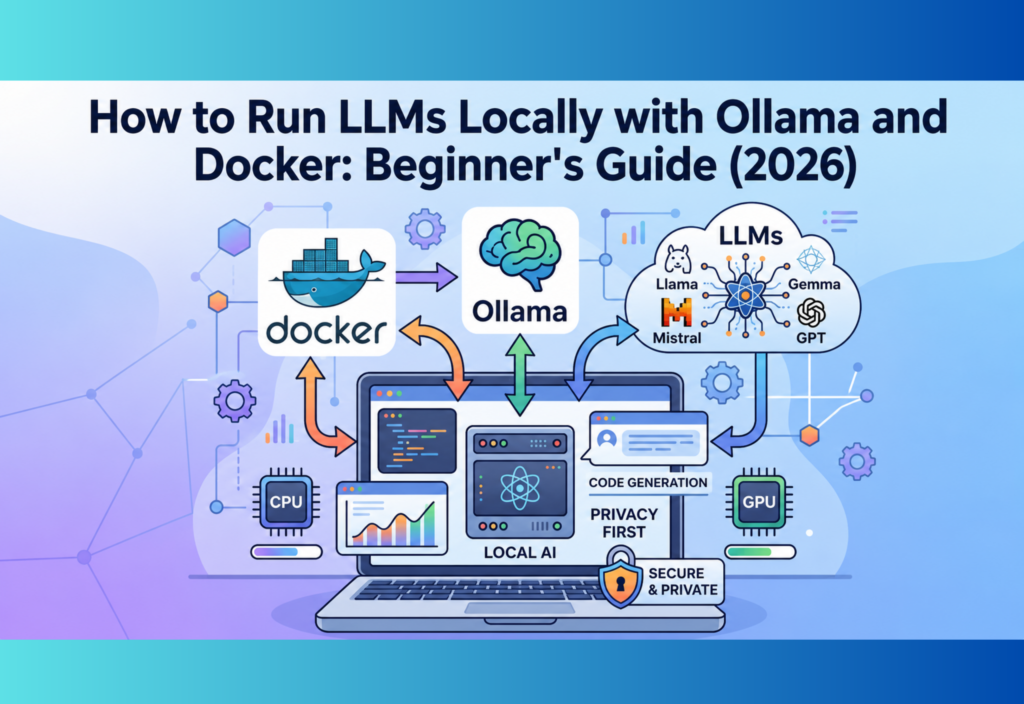
How Ollama and Docker Work Together
A common production workflow looks like this:
- Docker launches the application container.
- Ollama loads the selected language model.
- The application sends prompts to Ollama.
- Ollama generates responses locally.
- The application displays the output to the user.
This architecture keeps AI processing isolated while making deployment much easier.
Using Ollama APIs in Your Applications
One of Ollama’s most powerful features is its built-in API. Instead of using only a terminal, developers can connect websites, desktop software, mobile apps, and automation workflows directly to locally hosted language models.
Common integrations include:
- AI chatbots
- Code assistants
- Document summarisation
- Customer support systems
- Content generation tools
- Internal business applications
This makes Ollama suitable for both personal projects and enterprise solutions.
Real-World Use Cases
Local LLMs are being used across many industries.
Software Development
Developers use local models for:
- Code generation
- Bug fixing
- Documentation
- Code reviews
- Unit test creation
Content Creation
Writers use local AI for:
- Blog writing
- Email drafting
- SEO optimisation
- Content summarisation
- Translation
Business Automation
Companies automate:
- Customer support
- Internal knowledge bases
- Report generation
- Document analysis
- Workflow automation
Education
Students and teachers use local AI for:
- Learning assistance
- Research
- Programming practice
- Language learning
- Note summarisation
Private AI Assistants
Many users build personal AI assistants that manage files, answer questions, and automate daily tasks without sending data to external servers.
Advantages of Local LLMs
Better Data Privacy
Since all processing happens on your own computer or server, confidential information stays within your environment.
No Internet Dependency
Once installed, the models continue working even without an internet connection.
Lower Operating Costs
Unlike cloud APIs that charge per request, locally hosted models can significantly reduce long-term costs for frequent usage.
Full Customisation
Developers can choose:
- Different models
- Model sizes
- Hardware configuration
- Deployment environment
- Security policies
Faster Experimentation
Without API limits or cloud restrictions, developers can quickly test prompts, applications, and workflows.
Limitations of Running LLMs Locally
Despite the benefits, local AI also has some limitations.
Hardware Requirements
Large models require substantial RAM, storage, and processing power.
Older computers may struggle to run advanced models efficiently.
Slower Than Cloud GPUs
Cloud providers often use powerful enterprise GPUs.
A personal computer may generate responses more slowly, especially when running larger models.
Storage Usage
Each downloaded model consumes several gigabytes of disk space.
Installing multiple models can require significant storage capacity.
Maintenance
Unlike cloud services, local deployments require users to manage updates, models, and system resources themselves.
Best Practices
To achieve the best performance when running LLMs locally:
- Keep Ollama updated.
- Use lightweight models on lower-end hardware.
- Monitor RAM and CPU usage.
- Store models on fast SSD storage.
- Keep Docker containers organised.
- Regularly update AI models.
- Protect local APIs from unauthorised access.
- Back up important configurations.
These practices improve stability and security.
Common Mistakes Beginners Make
Many new users encounter similar problems when setting up local AI.
Common mistakes include:
- Choosing models that exceed available RAM.
- Running multiple large models simultaneously.
- Ignoring Docker updates.
- Forgetting to secure local APIs.
- Downloading unnecessary models.
- Expecting cloud-level performance from older hardware.
Avoiding these issues makes the learning experience much smoother.
Local LLMs vs Cloud AI APIs
| Feature | Details |
|---|---|
| Privacy | Excellent |
| Internet | Not required |
| Cost | Lower over time |
| Setup | More complex |
| Performance | Depends on hardware |
| Control | Full |
| Scalability | Hardware-dependent |
Cloud AI APIs
| Feature | Details |
|---|---|
| Privacy | Depends on provider |
| Internet | Required |
| Cost | Usage-based |
| Setup | Easier |
| Performance | Usually faster |
| Control | Limited |
| Scalability | Highly scalable |
The best choice depends on your project, budget, and privacy requirements.
When Should You Run LLMs Locally?
Local deployment is ideal if you:
- Need strong privacy.
- Want to reduce API costs.
- Build internal business tools.
- Develop AI applications.
- Work with confidential data.
- Frequently test AI workflows.
- Need offline AI capabilities.
Cloud APIs remain a better option when maximum scalability and the latest commercial models are required.
Future of Local AI
Local AI is improving rapidly.
Future developments are expected to include:
- Faster inference speeds
- Better GPU optimisation
- Smaller yet more capable language models
- Improved multimodal support
- Easier deployment tools
- Better enterprise integration
- More efficient resource usage
- Advanced AI agents running entirely on local hardware
As hardware continues to improve, local AI will become increasingly practical for individuals and organisations alike.
Frequently Asked Questions
What is Ollama?
Ollama is an open-source platform that allows users to download, manage, and run Large Language Models locally with minimal setup.
Why use Docker with Ollama?
Docker provides an isolated environment that simplifies deployment, improves portability, and reduces dependency issues across operating systems.
Can I run LLMs without a GPU?
Yes. Many smaller language models run well on modern CPUs, although response times may be slower than GPU-based systems.
Which models work with Ollama?
Ollama supports many popular open-source models, including Llama, Mistral, Gemma, Phi, Qwen, DeepSeek, and Code Llama.
Is running LLMs locally free?
Most open-source models can be downloaded and used without licensing fees. However, you should consider hardware and electricity costs.
Conclusion
Running LLMs locally with Ollama and Docker gives developers, businesses, and AI enthusiasts greater control over their AI projects. Instead of relying on cloud-based APIs, users can build secure, private, and cost-effective AI applications on their own hardware.
Ollama simplifies model management, while Docker provides reliable and portable deployment environments. Together, they make local AI development accessible even for beginners.
Although local deployment requires suitable hardware and some initial setup, the benefits of improved privacy, offline access, lower long-term costs, and greater flexibility make it an excellent choice for many AI projects. As open-source language models continue to evolve, local AI will become an even more valuable tool for modern developers.