Artificial Intelligence has transformed software development, making it possible to build chatbots, AI assistants, content generators, coding tools, and automation systems with just a few lines of code. One of the easiest ways to add these capabilities to your applications is by using the OpenAI API with Python.
Python is one of the world’s most popular programming languages because it is simple, beginner-friendly, and supported by thousands of powerful libraries. When combined with the OpenAI API, Python allows developers to create intelligent applications that can understand text, generate content, analyze data, and automate everyday tasks.
Whether you’re a beginner learning AI development or an experienced programmer building production-ready applications, this guide will teach you how to use the OpenAI API with Python step by step.
What Is the OpenAI API?
The OpenAI API is a cloud-based service that gives developers access to advanced AI models through simple API requests. Instead of building and training a large language model from scratch, developers can connect their Python applications to OpenAI’s models and use AI capabilities immediately.
Using the API, you can build applications that:
- Answer questions
- Generate articles
- Summarize documents
- Translate languages
- Write code
- Create chatbots
- Analyze text
- Automate workflows
Because everything runs in the cloud, you don’t need expensive hardware or deep machine learning expertise to start building AI-powered applications.
Why Use Python with the OpenAI API?
Python is the preferred language for AI development because of its readability, large ecosystem, and excellent community support.
Here are some reasons developers choose Python:
Easy to Learn
Python has clean syntax that allows beginners to understand programming concepts quickly.
Powerful Libraries
Python offers libraries for web development, automation, data science, machine learning, and AI integration.
Excellent API Support
The official OpenAI Python library makes it easy to send requests and receive AI-generated responses.
Cross-Platform Compatibility
Python works on Windows, macOS, and Linux without major changes to your code.
Prerequisites
Before using the OpenAI API with Python, make sure you have the following:
- Python 3.10 or later installed
- A code editor such as VS Code or PyCharm
- An OpenAI account
- An API key
- Internet connection
- Basic knowledge of Python
If you’re completely new to Python, don’t worry. The examples in this guide are beginner-friendly and easy to follow.
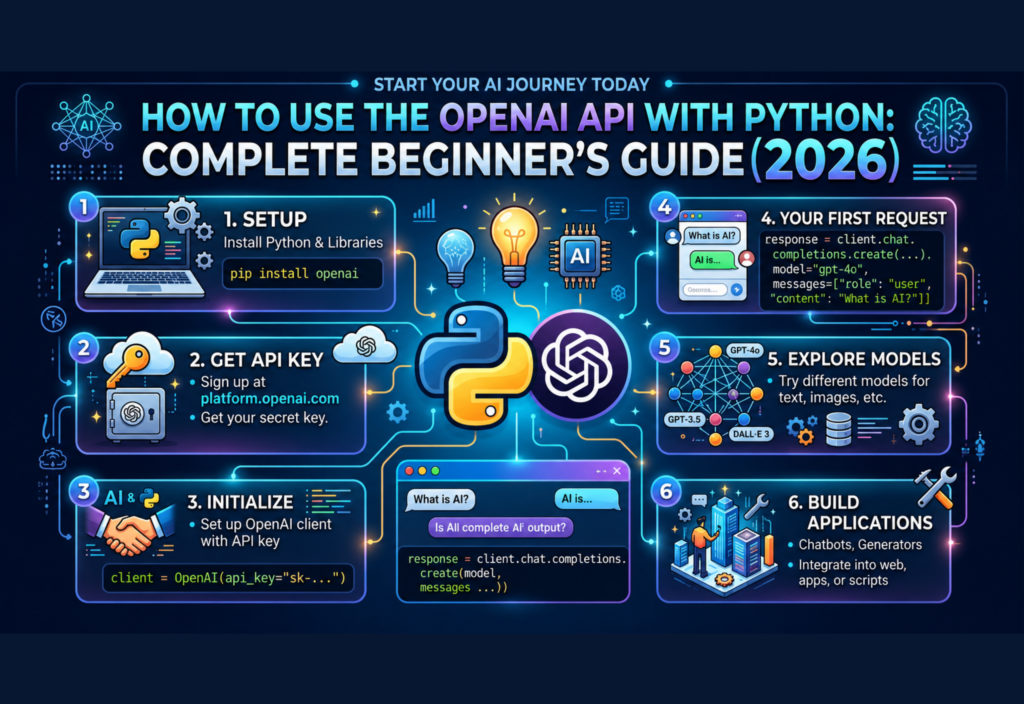
Step 1: Create an OpenAI Account
The first step is creating an OpenAI account.
After signing in, go to the developer dashboard and create an API key.
Your API key acts like a password that allows your Python application to communicate securely with OpenAI’s servers.
Important: Never share your API key publicly or upload it to GitHub.
Step 2: Install Python
If Python is not already installed on your computer:
- Download the latest version of Python.
- Run the installer.
- Enable the option to add Python to your system PATH.
- Verify the installation from the terminal.
You can verify that Python is installed correctly by running:
python --versionIf the version number appears, Python has been installed successfully.
Step 3: Create a Project Folder
Create a new folder for your AI project.
Example:
OpenAI-Python-ProjectInside the folder, create a new Python file.
Example:
main.pyKeeping your project organized makes future development much easier.
Step 4: Install the OpenAI Python Library
Open your terminal and install the official OpenAI package using pip:
pip install openaiThis library allows Python to communicate with the OpenAI API without writing complex networking code.
After installation, you’re ready to start building AI-powered applications.
Step 5: Store Your API Key Securely
Avoid writing your API key directly inside your Python code.
A better approach is to store it as an environment variable.
Example:
OPENAI_API_KEY=your_api_key_hereYour Python application can then read the key securely when it starts.
This approach improves security and prevents accidental exposure of sensitive credentials.
Step 6: Write Your First OpenAI API Program
Now it’s time to write your first Python program.
Import the required library:
from openai import OpenAI
import os
Create the client:
client = OpenAI(api_key=os.getenv("OPENAI_API_KEY"))Send your first request:
response = client.responses.create(
    model="gpt-5.5",
    input="Explain Python in simple words."
)
Print the output:
print(response.output_text)When you run the program, the API sends your request to the AI model and returns a human-like response.
Understanding the API Response
When your application sends a request, several steps happen behind the scenes:
- Python sends the request to the OpenAI API.
- The API processes your prompt using the selected AI model.
- The model generates a response.
- The response is returned to your Python application.
- Your program displays the generated output.
This entire process usually takes only a few seconds and forms the foundation for more advanced AI applications.
Best Practices for Beginners
As you start working with the OpenAI API, keep these best practices in mind:
- Keep prompts clear and specific.
- Store API keys securely.
- Test with small requests before building larger projects.
- Organize your code into reusable functions.
- Handle errors gracefully to avoid application crashes.
- Read the official API documentation regularly to stay updated with new features.
Following these practices will help you build reliable and maintainable AI applications.
Build Your First AI Chatbot with Python
Now that you’ve successfully connected your Python application to the OpenAI API, the next step is building a simple AI chatbot. A chatbot continuously accepts user input, sends it to the AI model, and displays the response.
Here’s a basic example:
from openai import OpenAI
import os

client = OpenAI(api_key=os.getenv("OPENAI_API_KEY"))

while True:
    question = input("You: ")

    if question.lower() == "exit":
        break

    response = client.responses.create(
        model="gpt-5.5",
        input=question
    )

    print("AI:", response.output_text)
This program creates a simple command-line chatbot. Every time the user enters a message, Python sends it to the OpenAI API and prints the AI-generated response. While basic, this example demonstrates the foundation of many AI-powered applications.
Common Errors and How to Fix Them
Beginners often encounter a few common issues when working with the OpenAI API. Understanding these problems can save a lot of debugging time.
Invalid API Key
If your API key is incorrect or missing, authentication will fail.
Solution: Verify that your API key is valid and stored correctly in your environment variables.
ModuleNotFoundError
This error usually appears when the OpenAI Python package has not been installed.
Solution: Install the library using:
pip install openaiRate Limit Error
If your application sends too many requests in a short period, the API may temporarily reject new requests.
Solution: Reduce request frequency or implement retry logic in your application.
Network Errors
Internet connectivity issues can prevent successful API calls.
Solution: Check your internet connection and add proper exception handling to your code.
Real-World Projects You Can Build
One of the biggest advantages of the OpenAI API is its flexibility. After learning the basics, you can create a wide variety of AI-powered applications.
Popular beginner projects include:
- AI chatbots
- Content writing assistants
- Blog title generators
- Email writing tools
- Grammar correction apps
- Code explanation assistants
- Text summarizers
- Document Q&A systems
- Translation tools
- AI customer support bots
These projects are excellent for improving your Python skills while building a practical portfolio.
Best Practices for Production Applications
As your applications grow, following good development practices becomes increasingly important.
Protect Your API Key
Never hardcode your API key into your source code. Store it securely using environment variables or a secrets manager.
Write Better Prompts
The quality of AI responses depends heavily on the prompt. Be specific about the task, desired format, and any important context.
Handle Errors Gracefully
Always use error handling to prevent your application from crashing if an API request fails.
Monitor API Usage
Keep track of your requests and usage to avoid unexpected costs and identify optimization opportunities.
Keep Libraries Updated
Regularly update the OpenAI Python package to benefit from new features, security improvements, and bug fixes.
Understanding API Costs
The OpenAI API is a paid service based on usage. Costs depend on the model you use and the number of input and output tokens processed.
To manage expenses:
- Choose the appropriate model for your task.
- Keep prompts concise.
- Avoid unnecessary API requests.
- Cache repeated responses where appropriate.
- Monitor usage through your OpenAI dashboard.
For beginners and small projects, efficient prompt design can significantly reduce costs.
Security Tips
Security should always be a priority when building AI applications.
Follow these recommendations:
- Never expose your API key in public repositories.
- Use environment variables for credentials.
- Validate user input before sending it to the API.
- Limit API access where possible.
- Regularly rotate sensitive keys if needed.
Taking these precautions helps protect both your application and your OpenAI account.
Why Developers Choose the OpenAI API with Python
Python remains one of the best languages for AI development because it combines simplicity with powerful libraries. When paired with the OpenAI API, developers can build intelligent applications quickly without creating machine learning models from scratch.
From startups and freelancers to enterprise software teams, developers use Python and the OpenAI API to automate workflows, improve productivity, and deliver AI-powered experiences across web, mobile, and desktop applications.
Frequently Asked Questions
Is Python the best language for the OpenAI API?
Yes. Python is one of the most popular languages for AI development because it is easy to learn, has excellent documentation, and is officially supported by the OpenAI SDK.
Do I need machine learning knowledge?
No. You don’t need to train AI models yourself. The OpenAI API allows you to integrate advanced AI capabilities using simple Python code.
Can beginners use the OpenAI API?
Absolutely. With basic Python knowledge, beginners can build chatbots, automation tools, content generators, and many other AI applications.
Is the OpenAI API free?
OpenAI provides different pricing options. While some accounts may receive introductory credits or limited free access depending on current offerings, ongoing usage is generally billed based on the models and tokens you use.
What can I build with the OpenAI API?
You can build AI chatbots, virtual assistants, writing tools, coding assistants, translation apps, summarizers, customer support systems, educational tools, and workflow automation solutions.
Conclusion
Learning how to use the OpenAI API with Python is one of the best ways to begin your AI development journey in 2026. With just a few lines of Python code, you can integrate powerful AI capabilities into your own applications without needing advanced machine learning expertise.
As you become more comfortable with the API, you can expand beyond simple examples and build production-ready AI solutions for businesses, education, healthcare, customer support, and automation. By following best practices for security, prompt design, and error handling, you’ll be well prepared to create reliable and scalable AI-powered software.