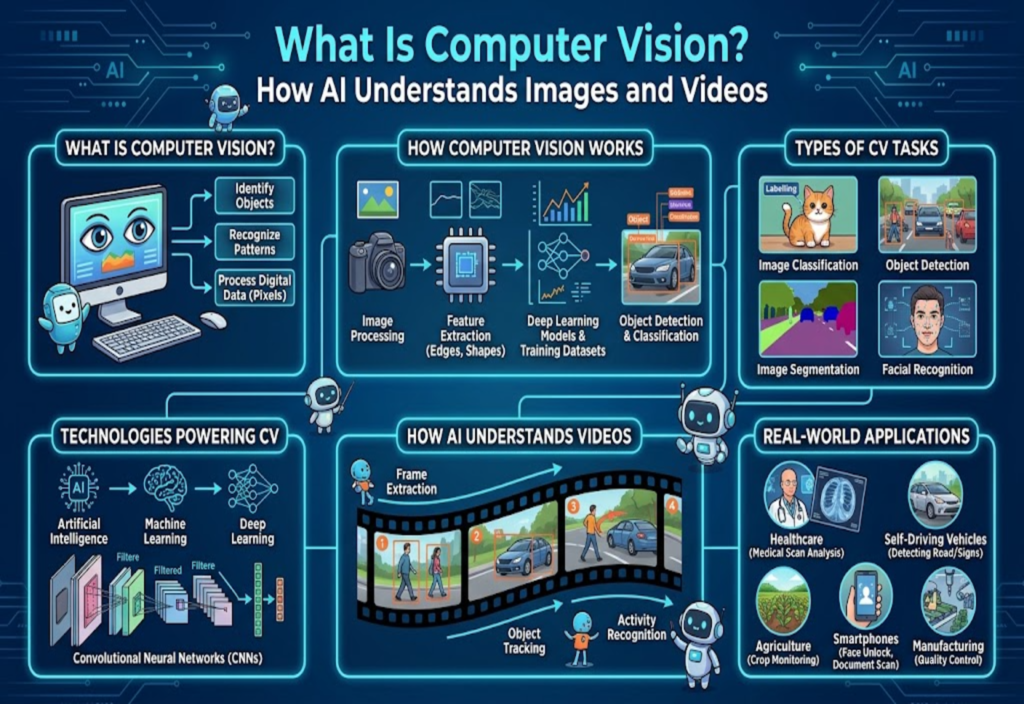
Computer Vision is an important field of Artificial Intelligence (AI) that helps computers analyze and understand images and videos. It allows machines to identify objects, recognize patterns, detect movement, and extract useful information from visual content.
Today, Computer Vision is used in many areas of daily life. Smartphones use it to recognize faces and improve photographs. Hospitals use computer-based image analysis to help examine medical scans. Self-driving vehicle research uses visual information to detect roads, traffic signs, pedestrians, and other vehicles. Businesses also use this technology to monitor products, inspect quality, and improve their services.
Many people use Computer Vision features every day without knowing how they work. For example, when a phone recognizes a face in a photograph or an application scans a document, Computer Vision may be working in the background.
But how can a computer understand an image when it does not see the world like a human?
In this guide, we will explain what Computer Vision is, how it works, which technologies support it, and how people use it in real-world applications.
What Is Computer Vision?
Computer Vision is a branch of Artificial Intelligence that enables computers to process and analyze visual information, such as digital images and videos.
A computer does not naturally understand an image in the same way a person does. It receives an image as digital data made up of pixels. Each pixel contains information about color and brightness.
Computer Vision systems use algorithms and trained machine learning models to study this information. They can identify objects, find important details, and classify different parts of an image.
For example, imagine uploading a photograph of a street to a Computer Vision system. The system may identify cars, motorcycles, people, traffic lights, road signs, buildings, and trees.
The system processes the image and produces results based on patterns learned during training.
Computer Vision does not mean that a machine has human understanding or awareness. It refers to the technical ability to analyze visual data and perform specific tasks.
How Does Computer Vision Work?
Computer Vision works through several steps. These steps help a computer process an image or video and produce useful information.
The exact process depends on the application, but most systems follow a similar workflow.
1. Image or Video Collection
The first step is collecting visual information.
A Computer Vision system can receive data from different sources, including:
Smartphone cameras.
Security cameras.
Digital photographs.
Medical imaging devices.
Industrial cameras.
Drones and other imaging equipment.
For example, a security camera records a video of a building entrance. The Computer Vision system receives video frames and analyzes them to detect movement or identify objects.
The quality of the input data can affect the final results. Poor lighting, blurry images, and unusual camera angles may make object detection more difficult.
2. Image Processing
After collecting an image, the system may process it to improve its quality and prepare it for analysis.
Image processing can include:
Resizing images.
Removing unnecessary noise.
Adjusting brightness and contrast.
Improving image quality.
Changing image formats.
Separating important image regions.
These steps help prepare visual data for machine learning models.
3. Feature Extraction
Feature extraction is an important part of Computer Vision.
A feature is a visual detail that helps a system identify or understand an object.
Common image features include edges, shapes, colors, textures, lines, corners, and object boundaries.
Older Computer Vision systems often used manually designed features. Modern deep learning systems can learn useful visual features automatically during training.
For example, a model trained to recognize cats may learn to identify features such as ears, eyes, fur patterns, and body shapes.
It combines these visual patterns to classify an image.
4. Model Training
Machine learning models need training data to perform Computer Vision tasks.
During training, developers provide large collections of images or videos. Some datasets include labels that explain what each image contains.
For example, a dataset for vehicle detection may contain thousands of images labeled with cars, buses, trucks, and motorcycles.
The model studies these examples and adjusts its internal parameters to reduce prediction errors.
After training, developers test the model using separate data. This helps them evaluate how well it performs on images it has not seen before.
A well-trained model can recognize patterns in new images, although its accuracy still depends on the quality of training data and the conditions in which it is used.
5. Object Recognition and Prediction
Once the model is ready, it can analyze new visual information.
Depending on its purpose, the system may identify objects, classify images, detect people or vehicles, recognize printed text, track movement, or identify unusual patterns.
For example, a system may receive an image of a dog and classify it as an animal.
Another system may detect several vehicles in a road image and identify their locations.
6. Displaying the Results
The final step is presenting the results in a useful format.
A Computer Vision system may display labels, detection boxes, image descriptions, measurements, or alerts.
For example, a factory inspection system may highlight a damaged product on a production line. Workers can then review the result and decide what action to take.
This completes the basic Computer Vision workflow.
Main Types of Computer Vision Tasks
Computer Vision includes several different tasks. Each task helps a machine analyze visual information in a specific way.
1. Image Classification
Image classification is the process of assigning a category or label to an image.
For example, a model may classify an image as a cat, dog, car, flower, or building.
The system looks at the image and predicts which category best matches its visual patterns.
Image classification is useful in photo applications, product organization, and image search systems.
2. Object Detection
Object detection identifies objects and finds their locations inside an image.
Unlike image classification, which assigns a label to an entire image, object detection can identify multiple objects at the same time.
For example, a traffic monitoring system may detect three cars, two motorcycles, one pedestrian, and one traffic light.
The system can mark each detected object with a bounding box.
Object detection is widely used in traffic monitoring, industrial inspection, and security applications.
3. Image Segmentation
Image segmentation divides an image into smaller regions based on their visual content.
It helps a computer identify exactly which pixels belong to a particular object or area.
There are two common forms:
Semantic segmentation: It assigns a category to each pixel. For example, road pixels receive one label, while building pixels receive another.
Instance segmentation: It identifies individual objects separately, even when they belong to the same category.
Image segmentation is useful in medical imaging, satellite image analysis, agriculture, and autonomous vehicle research.
4. Facial Recognition
Facial recognition systems analyze facial features to compare or identify faces.
These systems may examine facial landmarks, shapes, and other visual patterns.
Common applications include smartphone face unlocking, identity verification, photo organization, and security systems.
Facial recognition also raises privacy and security concerns. Organizations should follow applicable laws and obtain appropriate permission before collecting or processing facial data.
5. Optical Character Recognition (OCR)
Optical Character Recognition, commonly called OCR, converts text inside images into machine-readable text.
For example, you can take a photograph of a printed document. An OCR system can detect the letters and numbers and convert them into editable digital text.
OCR is used for scanning documents, reading invoices, extracting information from forms, converting printed books into digital text, and processing business records.
It saves time when people need to work with large numbers of printed documents.
6. Human Pose Estimation
Human pose estimation identifies the positions of important body points in an image or video.
These points may include the head, shoulders, elbows, wrists, knees, and ankles.
A Computer Vision model can use these points to estimate body posture and movement.
This technology is used in sports analysis, fitness applications, motion tracking, and certain healthcare research projects.
What Technologies Power Computer Vision?
Computer Vision uses several technologies that help machines process and analyze images.
Some of the most important technologies are explained below.
1. Artificial Intelligence
Artificial Intelligence provides the broader technology behind Computer Vision.
AI systems can perform tasks such as recognizing patterns, processing information, and making predictions.
Computer Vision is one application of AI that focuses specifically on visual information.
2. Machine Learning
Machine Learning is a field of AI that allows computer systems to learn patterns from data.
Instead of writing separate rules for every possible image, developers train machine learning models using examples.
For instance, a model trained with thousands of fruit images may learn to distinguish apples, bananas, oranges, and other fruits.
The model uses the patterns learned during training to classify new images.
3. Deep Learning
Deep Learning is a type of Machine Learning that uses artificial neural networks with multiple layers.
These networks can learn complex patterns from large datasets.
Deep Learning has improved Computer Vision in areas such as object detection, image classification, facial recognition, medical image analysis, and video understanding.
Modern Computer Vision applications often rely on deep learning because it can learn complex visual features without requiring developers to manually define every feature.
4. Convolutional Neural Networks (CNNs)
Convolutional Neural Networks, also known as CNNs, are deep learning models designed to process grid-like data, including images.
CNNs use filters to detect visual patterns.
Early layers may learn simple features such as edges and lines. Deeper layers can learn more complex patterns, such as shapes and object parts.
CNNs have played an important role in image recognition and object detection.
5. Vision Transformers (ViTs)
Vision Transformers are another important technology in modern Computer Vision.
They apply the Transformer architecture to image processing.
Instead of processing an image only through traditional convolution operations, Vision Transformers divide an image into smaller patches. The model then studies relationships between these patches.
This approach can help models understand how different parts of an image relate to each other.
Vision Transformers are used in image classification and other visual learning tasks.
6. Multimodal AI Models
Multimodal AI models can process more than one type of information.
For example, some models can analyze both images and text. Others can work with images, video, audio, and written instructions.
A user may upload a picture and ask a model to describe the objects inside it.
The model processes the visual input and generates a text response.
This technology is making Computer Vision more useful in education, research, content analysis, and business applications.
How Does AI Understand Videos?
Video analysis is another important area of Computer Vision.
A video is made up of many individual images called frames. These frames appear one after another to create the appearance of movement.
Computer Vision systems can analyze these frames to detect objects, track activities, and understand changes over time.
Here is how video analysis generally works.
1. Video Frame Extraction
The system receives a video and separates it into individual frames.
For example, a video recorded at 30 frames per second contains 30 individual frames every second.
A system may analyze every frame or select certain frames depending on its purpose.
2. Object Detection in Frames
After extracting frames, the model identifies objects.
It may detect people, vehicles, animals, or other objects in each frame.
For example, a traffic camera may detect several cars moving along a road.
3. Object Tracking
Object tracking follows the same object across multiple video frames.
For example, when a car moves from the left side of a camera view to the right, a tracking system can follow its position.
This helps systems study movement and changes in object locations.
4. Activity Recognition
Activity recognition attempts to identify actions or activities from video information.
Examples include a person walking, a vehicle turning, a ball moving through the air, a machine operating, or products moving along a production line.
These systems can help analyze activities, but their predictions may not always be correct. Human review can be important in sensitive applications.
Real-World Applications of Computer Vision
Computer Vision is no longer limited to research laboratories. It is used in many industries and digital products.
1. Healthcare and Medical Imaging
Computer Vision supports medical professionals by helping analyze medical images.
It can be used with X-ray images, CT scans, MRI scans, ultrasound images, and retinal photographs.
For example, an AI model may highlight an unusual region in an X-ray image so a medical professional can examine it more closely.
These tools can support medical workflows, but they do not replace qualified doctors or professional medical judgment.
2. Self-Driving Vehicles
Autonomous vehicle research uses Computer Vision to analyze the surrounding environment.
Cameras collect visual information about roads, vehicles, pedestrians, and traffic signs.
Computer Vision models can help identify lane markings, road signs, traffic lights, nearby vehicles, pedestrians, and road obstacles.
This information can support navigation and driving decisions.
However, safe autonomous driving requires more than Computer Vision. It may also use radar, LiDAR, GPS, mapping systems, and other technologies.
3. Retail and E-Commerce
Online stores and retail businesses use Computer Vision to improve shopping experiences.
Visual product search: Customers upload a product image to find similar items.
Product inspection: Systems examine products for visible damage or defects.
Inventory monitoring: Cameras can help track products on shelves.
Virtual try-on: Some applications allow customers to preview how glasses, clothing, or accessories may look.
These features can make online shopping more convenient.
4. Agriculture
Computer Vision can help farmers monitor crops and identify visible changes in fields.
Drones and cameras collect images of agricultural areas. AI models can analyze these images to detect crop damage, weed growth, changes in plant color, uneven crop development, and visible signs of plant disease.
This information can help farmers decide where further inspection or treatment may be needed.
5. Manufacturing and Quality Control
Factories use Computer Vision to inspect products during manufacturing.
A camera captures product images, and an AI model checks for visible defects.
For example, a system may detect scratches, broken parts, incorrect labels, missing components, and uneven product surfaces.
Automated inspection can reduce repetitive manual work and help improve product quality.
6. Security and Surveillance
Computer Vision can analyze video footage from security cameras.
Depending on the system, it may detect movement, identify objects, or send alerts when certain events occur.
For example, a system may notify security staff when someone enters a restricted area.
However, surveillance technology must be used responsibly. Privacy, consent, data protection, and local legal requirements should always be considered.
7. Smartphones and Everyday Applications
Many smartphone features use Computer Vision.
Examples include face detection in photographs, background removal, document scanning, image enhancement, QR code scanning, camera-based translation, and photo search.
These features help people complete everyday tasks more easily.
Computer Vision vs Image Processing: What Is the Difference?
Computer Vision and Image Processing are closely related, but they have different goals.
Image Processing focuses on changing or improving an image. Computer Vision focuses on analyzing visual information and extracting meaning from it.
For example, increasing the brightness of a photograph is an image processing task.
Identifying the car inside that photograph is a Computer Vision task.
Image Processing:
Improves image quality.
Adjusts brightness and contrast.
Removes noise.
Changes image size.
Applies filters and effects.
Computer Vision:
Identifies objects.
Classifies images.
Detects visual patterns.
Tracks movement.
Analyzes scenes.
Both technologies can work together. Image Processing often prepares visual data before a Computer Vision model analyzes it.
Computer Vision vs Machine Learning
These terms are also connected, but they do not mean the same thing.
Machine Learning is a broader field of technology that allows computers to learn patterns from data.
Computer Vision is a field focused on visual information. It often uses Machine Learning and Deep Learning to analyze images and videos.
For example, a Machine Learning model may predict house prices using property information.
A Computer Vision model may identify buildings, roads, and vehicles in satellite images.
Machine Learning can work with many types of data, while Computer Vision mainly focuses on images and videos.
What Are the Benefits of Computer Vision?
Computer Vision provides several benefits to businesses, researchers, and everyday users.
1. Faster Image Analysis
A Computer Vision system can process large numbers of images much faster than manual inspection in many situations.
This is useful for factories, online stores, and businesses that manage large image collections.
2. Reduced Repetitive Work
Some visual tasks require people to examine the same types of images repeatedly.
Computer Vision can automate parts of this work and allow employees to focus on tasks that need human judgment.
3. Improved Quality Control
Manufacturing companies can use image analysis to detect visible product defects.
This may help identify problems earlier in the production process.
4. Better Visual Search
Computer Vision makes it possible to search for products and information using images instead of relying only on written keywords.
This can improve the search experience for online shoppers.
5. Support for Better Decisions
Computer Vision systems can extract useful information from large visual datasets.
Businesses can use this information to understand product conditions, monitor operations, and identify patterns.
However, the quality of decisions still depends on accurate data and proper human review.
Challenges and Limitations of Computer Vision
Although Computer Vision has many advantages, it also has limitations.
Understanding these challenges is important before using this technology.
1. Poor Image Quality
Blurry photographs, low resolution, shadows, and poor lighting can affect model performance.
A system may fail to recognize an object if important details are missing.
2. Training Data Problems
Computer Vision models need suitable training data.
If the training dataset does not represent real-world conditions, the model may produce inaccurate results.
For example, a model trained mainly on daytime road images may perform poorly at night.
3. Bias and Accuracy Issues
AI models can produce biased results when their training data is incomplete or unbalanced.
This is especially important in facial recognition and other sensitive applications.
Developers should test models using diverse datasets and regularly evaluate their performance.
4. High Computing Requirements
Some Computer Vision models require powerful hardware and significant computing resources.
Processing high-resolution videos or large image datasets can increase costs.
However, smaller models and optimized systems can run on smartphones and other devices with limited resources.
5. Privacy and Data Protection
Images and videos may contain personal information, including faces, home addresses, vehicle registration numbers, and private activities.
Businesses must handle this information carefully.
They should use appropriate security measures, limit unnecessary data collection, and follow applicable privacy laws.
6. Incorrect Predictions
Computer Vision systems can make mistakes.
A model may identify an object incorrectly or miss an important detail.
For this reason, sensitive applications should include human review and suitable safety checks.
Popular Computer Vision Tools and Frameworks
Developers use different tools and frameworks to build Computer Vision applications.
Here are some widely used options.
1. OpenCV
OpenCV is an open-source library used for image processing and Computer Vision.
It supports tasks such as image manipulation, object detection, video processing, feature extraction, and camera operations.
OpenCV supports several programming languages, including Python and C++.
Official website: https://opencv.org/
2. TensorFlow
TensorFlow is a machine learning framework developed by Google.
Developers can use it to build and train models for image classification, object detection, and other AI tasks.
Official website: https://www.tensorflow.org/
3. PyTorch
PyTorch is a popular deep learning framework used in research and application development.
It provides tools for creating neural networks and training models on image and video datasets.
Official website: https://pytorch.org/
4. YOLO
YOLO stands for You Only Look Once.
It is a family of object detection models designed to identify objects in images and videos efficiently.
YOLO models are used in applications such as traffic monitoring, security systems, and industrial inspection.
Official website: https://www.ultralytics.com/
5. Hugging Face
Hugging Face provides access to many AI models, datasets, and development resources.
Developers can explore pretrained Computer Vision models for image classification, object detection, image segmentation, and related tasks.
Official website: https://huggingface.co/
How to Start Learning Computer Vision
If you are interested in learning Computer Vision, you do not need to start with complicated AI models.
A step-by-step approach can make learning easier.
Step 1: Learn Basic Python
Python is widely used in AI and Computer Vision development.
Start by learning variables, data types, lists, dictionaries, loops, functions, and basic file handling.
These concepts will help you understand Computer Vision examples.
Step 2: Understand Basic Image Concepts
Learn how digital images work.
Important concepts include pixels, image resolution, RGB color channels, grayscale images, image formats, and image dimensions.
Understanding these concepts will make image processing easier.
Step 3: Practice with OpenCV
Install OpenCV and start with simple image processing tasks.
For example, you can write a Python program to open an image, resize an image, convert a color image to grayscale, detect edges, and read a video file.
These small projects will help you understand how computers process visual data.
Step 4: Learn Machine Learning and Deep Learning
After learning the basics, study Machine Learning and Deep Learning.
Focus on how models learn from training data and how neural networks process information.
You can then explore CNNs and Vision Transformers.
Step 5: Build Small Projects
Practical projects are one of the best ways to improve your skills.
Here are some beginner-friendly ideas:
Image classification application.
Face detection demo.
Object detection system.
Document text extraction tool.
Basic plant image classifier.
Product image recognition application.
Start with simple projects and gradually increase their complexity.
What Is the Future of Computer Vision?
Computer Vision continues to develop as AI models, cameras, and computing hardware improve.
In the coming years, this technology may become more useful in several areas.
1. More Advanced AI Cameras
Smart cameras may become better at identifying objects, analyzing scenes, and processing information directly on devices.
This can reduce the need to send every image to a remote server.
2. Improved Medical Image Analysis
Computer Vision research may support more advanced medical image analysis tools.
These systems could help medical professionals examine scans and identify areas that need further attention.
3. Smarter Industrial Systems
Factories may use more advanced visual inspection systems to monitor production and identify defects.
This can support quality control and reduce unnecessary waste.
4. Computer Vision in Robotics
Robots use cameras and visual sensors to understand their surroundings.
Computer Vision can help them identify objects, avoid obstacles, and perform tasks in controlled environments.
5. Real-Time Video Understanding
New AI models are improving the ability to process video and understand visual events over time.
This may support applications in education, transportation, business operations, and content analysis.
However, future progress will also depend on privacy protection, model accuracy, responsible development, and affordable computing resources.
Frequently Asked Questions (FAQs)
1. What is Computer Vision in simple words?
Computer Vision is a field of Artificial Intelligence that helps computers analyze images and videos. It allows machines to identify objects, recognize patterns, detect movement, and extract useful information from visual data.
2. Is Computer Vision a part of Artificial Intelligence?
Yes. Computer Vision is a field of Artificial Intelligence. It often uses Machine Learning and Deep Learning to process and analyze visual information.
3. How does AI recognize objects in images?
AI models learn visual patterns from training images. They use these learned patterns to identify objects in new images and predict their categories or locations.
4. What is the difference between Computer Vision and image recognition?
Image recognition is one task within Computer Vision. It focuses on identifying objects or categories in images, while Computer Vision also includes image segmentation, object tracking, video analysis, and other visual tasks.
5. Is Computer Vision the same as Deep Learning?
No. Deep Learning is a type of Machine Learning. Computer Vision is a field that uses different technologies, including Deep Learning, to analyze images and videos.
6. Which programming language is best for Computer Vision?
Python is a popular choice because it has many useful libraries, including OpenCV, TensorFlow, and PyTorch. C++ is also widely used when performance is important.
7. Can Computer Vision work without the internet?
Yes. Some Computer Vision applications can run directly on local devices without an internet connection. However, larger models and cloud-based services may require internet access.
8. Is Computer Vision used in everyday life?
Yes. It is used in smartphone cameras, document scanners, photo organization, visual search, face detection, and many other everyday applications.
9. Does Computer Vision replace human workers?
Computer Vision can automate certain repetitive visual tasks, but it does not replace every role that requires human judgment. Many applications still need people to review results, make decisions, and manage the system.
10. Is Computer Vision difficult to learn?
The advanced concepts can be challenging, but beginners can start with Python, basic image processing, and simple OpenCV projects. Learning step by step makes the subject easier to understand.
Final Thoughts
Computer Vision is an important part of modern Artificial Intelligence. It helps computers analyze images and videos, identify objects, recognize patterns, and process visual information.
From smartphone cameras and online shopping to healthcare, agriculture, manufacturing, and robotics, this technology has many practical applications.
Machine Learning, Deep Learning, CNNs, and Vision Transformers continue to improve the way Computer Vision systems process visual data.
However, these systems also have limitations. Their results depend on training data, image quality, model performance, and responsible use.
For beginners, learning Python and practicing with OpenCV is a good starting point. With regular practice, you can understand how Computer Vision works and build simple applications of your own.
As AI technology continues to develop, Computer Vision will remain an important area of research and practical innovation.