
Artificial intelligence is transforming the way developers build software. Today, AI coding assistants help programmers write code faster, debug errors more efficiently, and understand complex programming concepts with less effort. As a result, developers can focus on solving real problems instead of spending hours on repetitive coding tasks.
Whether you are a beginner learning Python or an experienced software engineer working on enterprise applications, the right AI coding assistant can significantly improve your productivity. Moreover, these tools support multiple programming languages and integrate with popular code editors, making them valuable for developers of all skill levels.
In 2026, four AI coding assistants continue to dominate the market: ChatGPT, Claude Code, Cursor, and GitHub Copilot. Although all of them use advanced artificial intelligence, each tool has its own strengths. Some excel at generating code, while others are better at understanding large codebases, debugging applications, or providing intelligent code suggestions inside your editor.
In this guide, you’ll compare the best AI coding assistants based on features, performance, pricing, advantages, limitations, and ideal use cases. By the end, you’ll know which AI coding tool best matches your workflow.
What Are AI Coding Assistants?
An AI coding assistant is a software tool powered by artificial intelligence that helps developers write, edit, review, and improve code. Instead of searching through documentation or browsing programming forums, developers can simply ask an AI assistant to solve coding problems, explain concepts, or generate complete functions.
For example, an AI coding assistant can:
- Generate complete code from natural language
- Explain programming concepts
- Debug coding errors
- Optimize existing code
- Write SQL queries
- Generate REST APIs
- Create documentation
- Build unit tests
Furthermore, modern AI coding assistants support many popular programming languages, including:
- Python
- JavaScript
- TypeScript
- Java
- C++
- C#
- PHP
- Go
- Rust
- SQL
Because of these capabilities, AI coding assistants have become essential tools for students, freelancers, software startups, and enterprise development teams.
Why AI Coding Assistants Matter in 2026
Software development continues to evolve rapidly. Modern applications require faster development, stronger security, and higher code quality. Therefore, developers need tools that improve productivity without sacrificing reliability.
AI coding assistants help developers by:
- Writing boilerplate code quickly
- Explaining difficult programming concepts
- Finding and fixing coding errors
- Refactoring outdated code
- Generating technical documentation
- Creating unit tests
- Suggesting cleaner code
- Helping developers learn new frameworks
Moreover, these tools reduce repetitive work. Instead of manually writing similar code repeatedly, developers can concentrate on solving business problems and building better software.
However, AI should never replace human judgment. Developers should always review AI-generated code, test applications carefully, and follow secure coding practices before deployment.
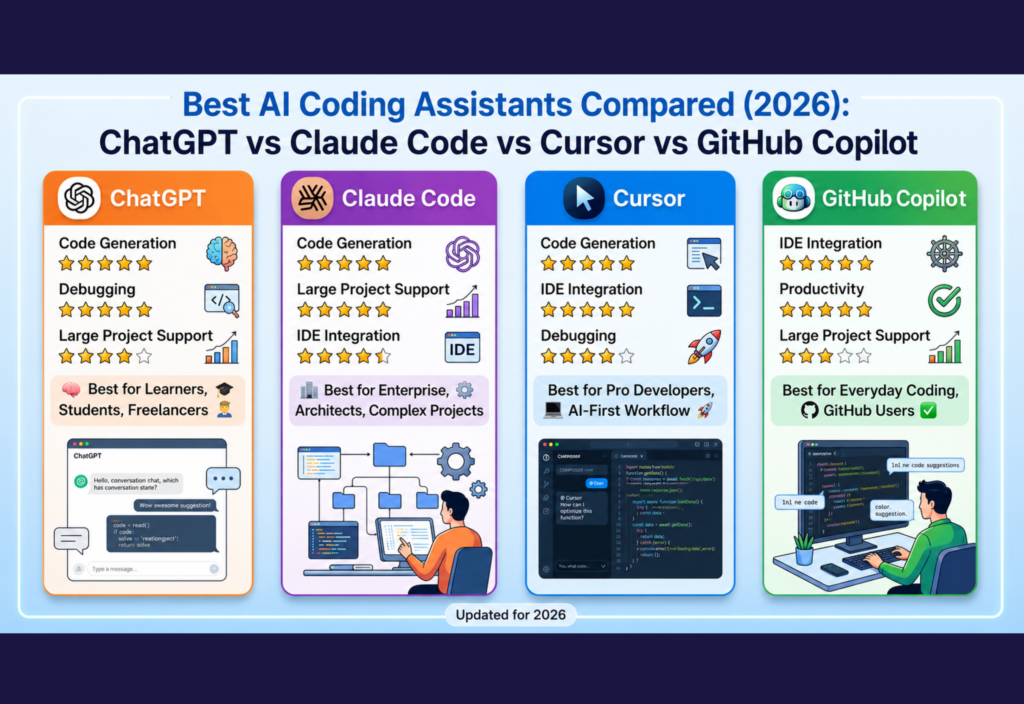
Quick Comparison of the Best AI Coding Assistants
Instead of a large table, here’s a mobile-friendly comparison.
🤖 ChatGPT
- Code Generation: ⭐⭐⭐⭐⭐
- Debugging: ⭐⭐⭐⭐⭐
- Large Project Support: ⭐⭐⭐⭐☆
- Documentation: ⭐⭐⭐⭐⭐
- IDE Integration: Good
- Best For: Beginners, students, freelancers, and full-stack developers
🧠 Claude Code
- Code Generation: ⭐⭐⭐⭐⭐
- Debugging: ⭐⭐⭐⭐⭐
- Large Project Support: ⭐⭐⭐⭐⭐
- Documentation: ⭐⭐⭐⭐⭐
- IDE Integration: Good
- Best For: Enterprise teams, senior developers, and software architects
⚡ Cursor
- Code Generation: ⭐⭐⭐⭐⭐
- Debugging: ⭐⭐⭐⭐☆
- Large Project Support: ⭐⭐⭐⭐⭐
- Documentation: ⭐⭐⭐⭐☆
- IDE Integration: Excellent
- Best For: Professional developers and AI-first coding
💻 GitHub Copilot
- Code Generation: ⭐⭐⭐⭐☆
- Debugging: ⭐⭐⭐⭐☆
- Large Project Support: ⭐⭐⭐☆☆
- Documentation: ⭐⭐⭐⭐☆
- IDE Integration: Excellent
- Best For: Everyday coding and GitHub users
Although every AI coding assistant performs well, the best choice depends on your programming experience, project size, and preferred development workflow.
ChatGPT
ChatGPT remains one of the best AI coding assistants in 2026 because of its flexibility and ease of use. Unlike traditional autocomplete tools, ChatGPT works as an intelligent programming partner that understands detailed instructions and provides complete coding solutions.
Instead of generating only small snippets, ChatGPT can explain algorithms, debug applications, generate documentation, write APIs, and even assist with software architecture. As a result, both beginners and experienced developers can improve their productivity.
Another major advantage is its conversational interface. Developers can continue asking follow-up questions until they completely understand the solution. Consequently, learning programming becomes faster and more interactive.
Key Features
- Generates complete code from natural language
- Explains programming concepts step by step
- Finds and fixes coding errors
- Writes SQL queries
- Creates REST APIs
- Generates technical documentation
- Assists with algorithms and data structures
- Supports dozens of programming languages
Pros
- Beginner-friendly interface
- Excellent debugging capabilities
- High-quality explanations
- Supports many programming languages
- Great for learning new technologies
Cons
- Results depend on prompt quality
- AI-generated code should always be reviewed
Best For
ChatGPT is ideal for:
- Students
- Freelancers
- Full-stack developers
- Backend developers
- Frontend developers
- Developers learning new programming languages
Claude Code
Claude Code has become one of the strongest competitors in the AI coding industry. Unlike many AI coding assistants, it performs exceptionally well with large repositories and enterprise-scale software projects.
Instead of focusing only on generating code, Claude Code understands relationships between files, project architecture, and long programming sessions. Therefore, many professional software engineers choose it for complex development tasks.
Another strength is its ability to analyze thousands of lines of code while maintaining context. In addition, it produces detailed explanations, high-quality documentation, and thoughtful recommendations. Consequently, code reviews become faster and software quality improves.
Key Features
- Excellent long-context understanding
- Large repository analysis
- Intelligent code reviews
- High-quality documentation
- Code refactoring assistance
- Strong reasoning capabilities
Pros
- Handles complex software projects efficiently
- Produces well-structured code
- Excellent reasoning abilities
- Great for enterprise applications
- Strong documentation support
Cons
- Better suited for experienced developers
- Some advanced features require a paid subscription
Best For
Claude Code is an excellent choice for:
- Enterprise development teams
- Large software projects
- Senior developers
- Code reviewers
- Software architects
Cursor
Cursor has become one of the best AI coding assistants for professional developers in 2026. Unlike traditional code editors, Cursor is built with artificial intelligence at its core. Since it is based on Visual Studio Code, developers get a familiar interface while benefiting from powerful AI-driven features.
Instead of switching between a browser and an IDE, developers can ask Cursor to explain code, generate new functions, refactor files, or fix bugs without leaving the editor. As a result, coding becomes faster and more efficient.
Moreover, Cursor understands your project structure instead of analyzing only one file. Therefore, it can edit multiple files, suggest improvements across the entire project, and maintain consistency throughout your codebase.
Key Features
- AI-powered code editor
- Smart code generation
- Multi-file editing
- Project-wide code understanding
- Intelligent debugging
- Inline AI chat
- Fast code refactoring
- Visual Studio Code compatibility
Pros
- Excellent developer experience
- Deep project awareness
- Fast code editing
- Strong AI integration
- Supports modern programming languages
Cons
- Some advanced features require a paid plan
- Beginners may need time to learn its workflow
Best For
Cursor is perfect for:
- Professional developers
- Startup teams
- Full-stack engineers
- Developers using Visual Studio Code
- AI-assisted software development
GitHub Copilot
GitHub Copilot remains one of the most widely used AI coding assistants in 2026. Unlike chatbot-style AI tools, Copilot focuses on providing real-time code suggestions while developers type.
Because it integrates directly with popular IDEs, developers rarely need to leave their coding environment. Consequently, productivity improves without interrupting the coding workflow.
Another advantage is its intelligent autocomplete system. For example, writing a simple function name or comment often allows GitHub Copilot to generate the remaining code automatically. Therefore, repetitive coding tasks become much faster.
Key Features
- Intelligent autocomplete
- Function generation
- Unit test creation
- Multi-language support
- IDE integration
- Productivity-focused workflow
Pros
- Very fast suggestions
- Easy to use
- Excellent IDE integration
- Great for everyday coding
- Supports many programming languages
Cons
- Less conversational than chatbot-based AI assistants
- Generated code should always be reviewed
Best For
GitHub Copilot is ideal for:
- Daily software development
- Backend developers
- Frontend developers
- Enterprise teams
- Developers who use GitHub regularly
Feature Comparison
🤖 ChatGPT
- ⭐ Code Generation: ⭐⭐⭐⭐⭐
- 📖 Code Explanation: ⭐⭐⭐⭐⭐
- 🐞 Debugging: ⭐⭐⭐⭐⭐
- 📂 Large Codebase Support: ⭐⭐⭐⭐☆
- 📝 Documentation: ⭐⭐⭐⭐⭐
- 💻 IDE Integration: Good
- 🎓 Learning Support: ⭐⭐⭐⭐⭐
- ⚡ Productivity: ⭐⭐⭐⭐⭐
🧠 Claude Code
- ⭐ Code Generation: ⭐⭐⭐⭐⭐
- 📖 Code Explanation: ⭐⭐⭐⭐⭐
- 🐞 Debugging: ⭐⭐⭐⭐⭐
- 📂 Large Codebase Support: ⭐⭐⭐⭐⭐
- 📝 Documentation: ⭐⭐⭐⭐⭐
- 💻 IDE Integration: Good
- 🎓 Learning Support: ⭐⭐⭐⭐☆
- ⚡ Productivity: ⭐⭐⭐⭐⭐
⚡ Cursor
- ⭐ Code Generation: ⭐⭐⭐⭐⭐
- 📖 Code Explanation: ⭐⭐⭐⭐☆
- 🐞 Debugging: ⭐⭐⭐⭐☆
- 📂 Large Codebase Support: ⭐⭐⭐⭐⭐
- 📝 Documentation: ⭐⭐⭐⭐☆
- 💻 IDE Integration: Excellent
- 🎓 Learning Support: ⭐⭐⭐☆☆
- ⚡ Productivity: ⭐⭐⭐⭐⭐
💻 GitHub Copilot
- ⭐ Code Generation: ⭐⭐⭐⭐☆
- 📖 Code Explanation: ⭐⭐⭐☆☆
- 🐞 Debugging: ⭐⭐⭐⭐☆
- 📂 Large Codebase Support: ⭐⭐⭐☆☆
- 📝 Documentation: ⭐⭐⭐⭐☆
- 💻 IDE Integration: Excellent
- 🎓 Learning Support: ⭐⭐⭐☆☆
- ⚡ Productivity: ⭐⭐⭐⭐⭐
Pricing Comparison
🤖 ChatGPT
- Free Version: ✅ Yes
- Paid Version: Premium subscription available
🧠 Claude Code
- Free Version: ⚠️ Limited
- Paid Version: Premium subscription available
⚡ Cursor
- Free Version: ✅ Yes
- Paid Version: Pro plan available
💻 GitHub Copilot
- Free Version: ⚠️ Limited Trial
- Paid Version: Monthly subscription
Note: Pricing and subscription plans may change over time. Therefore, always visit the official website of each AI coding assistant for the latest pricing and features.
Which AI Coding Assistant Should You Choose?
Choosing the best AI coding assistant depends on your experience level, project size, and daily development workflow.
Choose ChatGPT if:
- You are learning programming.
- You want detailed explanations.
- You frequently debug code.
- You work with different programming languages.
Choose Claude Code if:
- You manage large repositories.
- You work on enterprise software.
- You perform detailed code reviews.
- You need long-context reasoning.
Choose Cursor if:
- You want an AI-first code editor.
- You spend most of your time in Visual Studio Code.
- You prefer project-wide AI editing.
- You want AI integrated directly into your coding workflow.
Choose GitHub Copilot if:
- You want fast autocomplete.
- You already use GitHub.
- You prefer coding without switching tabs.
- You need quick code suggestions while typing.
Ultimately, every AI coding assistant has its own strengths. Therefore, selecting the right tool depends on your coding style, project requirements, and productivity goals.
Tips for Using AI Coding Assistants Effectively
Even the best AI coding assistants deliver better results when developers provide clear instructions and review the generated code carefully. Therefore, following a few best practices can improve both code quality and productivity.
Write Clear Prompts
Always describe your requirements in detail. Instead of asking for “a login system,” explain the programming language, framework, authentication method, and expected functionality. As a result, the AI can generate more accurate code.
Provide Enough Context
Share the relevant files, functions, or code snippets before asking questions. Furthermore, explain the purpose of your project so the AI can generate solutions that match your existing codebase.
Review Every Suggestion
Although AI coding assistants are highly capable, they can still produce mistakes or outdated implementations. Therefore, review every suggestion before using it in production.
Test AI-Generated Code
Never assume generated code is perfect. Instead, run unit tests, integration tests, and manual testing to verify that everything works correctly.
Protect Sensitive Information
Avoid sharing passwords, API keys, database credentials, or confidential business data with AI tools. Consequently, you can reduce security and privacy risks.
Follow Secure Coding Practices
AI can speed up development, but developers remain responsible for writing secure software. Therefore, validate user input, sanitize data, and follow your organization’s security guidelines.
Use AI as a Coding Partner
Rather than replacing your programming knowledge, use AI to automate repetitive tasks, explain complex concepts, and improve productivity. Combining your expertise with AI assistance usually produces the best results.
Frequently Asked Questions
Which AI coding assistant is best in 2026?
There is no single winner because every tool serves a different purpose. ChatGPT is excellent for learning and debugging, Claude Code handles large codebases exceptionally well, Cursor provides an AI-first development experience, and GitHub Copilot excels at real-time code completion.
Is ChatGPT better than GitHub Copilot?
It depends on your workflow. ChatGPT is ideal for explaining concepts, solving programming problems, debugging applications, and designing software architecture. In contrast, GitHub Copilot focuses on fast autocomplete and code suggestions directly inside your IDE.
Can beginners use AI coding assistants?
Yes. Beginners can learn programming faster with AI coding assistants. ChatGPT is especially useful because it explains programming concepts step by step, answers follow-up questions, and provides beginner-friendly examples.
Which AI coding assistant is best for professional developers?
Professional developers often choose Cursor or Claude Code because both tools understand larger projects and integrate well into modern development workflows. However, GitHub Copilot is also a popular choice for everyday coding.
Do AI coding assistants replace software developers?
No. AI coding assistants improve productivity by automating repetitive tasks and generating code suggestions. However, developers are still responsible for software architecture, testing, debugging, security, and maintaining code quality.
Are AI coding assistants worth paying for?
If you write code regularly, a premium AI coding assistant can save significant time and improve productivity. Therefore, many professional developers find paid plans worthwhile for advanced features and higher usage limits.
Final Verdict
AI coding assistants have become essential tools for modern software development. They help developers write cleaner code, debug applications faster, automate repetitive tasks, and learn new programming technologies more efficiently.
If you need an all-around assistant for coding, debugging, and learning, ChatGPT is one of the best choices. It offers detailed explanations, supports many programming languages, and works well for both beginners and experienced developers.
On the other hand, Claude Code is an excellent option for enterprise teams and developers working with large repositories. Its ability to understand long coding sessions and complex project structures makes it a powerful solution for professional software engineering.
Meanwhile, Cursor provides one of the most advanced AI-powered coding experiences by integrating intelligent assistance directly into the editor. As a result, developers can write, edit, and refactor code without interrupting their workflow.
Finally, GitHub Copilot remains one of the most popular AI coding assistants because of its fast autocomplete, excellent IDE integration, and productivity-focused features. It is especially useful for developers who spend most of their day writing code inside Visual Studio Code or other supported IDEs.
Ultimately, the best AI coding assistant depends on your programming experience, project size, preferred workflow, and budget. Many software engineers even combine multiple AI tools to maximize productivity, improve code quality, and speed up development in 2026.
Conclusion
Artificial intelligence is reshaping software development, and AI coding assistants are becoming indispensable for developers of every skill level. Whether you choose ChatGPT, Claude Code, Cursor, or GitHub Copilot, each tool offers unique strengths that can make coding faster, smarter, and more efficient.
Before making your final decision, compare each tool’s features, pricing, integrations, and capabilities. Then, select the AI coding assistant that best aligns with your workflow and long-term development goals. By using the right AI tool effectively, you can build better software while saving valuable time and effort.

