
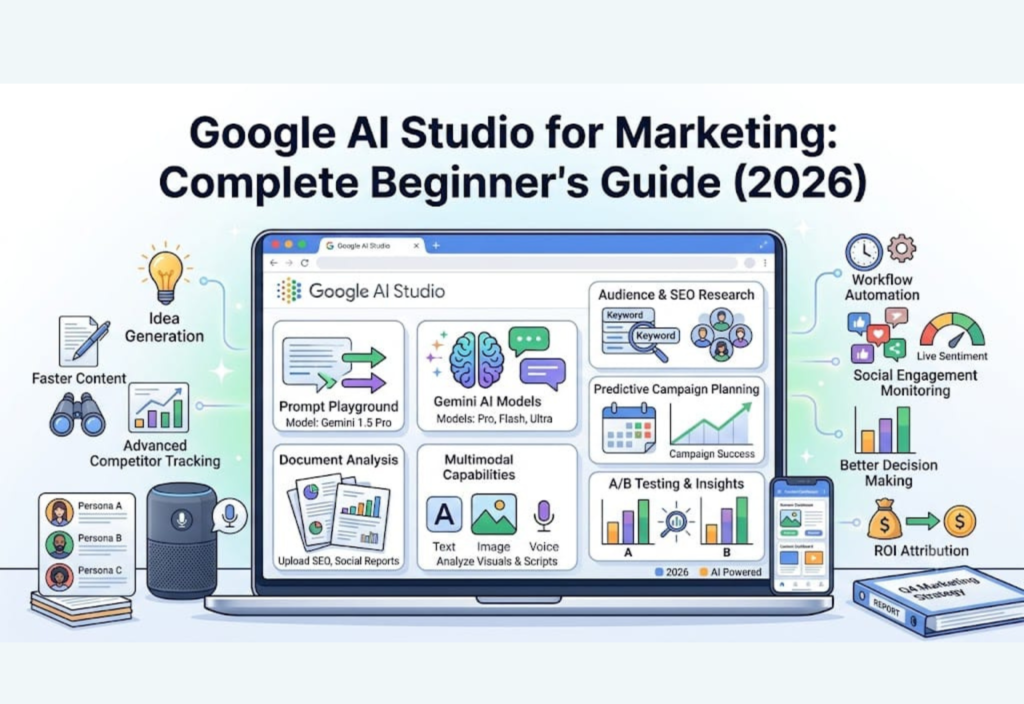
Artificial Intelligence is changing the way businesses approach digital marketing. From creating blog posts and social media captions to analyzing customer feedback and planning email campaigns, AI helps marketers complete tasks faster and more efficiently. One of the newest and most powerful tools available is Google AI Studio, Google’s browser-based platform for interacting with Gemini AI models.
Whether you’re a blogger, freelancer, business owner, or digital marketing professional, learning how to use Google AI Studio can help you improve productivity, generate high-quality content, and simplify everyday marketing tasks. Instead of switching between multiple AI tools, you can experiment with prompts, analyze documents, brainstorm ideas, and create better content from one platform.
In this beginner-friendly guide, you’ll learn what Google AI Studio is, how it works, its key features, and the practical ways marketers can use it to improve their workflows in 2026.
What Is Google AI Studio?
Google AI Studio is a web-based platform developed by Google that gives users direct access to Gemini AI models. It allows you to test prompts, generate content, analyze documents, and experiment with artificial intelligence through an easy-to-use browser interface.
Originally designed for developers who wanted to test AI models before integrating them into applications, the platform has quickly become valuable for marketers, writers, educators, and business owners. You don’t need advanced programming knowledge to use many of its features, making it accessible to beginners as well as professionals.
Unlike traditional AI writing tools that focus mainly on generating text, Google AI Studio encourages users to experiment with different prompts, compare multiple responses, and refine results until they meet specific goals.
Why Should Marketers Use Google AI Studio?
Modern digital marketing involves dozens of repetitive tasks every day. Writing blog posts, creating social media content, planning advertising campaigns, responding to customer inquiries, and researching competitors all require time and effort.
Google AI Studio helps simplify these activities by acting as an intelligent assistant rather than replacing human creativity. It speeds up brainstorming, improves writing quality, and organizes information so marketers can focus on strategy, creativity, and business growth.
Some of the biggest benefits include:
Faster content creation
Better brainstorming sessions
Improved writing quality
AI-assisted research
Time-saving workflows
Smarter campaign planning
Increased productivity
More consistent marketing content
Key Features of Google AI Studio
Google AI Studio includes several powerful features that make it useful for both beginners and experienced marketers.
Prompt Playground
The Prompt Playground is one of the platform’s most valuable features. It allows users to experiment with different prompts and compare AI responses before using the final output in real projects.
Instead of asking the AI a simple question, you can test multiple prompt styles to discover which one produces the highest-quality results.
For example, you can ask the AI to:
Write an SEO-friendly introduction.
Generate five blog title ideas.
Create frequently asked questions.
Rewrite content in a professional tone.
Improve readability for beginners.
Expand short paragraphs with useful information.
Testing prompts in different ways helps marketers produce more accurate and engaging content while reducing the amount of editing required later.
Gemini AI Models
Google AI Studio provides access to Google’s advanced Gemini AI models, which understand natural language and generate detailed, context-aware responses.
These models can assist with many marketing tasks, including:
Blog writing
Product descriptions
Email marketing
SEO content creation
Landing page copy
Marketing campaigns
Business planning
Customer support responses
Because Gemini understands context well, it can produce content that feels more natural and relevant than many traditional AI writing tools.
Document Analysis
Reading long reports and documents manually can consume valuable time. Google AI Studio allows users to upload documents and ask AI to summarize the most important information within seconds.
This feature is especially useful for reviewing:
SEO reports
Customer reviews
Market research
Competitor analysis
Business plans
Product documentation
Meeting notes
Instead of reading dozens of pages, marketers can quickly identify key insights and focus on making informed decisions.
Multimodal Capabilities
Unlike many text-only AI tools, Google AI Studio supports multiple types of input, including text, images, and documents.
This multimodal capability enables marketers to:
Generate image captions
Analyze product photos
Brainstorm advertising ideas
Improve promotional graphics
Create visual marketing concepts
Review documents and images together
As visual content becomes increasingly important across social media and digital advertising, this feature gives businesses greater flexibility when creating campaigns.
Practical Marketing Use Cases
Google AI Studio can support marketers in many real-world situations. Below are some of the most common ways professionals use the platform to save time and improve content quality.
Create SEO-Friendly Content
Search engine optimization remains one of the most effective ways to attract organic traffic. Google AI Studio can assist with content planning by generating article outlines, blog introductions, FAQs, title ideas, meta descriptions, and heading suggestions.
Rather than publishing AI-generated articles without changes, experienced marketers use the platform to accelerate research and drafting before adding their own expertise, examples, and industry knowledge.
Some common SEO tasks include:
Generating blog topic ideas
Writing article outlines
Creating optimized introductions
Suggesting engaging headings
Writing FAQ sections
Improving readability
Creating meta descriptions
Rewriting paragraphs for clarity
When combined with keyword research tools like Google Search Console, Ahrefs, or Semrush, the platform becomes an excellent assistant for planning high-quality SEO content.
Plan Social Media Campaigns
Creating fresh content for multiple social media platforms every week can be challenging. Google AI Studio helps marketers organize campaigns by generating captions, content calendars, promotional ideas, hashtags, and audience-specific messaging.
Instead of creating each post from scratch, you can ask the AI to produce several variations and choose the one that best matches your brand voice.
The platform can help you create content for:
Facebook
Instagram
LinkedIn
X (formerly Twitter)
Pinterest
Threads
TikTok
Planning social media content in advance helps maintain consistency while reducing the stress of daily posting.
Improve Email Marketing Campaigns
Email marketing continues to deliver one of the highest returns on investment in digital marketing. Google AI Studio makes the process easier by helping marketers create professional email content in just a few minutes.
Instead of writing every message manually, you can use AI to generate multiple versions and then customize them for your audience.
The platform can assist with creating:
Welcome emails
Promotional campaigns
Product launch announcements
Weekly newsletters
Follow-up emails
Customer support replies
Sales sequences
Abandoned cart reminders
You can also request different writing styles, such as friendly, persuasive, professional, or conversational, allowing every email to match your brand’s tone and marketing goals.
How to Get Started with Google AI Studio
Getting started with Google AI Studio is simple, even if you have never used an AI platform before. The browser-based interface is designed to be user-friendly, allowing beginners to start experimenting with Gemini AI models in just a few minutes.
Step 1: Sign In
Visit the Google AI Studio website and sign in with your Google account. Once you’re logged in, you can create a new project and begin interacting with the available Gemini AI models.
Step 2: Choose the Right Gemini Model
Different Gemini models are designed for different tasks. Some excel at content writing, while others perform better for reasoning, coding, document analysis, or multimodal inputs.
Choose the model that best matches your project. If you’re creating blog posts, marketing copy, or email campaigns, select a model optimized for text generation. For image analysis or document summarization, use a model that supports multimodal capabilities.
Step 3: Write a Clear Prompt
The quality of your prompt directly affects the quality of the AI’s response. Instead of giving short or vague instructions, provide enough context about your goals, audience, and preferred writing style.
For example, you can ask the AI to:
Write an SEO-friendly blog outline about AI marketing.
Generate five engaging Instagram captions for a product launch.
Create persuasive email subject lines.
Rewrite this landing page for higher conversions.
Suggest ten blog ideas related to digital marketing.
The more details you include, the more accurate and useful the generated content will be.
Step 4: Review and Edit the Output
Although AI can generate impressive content, it should never replace human review. Always check the final output before publishing it.
Take time to:
Verify important facts and statistics.
Improve readability.
Add your own expertise and examples.
Match the content to your brand voice.
Remove repetitive sentences.
Update outdated information if necessary.
Human editing ensures your content remains trustworthy, engaging, and valuable to readers.
Best Practices for Using Google AI Studio
Following a few simple best practices can help you get better results and produce higher-quality marketing content.
Write Detailed Prompts
Avoid giving very short instructions. Instead, explain exactly what you want the AI to create.
For example, instead of writing:
Write a blog.
Try:
Write a 1,200-word beginner-friendly blog post about AI marketing with H2 headings, FAQs, and an engaging introduction.
Detailed prompts usually generate much better responses.
Define Your Audience
Tell the AI who the content is for. Knowing whether your audience consists of beginners, professionals, students, or business owners helps the model create more relevant content.
Request Multiple Versions
Instead of accepting the first response, ask for several alternatives. Comparing different outputs allows you to choose the strongest version or combine the best ideas from each.
Edit Before Publishing
AI-generated content should always be reviewed carefully. Add personal insights, examples, and practical experience to make your content more authentic and trustworthy.
Fact-Check Important Information
While AI is highly capable, it can occasionally provide outdated or incorrect information. Always verify statistics, product details, pricing, and technical information before publishing.
Advantages of Google AI Studio
Google AI Studio offers several benefits for bloggers, marketers, agencies, freelancers, and businesses looking to improve productivity.
Some of its biggest advantages include:
Easy-to-use browser interface
Access to powerful Gemini AI models
Fast content generation
Excellent brainstorming capabilities
Built-in document analysis
Multimodal support for text and images
Improved productivity
Flexible prompt testing
Better content planning
Suitable for beginners and professionals
Faster marketing workflows
Time-saving research assistance
These features make it a valuable AI assistant for modern digital marketing.
Limitations of Google AI Studio
Although Google AI Studio is a powerful platform, it also has a few limitations that users should understand.
Some common limitations include:
It is not a complete marketing automation platform.
Some advanced features are designed for developers.
AI-generated information should always be fact-checked.
It cannot replace human creativity or strategic thinking.
Poorly written prompts often produce weaker results.
Heavy API usage may involve additional costs.
AI may occasionally misunderstand complex requests.
Understanding these limitations helps you use the platform more effectively while avoiding common mistakes.
Tips for Better AI Prompts
One of the easiest ways to improve your results is by writing better prompts. High-quality prompts give the AI clear instructions and reduce the need for extensive editing.
Here are a few useful tips:
Clearly explain your goal.
Mention your target audience.
Specify the desired tone of voice.
Include the preferred word count.
Ask for headings, bullet points, or FAQs when needed.
Request multiple variations for comparison.
Provide background information whenever possible.
A well-written prompt usually leads to more accurate and relevant responses.
Common Mistakes to Avoid
Many beginners expect AI to generate perfect content instantly. However, avoiding a few common mistakes can significantly improve your experience.
Try not to:
Publish AI-generated content without editing.
Use very short or unclear prompts.
Ignore fact-checking.
Overuse AI without adding your own expertise.
Depend on AI for business decisions without human review.
Forget to optimize content for your target audience.
Using AI as a creative assistant rather than a complete replacement for human work leads to much better results.
The Future of AI-Powered Marketing
Artificial intelligence continues to evolve rapidly, and Google’s AI ecosystem is expected to become even more capable in the coming years.
Future improvements may include:
Smarter AI agents
Better integration with Google Workspace
More advanced multimodal features
Improved workflow automation
Personalized AI assistants
Faster content generation
Enhanced collaboration tools
More intelligent marketing insights
Businesses that begin adopting AI today will be better prepared to compete in the future digital marketplace.
Conclusion
Google AI Studio is one of the most valuable AI platforms available for marketers in 2026. It simplifies content creation, assists with SEO planning, analyzes documents, generates marketing ideas, and helps professionals complete repetitive tasks more efficiently.
Instead of replacing marketers, it serves as an intelligent assistant that enhances creativity, improves productivity, and supports better decision-making. Whether you’re running a blog, managing an online business, working in an agency, or building your personal brand, learning to use Google AI Studio can save time and improve the quality of your marketing efforts.
As artificial intelligence continues to evolve, developing practical AI skills today can help you stay competitive and adapt to the future of digital marketing.
Frequently Asked Questions (FAQs)
Is Google AI Studio free to use?
Yes. Google AI Studio provides free access to many of its core features. However, advanced API usage, higher rate limits, and enterprise-level services may require a paid plan.
Can beginners use Google AI Studio?
Absolutely. The platform has a browser-based interface that is easy to navigate, making it suitable for beginners while still offering advanced capabilities for experienced users.
Is Google AI Studio useful for SEO?
Yes. It can help generate blog ideas, article outlines, title suggestions, meta descriptions, FAQ sections, and readability improvements. For detailed keyword research and performance tracking, dedicated SEO tools such as Google Search Console, Ahrefs, or Semrush are still recommended.
Can businesses use Google AI Studio for marketing?
Yes. Businesses can use the platform to create marketing content, develop email campaigns, brainstorm advertising ideas, improve customer communication, and organize marketing workflows more efficiently.
Is Google AI Studio better than traditional AI writing tools?
It depends on your needs. Google AI Studio offers greater flexibility for prompt testing, experimenting with Gemini AI models, document analysis, and multimodal workflows. This makes it an excellent choice for marketers who want more control over AI-generated content while maintaining high-quality results.

