
Artificial Intelligence has become smarter than ever, but even the most advanced Large Language Models (LLMs) still face an important limitation—they only know what they were trained on. If the information is outdated, private, or company-specific, the AI may provide inaccurate or incomplete answers.
This is where Retrieval-Augmented Generation (RAG) changes everything.
Instead of relying only on its built-in knowledge, a RAG-powered AI retrieves fresh, relevant information from trusted sources before generating a response. This allows AI systems to answer questions using the latest documents, company databases, PDFs, websites, research papers, and internal knowledge bases.
In 2026, RAG has become one of the most important technologies behind enterprise AI assistants, customer support chatbots, coding assistants, healthcare systems, legal research tools, and educational platforms.
In this beginner-friendly guide, you’ll learn:
- What Retrieval-Augmented Generation (RAG) is
- Why traditional AI models have limitations
- How RAG works step by step
- The architecture behind RAG
- Benefits and challenges
- Real-world applications
- Popular tools for building RAG systems
- Future trends in 2026
What Is Retrieval-Augmented Generation (RAG)?
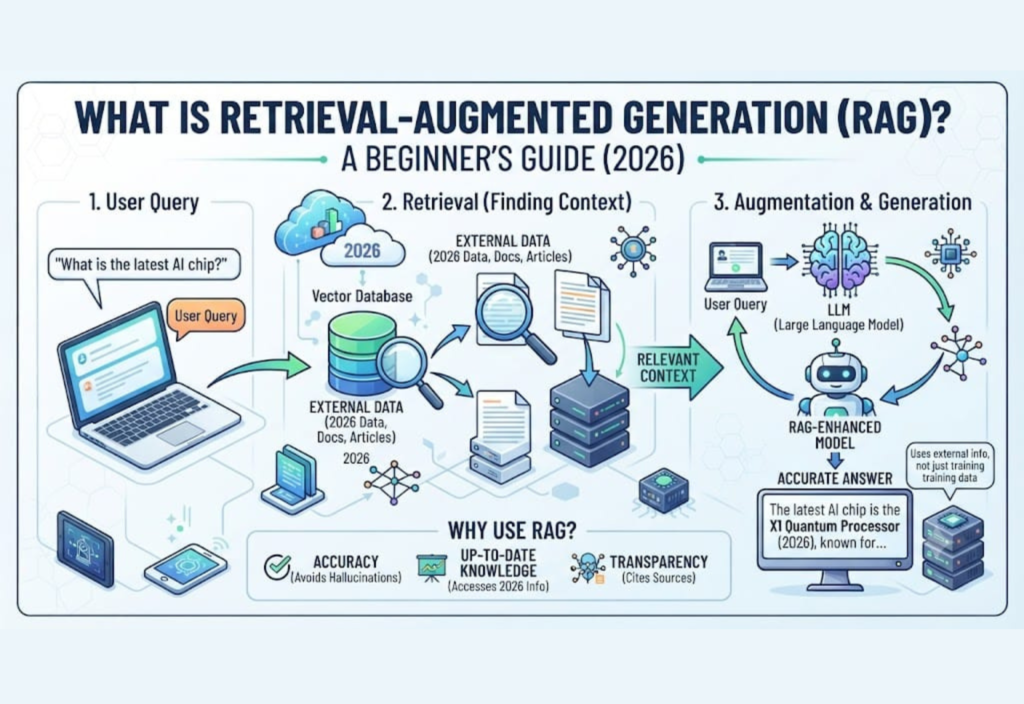
Retrieval-Augmented Generation (RAG) is an AI architecture that combines information retrieval with large language models (LLMs).
Instead of generating answers only from its training data, the AI first searches relevant external information and then uses that information to generate an accurate response.
Think of RAG like an intelligent research assistant.
Instead of answering from memory alone, it quickly searches trusted documents, finds the best information, and then explains it in natural language.
This makes AI significantly more reliable.
Why Traditional AI Models Have Limitations
Large Language Models such as ChatGPT, Claude, Gemini, and open-source LLMs are incredibly powerful.
However, they still have several challenges.
1. Knowledge Cutoff
Models are trained on historical data.
They don’t automatically know:
- Today’s news
- Latest product releases
- Company policies
- New research
- Private documents
2. Hallucinations
Sometimes AI confidently generates incorrect information.
These false answers are known as AI hallucinations.
RAG reduces hallucinations by grounding responses in actual documents.
3. No Access to Private Data
A normal LLM cannot access:
- Company PDFs
- Employee manuals
- CRM databases
- Internal documentation
- Private research
Unless connected through RAG.
4. Expensive Retraining
Updating an entire language model whenever information changes is expensive.
RAG solves this problem by retrieving new information instantly.
How Does Retrieval-Augmented Generation Work?
The RAG workflow is surprisingly simple.
Step 1 — User Asks a Question
Example:
“What are our company’s latest refund policies?”
Step 2 — Convert Question into Embeddings
The question is transformed into numerical vectors called embeddings.
Embeddings allow semantic search rather than simple keyword matching.
Step 3 — Search the Knowledge Base
The retriever searches:
- PDFs
- Word documents
- Databases
- Wikis
- Websites
- Internal documentation
to find the most relevant information.
Step 4 — Retrieve Relevant Documents
Instead of searching everything, the retriever returns only the most useful passages.
Example:
- Refund Policy PDF
- Customer Service Guide
- Internal SOP
Step 5 — Add Context to the Prompt
The retrieved information is attached to the user’s original question.
The prompt becomes much richer.
Step 6 — LLM Generates the Final Answer
Finally, the language model uses both:
- User question
- Retrieved context
to generate an accurate answer.
Simple RAG Workflow
User Question
       │
       ▼
Embedding Model
       │
       ▼
Vector Database
       │
Retrieve Relevant Documents
       │
       ▼
Large Language Model
       │
       ▼
Final Answer
Components of a RAG System
A complete Retrieval-Augmented Generation system includes several important components.
| Component | Purpose |
|---|---|
| User Query | User asks a question |
| Embedding Model | Converts text into vectors |
| Vector Database | Stores document embeddings |
| Retriever | Finds similar documents |
| Prompt Builder | Combines retrieved context |
| LLM | Generates the final response |
What Is a Vector Database?
A vector database stores document embeddings rather than plain text.
Instead of matching exact keywords, it performs semantic search.
Example:
Searching:
“How can I reset my password?”
may also retrieve:
- Account recovery
- Forgot password guide
- Login issues
Even if the wording is different.
Popular vector databases include:
- Pinecone
- Weaviate
- Chroma
- Milvus
- Qdrant
- FAISS
Why Embeddings Matter
Embeddings allow AI to understand meaning rather than exact wording.
Example:
Sentence A
Dogs are loyal animals.
Sentence B
Puppies make wonderful companions.
Keyword search may fail.
Embedding search recognizes they are closely related.
Benefits of Retrieval-Augmented Generation
1. More Accurate Answers
Responses are based on actual documents.
2. Less Hallucination
Grounded information dramatically improves reliability.
3. Up-to-Date Knowledge
No retraining required.
Simply update the documents.
4. Access to Private Data
Perfect for enterprises.
5. Lower Costs
Updating documents is far cheaper than retraining an LLM.
6. Better Customer Support
AI can answer using:
- Product manuals
- Knowledge bases
- FAQs
- Company policies
7. Enterprise Ready
Large organizations increasingly rely on RAG for secure, domain-specific AI.
Real-World Applications of RAG
Customer Support
AI answers using support articles and product documentation.
Healthcare
Doctors search medical literature and clinical guidelines more efficiently.
Legal Research
Law firms retrieve relevant case law and contracts.
Education
Students ask questions based on textbooks, lecture notes, and research papers.
Software Development
Coding assistants retrieve API documentation and codebases.
Human Resources
Employees can search:
- Leave policies
- Payroll information
- Benefits
- Training documents
Finance
Banks retrieve compliance rules, regulations, and internal procedures.
RAG vs Fine-Tuning
🟣 Uses External Knowledge
- RAG: ✅ Yes
- Fine-Tuning: ❌ No
🟣 Easy to Update
- RAG: ✅ Yes
- Fine-Tuning: ❌ Requires retraining
🟣 Works with Private Documents
- RAG: ✅ Yes
- Fine-Tuning: ⚠️ Limited
🟣 Lower Cost
- RAG: ✅ Yes
- Fine-Tuning: 💰 More expensive
🟣 Best for Changing Information
- RAG: ✅ Excellent
- Fine-Tuning: ❌ Poor
🟣 Best for Changing Model Behavior
- RAG: ⚠️ Limited
- Fine-Tuning: ✅ Excellent
Popular RAG Frameworks in 2026
Some widely used frameworks include:
- LangChain
- LlamaIndex
- Haystack
- DSPy
- Semantic Kernel
These frameworks simplify document ingestion, retrieval, prompt construction, and integration with LLMs.
Challenges of RAG
Although powerful, RAG is not perfect.
Common challenges include:
- Poor document quality
- Incorrect chunk sizes
- Weak embedding models
- Slow retrieval if the index is not optimized
- Outdated knowledge bases
- Security and access control for private data
Proper document management and indexing are essential for high-quality results.
Best Practices for Building a RAG System
- Keep your knowledge base updated.
- Use clean, well-structured documents.
- Choose an appropriate embedding model.
- Optimize document chunk sizes.
- Rank retrieved passages by relevance.
- Evaluate responses regularly.
- Implement access controls for sensitive information.
Future of RAG in 2026
RAG is evolving beyond simple document retrieval. Emerging trends include:
- Agentic RAG, where AI agents plan multi-step retrieval and reasoning.
- Multimodal RAG, combining text with images, audio, and video.
- Graph RAG, using knowledge graphs to improve context and relationships.
- Hybrid Search, blending keyword and semantic search for higher accuracy.
- Real-Time RAG, connecting AI to live databases, APIs, and continuously updated knowledge sources.
These advances are making AI systems more accurate, transparent, and useful across industries.
Frequently Asked Questions (FAQs)
Is RAG better than fine-tuning?
Not necessarily. RAG is ideal for providing up-to-date or private information, while fine-tuning is better for changing how a model behaves or responds.
Does RAG eliminate AI hallucinations?
No. It significantly reduces hallucinations by grounding answers in retrieved information, but it does not eliminate them completely.
Can RAG work with PDFs?
Yes. RAG systems commonly index PDFs, Word documents, spreadsheets, websites, and internal databases.
Is RAG only for businesses?
No. Developers, researchers, educators, and hobbyists can also build RAG systems for personal knowledge bases or study assistants.
Do I need to retrain an AI model to update information?
Usually not. With RAG, you can update the knowledge base, re-index the documents, and the AI can use the new information without retraining the language model.
Final Thoughts
Retrieval-Augmented Generation (RAG) is one of the most significant advancements in modern AI because it bridges the gap between static language models and dynamic, real-world knowledge. By combining intelligent document retrieval with powerful language generation, RAG enables AI assistants to deliver more accurate, current, and trustworthy answers.
Whether you’re building an enterprise chatbot, a coding assistant, an educational platform, or a customer support system, understanding RAG is an essential skill in 2026. As AI continues to evolve with technologies like Agentic AI, Multimodal AI, and Graph RAG, mastering the fundamentals of Retrieval-Augmented Generation will help you create smarter, more reliable AI applications.

