
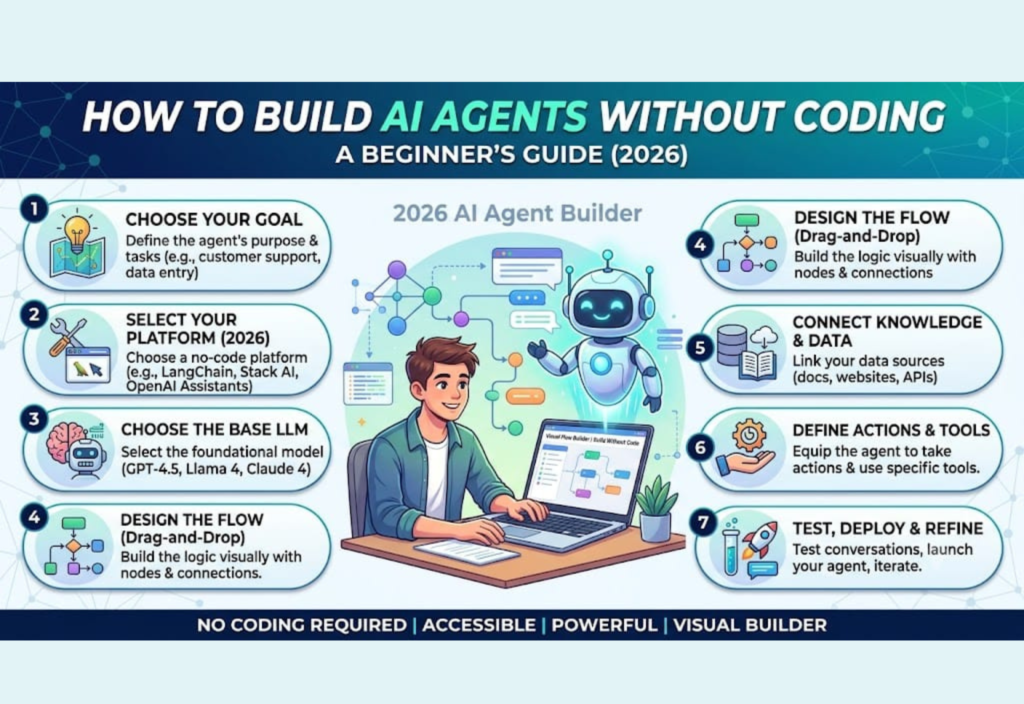
How to Build AI Agents Without Coding is easier than ever in 2026. Thanks to powerful no-code AI platforms, you can create intelligent AI agents without learning Python or any programming language. Modern AI agents can plan tasks, remember previous conversations, analyze documents, search the web, and automate complex workflows with minimal human effort.
Whether you’re a student, freelancer, marketer, business owner, or content creator, no-code tools make AI development accessible to everyone through simple drag-and-drop interfaces. In this beginner’s guide, you’ll learn how to build AI agents without coding, explore the best no-code platforms available in 2026, and follow a step-by-step process to create your first AI agent with ease.
What Is an AI Agent?
An AI agent is an intelligent software system designed to perform tasks on behalf of a user. Unlike traditional chatbots that simply answer questions, AI agents can understand goals, make decisions, use external tools, remember previous interactions, and complete complex workflows.
For example, instead of asking a chatbot to write a single email, you could ask an AI agent to:
- Research a company
- Draft a personalized email
- Check grammar
- Save the document
- Schedule a follow-up reminder
All of these actions can happen automatically through one intelligent workflow.
Why Build AI Agents Without Coding?
No-code AI development has become popular because it removes technical barriers. Anyone can experiment with AI automation without spending months learning programming.
Key Benefits
- Faster development
- Lower costs
- Beginner-friendly interfaces
- Easy integrations with existing apps
- Rapid testing and improvements
- Ideal for freelancers and small businesses
Many companies now prefer no-code automation because it saves both time and development costs.
How Does an AI Agent Work?
Although every platform is different, most AI agents follow the same workflow.
Step 1: Receive Input
The user asks a question or assigns a task to the AI agent.
Step 2: Understand Intent
The AI analyzes the request and determines the user’s objective using natural language processing.
Step 3: Plan Actions
The agent decides the best sequence of steps required to complete the task efficiently.
Step 4: Use External Tools
The AI may search the web, access files, call APIs, query databases, or interact with connected applications.
Step 5: Generate a Response
After processing the information, the AI creates a useful and relevant response or completes the requested action.
Step 6: Remember Context
Some AI agents save previous conversations or user preferences, allowing them to provide more personalized assistance over time.
This combination of reasoning, memory, and tool usage makes AI agents much more powerful than standard AI chatbots.
Best No-Code AI Platforms in 2026
1. Flowise
Flowise is a visual AI workflow builder that allows users to connect language models, APIs, and tools through an easy drag-and-drop interface.
Best For
- Visual AI workflows
- AI automation
- Beginners
- Custom AI assistants
2. Dify
Dify helps users build AI-powered applications and assistants without writing code. It includes prompt management, workflow automation, and deployment features.
Best For
- AI applications
- Business assistants
- Internal company tools
- Rapid AI development
3. n8n
n8n combines workflow automation with AI capabilities, allowing users to automate repetitive business processes using visual workflows.
Best For
- AI automation
- Business processes
- API integrations
- Advanced workflows
4. Zapier AI
Zapier AI makes it easy to automate tasks between thousands of applications using AI-powered workflows.
Best For
- Business automation
- Marketing workflows
- Productivity
- Small businesses
5. Make
Make provides a visual automation platform that connects apps, AI models, and online services without requiring programming knowledge.
Best For
- Automation
- Multi-step workflows
- Business operations
- Integrations
6. Voiceflow
Voiceflow specializes in creating conversational AI experiences using an intuitive visual builder.
Best For
- AI chatbots
- Voice assistants
- Customer support
- Conversational design
7. Botpress
Botpress enables businesses to build intelligent AI chatbots for customer service, internal support, and automation.
Best For
- Customer support bots
- Enterprise chatbots
- AI assistants
- Knowledge management
8. Google AI Studio
Google AI Studio allows users to experiment with AI models and build AI-powered applications through a beginner-friendly interface.
Best For
- AI experiments
- Gemini applications
- Prompt testing
- Learning AI development
Step-by-Step Guide to Build Your First AI Agent
Step 1: Define Your Goal
Start by deciding exactly what your AI agent should accomplish.
Examples include:
- Writing blog posts
- Answering customer questions
- Summarizing PDF documents
- Managing emails
- Creating social media captions
- Researching competitors
A clear objective makes the design process much easier.
Step 2: Choose a No-Code Platform
Select a platform that matches your project requirements.
For example:
- Content creation → Flowise
- Business automation → Zapier AI
- Customer support → Botpress
- Workflow automation → n8n
- Conversational AI → Voiceflow
Most platforms offer free plans, making it easy to begin experimenting.
Step 3: Connect an AI Model
Your no-code platform needs an AI model to generate responses.
Popular options include:
- ChatGPT
- Claude
- Gemini
- DeepSeek
- Llama
Most no-code platforms allow you to connect these models using simple settings instead of writing code.
Step 4: Add External Tools
The real power of AI agents comes from integrating them with external services.
Examples include:
- Google Drive
- Gmail
- Slack
- Notion
- Google Calendar
- Dropbox
- CRM software
- Databases
These integrations allow AI agents to perform useful actions instead of simply generating text.
Step 5: Test Your Workflow
Before publishing your AI agent, test multiple scenarios.
Ask questions like:
- Does the AI understand user requests?
- Are responses accurate?
- Does every workflow complete successfully?
- Can it recover from errors?
Testing improves reliability and ensures better performance.
Step 6: Publish Your AI Agent
Once everything works correctly, publish your AI agent for real-world use.
Many no-code platforms allow you to:
- Embed AI agents into websites
- Share them with team members
- Deploy customer support assistants
- Launch internal productivity tools
No programming is required.
Real-World Use Cases for No-Code AI Agents
Businesses across nearly every industry now use AI agents to automate repetitive tasks.
Common applications include:
- Customer support assistants
- HR onboarding agents
- Marketing content generators
- Email automation
- Meeting summarizers
- Research assistants
- Sales assistants
- E-commerce shopping assistants
These use cases continue expanding as AI technology becomes more capable.
Tips for Building Better AI Agents
Follow these best practices for better results.
- Give clear instructions.
- Keep prompts specific.
- Test multiple scenarios.
- Add memory only when necessary.
- Connect useful external tools.
- Review AI-generated content before publishing.
- Update workflows regularly.
A simple, well-designed workflow often performs better than an overly complex one.
Common Mistakes Beginners Should Avoid
Many first-time users make similar mistakes.
Avoid:
- Building overly complicated workflows
- Using vague prompts
- Skipping testing
- Connecting unnecessary tools
- Expecting AI to be perfect
- Ignoring privacy and security settings
Starting with a simple project helps you learn much faster.
Are No-Code AI Agents Safe?
Most modern no-code platforms provide security features such as:
- Encrypted connections
- User authentication
- Permission controls
- Secure API integrations
However, you should avoid sharing sensitive personal or business information with public AI models unless you fully understand how your data is processed.
If you’re creating AI agents for clients or businesses, always review each platform’s privacy policy and configure access permissions carefully.
The Future of No-Code AI Agents
The future of AI agents looks incredibly promising.
In the coming years, we can expect AI agents to:
- Collaborate with other AI agents
- Handle more advanced decision-making
- Support voice and video conversations
- Integrate with thousands of business tools
- Offer better long-term memory
- Deliver more personalized experiences
As no-code platforms continue to improve, building powerful AI assistants will become accessible to almost everyone.
Frequently Asked Questions
Can I Build an AI Agent Without Coding?
Yes. Modern no-code AI platforms provide visual builders that allow anyone to create AI agents without programming knowledge.
Which No-Code AI Platform Is Best?
The best platform depends on your goals.
- Flowise and Dify are excellent for AI workflows.
- Zapier AI and Make are ideal for business automation.
- Voiceflow works well for conversational AI.
- Botpress is a strong choice for customer support.
Are No-Code AI Platforms Free?
Many no-code AI platforms offer free plans with limited features. Paid plans usually provide advanced AI models, more integrations, and higher usage limits.
Can AI Agents Automate Business Tasks?
Yes. AI agents can:
- Manage emails
- Summarize documents
- Answer customer questions
- Create marketing content
- Schedule meetings
- Automate repetitive workflows
They can significantly improve productivity for businesses of all sizes.
Conclusion
Building AI agents without coding is no longer a futuristic concept—it’s a practical skill that anyone can learn in 2026. With intuitive no-code platforms, you can create intelligent assistants that automate tasks, improve productivity, and streamline everyday work without writing a single line of code.
The key is to start with a clear goal, choose the right platform, connect the tools you need, and thoroughly test your workflows before deployment. As your confidence grows, you can expand your AI agent with additional capabilities, integrations, and automation features.
Whether you’re a freelancer, student, entrepreneur, marketer, or business owner, learning how to build AI agents without coding is a valuable investment that can save time, reduce manual work, and prepare you for the rapidly evolving world of artificial intelligence.

