
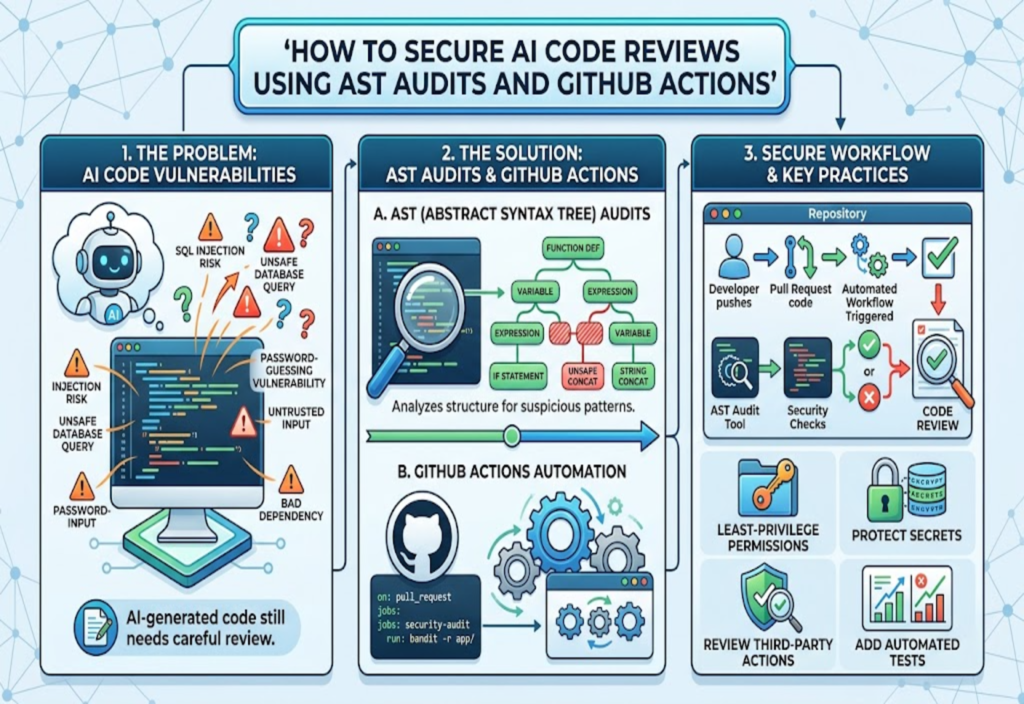
Artificial intelligence is changing how developers write, review, and maintain software. AI coding assistants can generate functions, suggest improvements, explain errors, and help developers complete programming tasks more efficiently. However, AI-generated code still requires careful review before it becomes part of a real application.
Although AI tools can produce useful code, their output may contain security vulnerabilities, incorrect assumptions, unsafe dependencies, or programming mistakes. A function may appear to work correctly while exposing sensitive information, accepting untrusted input, or allowing unauthorized access.
This is why securing AI code reviews using Abstract Syntax Tree (AST) audits and GitHub Actions is becoming an important software development practice.
AST audits help developers examine the structure of source code and identify patterns that may indicate security problems. GitHub Actions can automate these checks whenever developers submit changes through a pull request. Together, these technologies create a repeatable process for identifying potential risks before vulnerable code is merged into a project.
However, automated checks should support human judgment rather than replace it. A secure development process also requires testing, responsible use of AI tools, appropriate access controls, and careful handling of sensitive information.
In this guide, you will learn what AST audits are, why AI-generated code needs additional review, how to automate security checks with GitHub Actions, and which practices can help developers build safer applications.
What Is an AI Code Review?
An AI code review is the process of examining source code created or modified with the assistance of artificial intelligence.
Developers may use AI coding assistants to generate a new function, improve an existing component, write database queries, or create automated tests. These tools can save time, but their suggestions are not automatically secure or correct.
For example, an AI assistant might generate a login function that checks a username and password but fails to limit repeated login attempts. The function may pass a basic test while remaining vulnerable to password-guessing attacks.
Similarly, generated code might use an unsafe database query, expose an API key, or trust data received from an external source without proper validation.
A thorough code review examines several areas:
Correctness: Does the code perform the intended task?
Security: Could the implementation expose data or allow unauthorized actions?
Input validation: Does it handle unexpected or malicious input safely?
Dependencies: Are the libraries and packages appropriate and maintained?
Access control: Can users perform only the actions they are authorized to perform?
Testing: Do automated tests cover normal behavior and important failure cases?
Maintainability: Can another developer understand and safely update the code?
AI can assist with some of these tasks, but developers remain responsible for reviewing and validating the final implementation.
What Is an Abstract Syntax Tree (AST)?
An Abstract Syntax Tree, commonly called an AST, is a structured representation of source code.
Instead of treating a program as a collection of text characters, a compiler or parser analyzes its syntax and organizes the code into a tree of related elements. These elements may represent functions, variables, expressions, conditions, loops, imports, and function calls.
For example, consider this Python code:
def get_user(user_id):
    query = "SELECT * FROM users WHERE id = " + user_id
    return query
A text-based search might look for the plus sign or the phrase SELECT. An AST-based tool can examine the function, identify the string expression, and determine how the query is constructed.
This structural information makes it possible to write rules that identify suspicious programming patterns more precisely than simple text matching.
For instance, an audit could look for database queries that combine SQL statements with externally supplied values. Such patterns may indicate SQL injection risks, although the complete context must be examined before determining whether a vulnerability actually exists.
How AST Audits Work
A typical AST audit follows several steps:
Parse the source code: A parser converts supported code into a structured representation.
Identify relevant elements: The audit locates functions, expressions, imports, and other constructs.
Apply security rules: Rules search for patterns associated with potentially unsafe behavior.
Evaluate the findings: The tool reports suspicious code, and additional analysis may examine how data moves through the application.
Review the results: Developers investigate findings and determine whether changes are necessary.
AST analysis is particularly useful when security rules need to understand how code is organized rather than merely search for specific words.
However, AST audits are not perfect. They may miss vulnerabilities that require runtime information or interactions between different components. They can also report safe code as suspicious. For this reason, AST checks should be combined with other security testing methods.
Why AI-Generated Code Needs Security Audits
AI-generated code can introduce many of the same vulnerabilities found in manually written software. The difference is that developers may accept generated code quickly because it looks professional, follows familiar patterns, or appears to solve the requested problem.
There are several important reasons to review AI-assisted changes carefully.
1. AI May Produce Insecure Implementations
A coding assistant may generate code that satisfies the immediate request but overlooks a security requirement.
For example, it may create an upload feature without properly checking file types, or it may construct a database query using unsafe string concatenation.
Developers should examine the security implications of the implementation rather than relying solely on whether the code works.
2. Generated Code May Contain Hidden Assumptions
AI-generated functions may assume that an input is always valid, that a user has permission to access a resource, or that a configuration value is always present.
These assumptions can create vulnerabilities when the code operates under real-world conditions.
A secure review should consider empty values, unexpected data types, unauthorized requests, invalid sessions, and other failure scenarios.
3. Dependencies Can Introduce Additional Risks
AI assistants may recommend packages or libraries that are outdated, unnecessary, or unsuitable for a project.
A dependency review helps developers identify known vulnerabilities and evaluate whether the selected packages are appropriate.
Dependency scanning does not establish that every package is safe, but it provides another useful layer of protection.
4. AI Suggestions May Be Difficult to Verify Without Tests
Generated code may work for a basic example but fail when users provide unusual input or when multiple operations occur simultaneously.
Unit tests, integration tests, security-focused tests, and manual review help evaluate these situations.
The goal is not to assume that all AI-generated code is dangerous. Instead, the goal is to apply consistent verification to every change, regardless of how the code was produced.
What Is GitHub Actions?
GitHub Actions is an automation platform integrated with GitHub repositories. It allows development teams to run workflows in response to events such as pull requests, pushes, scheduled tasks, and other supported triggers.
A workflow is defined in a YAML file, usually stored inside the .github/workflows/ directory of a repository.
For example, a development team can configure a workflow to run whenever a pull request is opened or updated. The workflow can install the required tools, analyze changed files, run tests, and report whether the checks passed.
For AI-assisted code reviews, GitHub Actions can coordinate multiple security checks:
AST-based security rules.
Static application security testing.
Unit and integration tests.
Dependency vulnerability scanning.
Secret detection.
Code quality checks.
Workflow configuration analysis.
These checks can run consistently without requiring a developer to remember each step manually.
GitHub also provides security guidance for workflows, including recommendations for limiting token permissions, handling untrusted pull requests, and reviewing third-party actions.
Official documentation: https://docs.github.com/en/actions/reference/security/secure-use
How AST Audits and GitHub Actions Work Together
AST audits and GitHub Actions serve different purposes.
AST auditing analyzes code structure and looks for suspicious patterns. GitHub Actions provides the automation needed to run those checks at the appropriate stage of the development process.
A typical workflow looks like this:
Developer or AI assistant writes code → Pull request is created → Automated security checks run → Findings are reported → Developer reviews and fixes issues → Required checks pass → Code is eligible for merging.
This approach makes security review a routine part of software development rather than a task performed only before a major release.
For example, imagine an AI assistant generates a new API endpoint. The developer opens a pull request containing the changes. A GitHub Actions workflow starts automatically and runs the project’s AST audit.
If the audit identifies a potentially unsafe database query, the workflow can report a failure and prevent merging when repository branch protection requires that check to pass.
The developer then investigates the finding, updates the implementation, and submits another revision.
Importantly, a failed check does not always mean a confirmed vulnerability exists. It means the change requires attention under the project’s security policy.
Step-by-Step Guide to Building an AST Security Audit Workflow
The following example demonstrates how a team can begin automating security checks for Python code. It uses Bandit, a Python security analysis tool, to identify common security-related coding patterns.
Bandit is useful for this example because it analyzes Python code through its abstract syntax tree. It is not a universal security scanner, and its findings should be interpreted in context.
Step 1: Organize Your Repository
A simple Python repository might have this structure:
my-project/
├── app/
│   ├── __init__.py
│   └── main.py
├── tests/
│   └── test_main.py
├── requirements.txt
└── .github/
    └── workflows/
        └── security-audit.yml
Your actual project may have a different structure. The important point is to identify the source-code directories that should be checked.
Before adding automated auditing, establish a normal development process that includes version control, code review, and testing.
Step 2: Choose an AST-Based Security Tool
For Python projects, Bandit can detect a range of potentially risky coding patterns, including certain unsafe function calls and insecure implementation choices.
Install it in a development environment with:
python -m pip install bandit
Run a basic scan against your application’s source code:
bandit -r app/
The -r option tells Bandit to inspect the selected directory recursively.
Review the findings carefully. Depending on the code and configuration, the tool may identify issues that need correction or patterns that require additional investigation.
For JavaScript and TypeScript projects, teams can consider ESLint security-related rules and other language-appropriate static analysis tools. For broader application security analysis, GitHub CodeQL can help identify supported vulnerability patterns.
The best choice depends on the programming languages, framework, repository structure, and security requirements of the project.
Step 3: Create a GitHub Actions Workflow
Inside your repository, create this file:
.github/workflows/security-audit.yml
Add the following example:
name: AST Security Audit

on:
  pull_request:
  push:
    branches:
      - main

permissions:
  contents: read

jobs:
  security-audit:
    name: Python Security Checks
    runs-on: ubuntu-latest

    steps:
      - name: Check out repository
        uses: actions/checkout@v4

      - name: Set up Python
        uses: actions/setup-python@v5
        with:
          python-version: "3.12"

      - name: Install audit tool
        run: python -m pip install bandit

      - name: Run AST security audit
        run: bandit -r app/ -ll
This is an illustrative starting point, not a complete production security configuration. Review action versions, pin third-party actions to verified full commit SHAs where appropriate, and use the Python version supported by your project.
Here is what each part does.
Workflow name: AST Security Audit identifies the automated check in GitHub.
Trigger: The workflow runs on pull requests and pushes to the main branch.
Permissions: contents: read limits the workflow token to read access to repository contents unless additional permissions are explicitly required.
Runner: ubuntu-latest requests a GitHub-hosted Ubuntu runner.
Checkout: The checkout action makes the repository files available to the job.
Python setup: The setup action configures the Python environment.
Tool installation: Bandit is installed so that the audit can run.
Audit command: bandit -r app/ -ll recursively scans the application directory and filters the reported results by the configured severity and confidence thresholds.
For a more reproducible production workflow, pin the audit tool to a reviewed version or use a dependency lock file. Review the behavior of your selected tool before relying on any severity threshold as a merge requirement.
Step 4: Add Tests and Additional Security Checks
An AST audit should not be the only automated check.
A more complete workflow can also run unit tests:
      - name: Install project dependencies
        run: |
          python -m pip install -r requirements.txt
          python -m pip install pytest

      - name: Run tests
        run: pytest
Add these steps to the workflow when the project uses requirements.txt and pytest. If the project has a different dependency-management or testing setup, adapt the commands accordingly.
Testing helps determine whether the application behaves as expected. Static analysis examines potential risks in the source code. Neither replaces the other.
For production projects, consider adding dependency scanning, secret detection, and broader static analysis where appropriate.
Step 5: Review Results in the Pull Request
When a pull request triggers the workflow, GitHub displays the status of the associated checks.
If the AST audit finds a problem that causes the command to exit unsuccessfully, the workflow job fails. Developers can inspect the logs, investigate the finding, and make corrections.
To make these results meaningful, teams should define a consistent policy for handling findings:
Fix confirmed security issues before merging.
Investigate high-severity findings promptly.
Document accepted exceptions and their justification.
Reassess exceptions when the code or threat model changes.
Avoid suppressing findings simply to obtain a passing check.
A failed scan should lead to investigation, not an automatic assumption that the tool is always correct.
Advanced Security: CodeQL and Data-Flow Analysis
AST-based pattern matching is useful, but some vulnerabilities require understanding how data travels through an application.
For example, a value received from an HTTP request might pass through several functions before reaching a database operation. A simple rule may identify the final query but fail to establish whether the input was properly validated or parameterized.
Data-flow analysis helps investigate relationships between sources of data and potentially sensitive operations.
GitHub CodeQL supports security analysis of code and includes libraries for analyzing GitHub Actions workflows themselves. Depending on the language and available configuration, CodeQL can help identify potentially vulnerable patterns and relationships between code elements.
Official references:
GitHub Actions security guidance: https://docs.github.com/en/actions/reference/security/secure-use
CodeQL query documentation for GitHub Actions: https://codeql.github.com/codeql-query-help/actions/
A practical strategy is to combine complementary methods:
Use AST-based rules to identify suspicious code structures.
Use static analysis to examine additional vulnerability patterns.
Use data-flow analysis where supported to investigate how untrusted input reaches sensitive operations.
Run tests to validate application behavior.
Require human review for security-sensitive changes.
The exact combination should be based on the application’s language, architecture, and risk profile.
Essential GitHub Actions Security Practices
Automating a security check is valuable only if the workflow itself is protected. An insecure workflow can create a new attack path even when the application code is well written.
1. Apply Least-Privilege Permissions
Give each workflow only the permissions it needs.
For example, a workflow that only checks source code generally does not need permission to publish releases, modify repository settings, or approve pull requests.
Explicitly setting permissions makes the intended access easier to review and reduces the potential impact of an unexpected workflow compromise.
2. Handle Untrusted Pull Requests Carefully
Contributions from external branches or forks may contain untrusted code. Build scripts, test commands, dependency installation, and project configuration can execute code introduced by a contributor.
Do not run untrusted pull-request code in a privileged workflow with access to sensitive secrets or write-enabled tokens.
In particular, avoid using pull_request_target to check out and execute untrusted pull-request code with elevated privileges. Use an appropriately restricted pull_request workflow when possible, and separate privileged operations from untrusted processing.
GitHub explains these risks in its official documentation:
https://docs.github.com/en/actions/reference/security/securely-using-pull_request_target
3. Protect Secrets and API Keys
Never place passwords, private keys, access tokens, or production credentials directly in source code or workflow files.
Use appropriate secret-management features when credentials are genuinely required. Keep their permissions narrow, limit which jobs can access them, and avoid printing sensitive values in logs.
A routine static audit should not need production credentials merely to inspect source code.
4. Review Third-Party Actions
GitHub Actions can use components maintained by external developers. Those components become part of the workflow’s security boundary.
Before adopting an action, review its source, maintainer, permissions, release practices, and relevant security history.
For sensitive workflows, pin actions to verified full commit SHAs and establish a process for reviewing updates. Version updates still need to be monitored so that security fixes are not overlooked.
5. Protect Workflow Configuration
Changes to .github/workflows/ can alter the security controls that protect a repository.
Use branch protection, required reviews, and CODEOWNERS rules where appropriate to ensure that changes to sensitive workflow files receive suitable scrutiny.
A workflow that checks application code but allows anyone to weaken or remove the checks without review does not provide a reliable security boundary.
6. Keep Dependencies Updated
Security tools, workflow actions, application libraries, and development dependencies can all receive updates.
Use appropriate dependency-management and vulnerability-alerting tools to identify risks and evaluate updates. Avoid assuming that a package is safe merely because it was suggested by an AI assistant or previously worked in the project.
Common Mistakes to Avoid
Even a well-designed audit process can become ineffective if it is poorly maintained.
Relying only on keyword searches: Searching for suspicious words can miss structurally complex vulnerabilities. Use language-aware analysis where possible.
Treating every alert as a confirmed vulnerability: Static analysis can produce false positives. Review the context and validate the issue.
Ignoring low-severity findings indefinitely: A seemingly minor issue can become important when combined with another weakness. Establish a sensible triage process.
Giving the workflow unnecessary write access: Excessive permissions increase the potential impact of a compromised action or unsafe script.
Running untrusted code with secrets: A pull request should not automatically receive access to sensitive credentials simply because an automated test needs to run.
Trusting AI-generated fixes without reviewing them: An AI assistant may suggest an incomplete correction or introduce another problem. Run the appropriate checks again after making changes.
Treating a passing scan as proof of complete security: A clean report means that the configured checks did not report a failure under their current rules. It does not prove that the application has no vulnerabilities.
How to Make AI Code Reviews More Effective
A useful AI-assisted review process begins with clear requirements.
Before asking an AI coding assistant to modify a component, describe the intended behavior, relevant security constraints, supported inputs, and testing expectations.
For example, a request to create a login endpoint should specify that passwords must be handled with an appropriate password-hashing mechanism, database access must use safe query techniques, authorization requirements must be enforced, and errors must not disclose sensitive information.
After the code is generated, developers should inspect the changes and ask focused questions about possible weaknesses. They can then run the AST audit, tests, and other applicable checks.
When an audit reports an issue, use the report as a starting point for investigation. Determine which code path is affected, whether an attacker can reach it, what protections already exist, and whether the proposed correction addresses the underlying cause.
Finally, review the resulting changes instead of assuming that an AI-generated explanation proves the fix is correct.
This approach combines the speed of AI-assisted development with the discipline of conventional software engineering.
Benefits and Limitations of AST Audits
AST-based security audits offer several advantages:
Consistency: The same configured rules can run on each eligible change.
Early detection: Potentially unsafe patterns can be identified before a change is merged.
Repeatability: Teams can document and rerun checks throughout development.
Reduced manual effort: Developers can automate routine checks and focus their attention on more complex findings.
Improved visibility: Pull-request checks provide a record of whether configured security requirements passed.
However, these benefits have limits.
An AST audit cannot necessarily understand every runtime condition, business rule, access-control decision, or interaction with an external service. Its effectiveness depends on the quality of the rules, the supported language, the configuration, and the code being analyzed.
GitHub Actions also requires ongoing maintenance. Workflow permissions, third-party actions, dependencies, and security policies must be reviewed as the project evolves.
The strongest approach is a layered security process rather than dependence on one tool.
Is This Approach Suitable for Small Projects?
Yes. Small teams and individual developers can benefit from automated code checks without building a complicated security platform.
A beginner-friendly starting point is to choose one language-specific analysis tool, create a workflow for pull requests, run the existing tests, and inspect the findings before merging changes.
As the project grows, developers can introduce broader static analysis, dependency scanning, secret detection, branch protection, and more advanced security testing.
Start with checks that are relevant to the application and that the team can maintain. A small, reliable workflow is more useful than a complex configuration that produces reports nobody reviews.
For applications that process financial information, personal data, authentication credentials, or other sensitive information, a more comprehensive security review may be necessary.
Ethical and Responsible Use of AI Security Tools
Responsible software development involves more than detecting technical vulnerabilities. Developers should also consider privacy, honesty, authorization, and the potential consequences of their work.
AI-generated code should be reviewed before deployment, particularly when it handles sensitive information or controls access to important resources. Developers should not expose confidential source code, customer records, passwords, or private credentials to AI services unless the service and its data-handling arrangements are appropriate for that information.
Security testing should also be performed only on systems that the developer owns or has permission to assess. Automated scanning and security tools should be used to identify and correct weaknesses, not to gain unauthorized access or disrupt other people’s services.
From an Islamic perspective, these are practical applications of general principles such as honesty, fulfilling responsibilities, protecting people’s rights, and avoiding harm. This article does not issue a religious ruling on a particular AI product, coding practice, or commercial arrangement. Specific rulings require appropriate evidence and qualified guidance.
The technical recommendations in this guide are based on software-security practices, not claims about unseen matters or unsupported religious assertions.
Conclusion
Securing AI code reviews using AST audits and GitHub Actions is a practical way to introduce repeatable security checks into modern software development.
AST-based tools examine source-code structure to identify potentially risky patterns, while GitHub Actions automates those checks during pull requests and other development events. Additional tools, such as CodeQL, dependency scanners, and automated tests, can provide complementary coverage.
However, automation is only one part of a secure development process. Developers must review findings, test corrections, protect secrets, limit workflow permissions, and treat AI-generated code with the same care as other code.
By combining automated checks with human judgment and responsible development practices, teams can make AI-assisted programming more reliable, maintainable, and secure.
The goal is not to eliminate human review. It is to help developers identify problems earlier, make informed decisions, and establish a consistent process for improving software security.

