
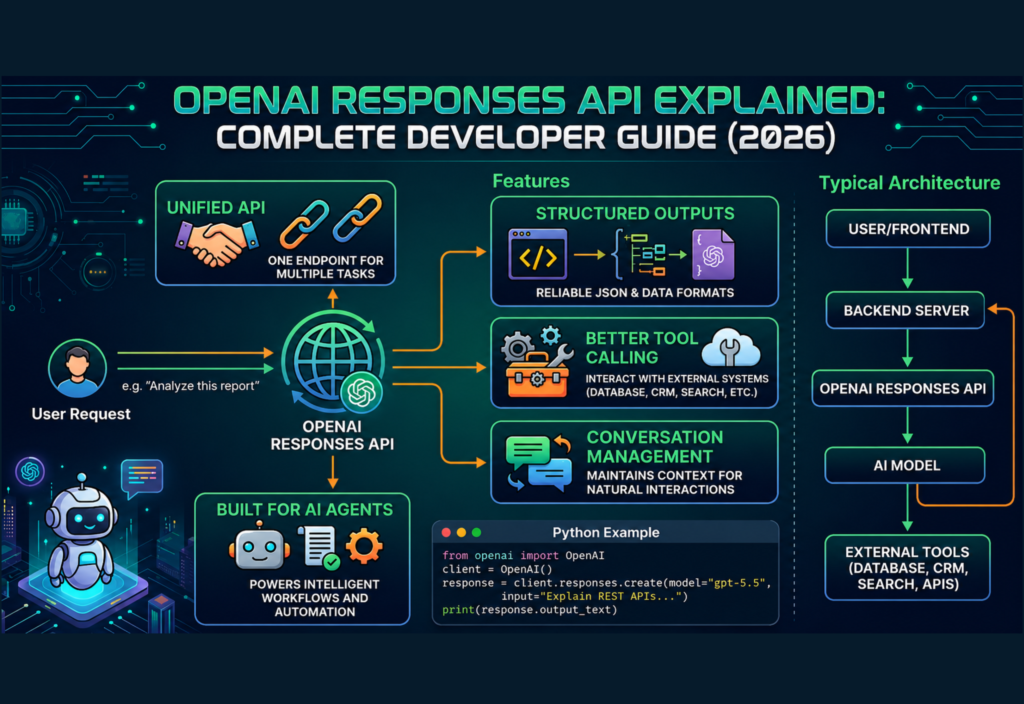
Artificial intelligence is transforming software development, and developers need APIs that are powerful, flexible, and easy to integrate. OpenAI Responses API is one of the most significant improvements introduced for building modern AI applications. Instead of using multiple endpoints for different AI capabilities, developers can work with a single, unified API that supports text generation, structured outputs, reasoning, and tool integration.
Whether you’re creating AI chatbots, coding assistants, customer support systems, AI agents, or workflow automation platforms, understanding the OpenAI Responses API can simplify development while making your applications more scalable and maintainable.
In this guide, you’ll learn what the OpenAI Responses API is, how it works, its major features, common use cases, and why many developers are choosing it for new AI projects in 2026.
What Is the OpenAI Responses API?
The OpenAI Responses API is a modern API designed to generate AI responses through a single interface. Rather than switching between different endpoints for various AI tasks, developers can send requests to one API that handles multiple capabilities.
It provides a simpler development experience while supporting advanced AI features that modern applications require.
The Responses API can be used for:
- AI chatbots
- Coding assistants
- AI agents
- Customer support
- Document analysis
- AI search tools
- Business automation
- Educational platforms
Because everything is managed through one consistent interface, developers spend less time managing APIs and more time building useful products.
Why Was the Responses API Introduced?
As AI applications became more sophisticated, developers often had to combine several APIs to complete everyday tasks.
For example, one application might need to:
- Generate text
- Maintain conversations
- Call external tools
- Return structured JSON
- Process multiple input types
Managing different endpoints increased development complexity.
The Responses API solves this by providing a unified developer experience.
Its primary goals include:
- Simplifying AI development
- Reducing backend complexity
- Supporting AI agents
- Improving tool integration
- Making structured outputs easier
- Preparing applications for future AI capabilities
Key Features of the OpenAI Responses API
Unified API
Instead of learning several APIs, developers work with one consistent interface.
This makes projects easier to maintain as they grow.
Better Tool Calling
The Responses API allows AI models to interact with external tools.
Examples include:
- Databases
- Search engines
- Calendars
- Business software
- CRM platforms
- Internal APIs
This enables AI to perform useful real-world tasks rather than simply generating text.
Structured Outputs
Applications often need data in a predictable format.
Instead of only receiving plain text, developers can request structured responses such as JSON.
This simplifies integration with web applications and backend systems.
Conversation Management
The API helps applications maintain conversation context more efficiently.
Users experience more natural interactions because previous messages can be considered during response generation.
Built for AI Agents
Modern AI agents perform more than conversations.
They can:
- Plan tasks
- Use tools
- Retrieve information
- Generate reports
- Complete workflows
The Responses API is designed to support these intelligent systems.
How the OpenAI Responses API Works
The overall workflow is straightforward.
Step 1
A user sends a request through your application.
Examples include:
- Asking a question
- Requesting code
- Summarizing a document
- Automating a task
Step 2
Your backend forwards the request to the OpenAI Responses API.
Step 3
The AI model analyzes the request.
If necessary, it performs reasoning before generating an answer.
Step 4
The model may call external tools if additional information is required.
For example:
- Search a database
- Retrieve customer information
- Access business documentation
- Query an internal API
Step 5
The Responses API returns the final answer.
Your application then displays it to the user.
Typical Responses API Architecture
Instead of using a large table or diagram, here’s the architecture in a simple format:
User
   │
Frontend Application
   │
Backend Server
   │
OpenAI Responses API
   │
AI Model
   │
External Tools
(Database • CRM • Search • Calendar • APIs)
This architecture works for both simple AI chatbots and enterprise AI systems.
Main Components
User Input
Every interaction begins with a prompt submitted by the user.
Examples include:
- Writing code
- Asking questions
- Analyzing documents
- Creating summaries
- Automating workflows
AI Model
The AI model understands the request, performs reasoning, and decides whether additional tools are required.
Tool Calling
If the task needs external information, the model can communicate with connected systems.
Examples:
- Database queries
- CRM lookups
- Calendar events
- Search engines
- Internal documentation
Response Generation
After gathering all required information, the model generates the final response and sends it back to the application.
Responses API vs Chat Completions API
Instead of a wide table that breaks on mobile, here’s a mobile-friendly comparison.
OpenAI Responses API
✅ Unified API design
✅ Advanced tool calling
✅ Better structured outputs
✅ Designed for AI agents
✅ Future-ready architecture
✅ Easier to scale
Chat Completions API
• Older architecture
• Basic tool calling
• Limited structured outputs
• Suitable for existing chat applications
• Less flexible for advanced AI workflows
Which Should You Choose?
If you’re building a new AI application, the Responses API is generally the better option because it offers a modern architecture, improved flexibility, and stronger support for AI agents and tool integration.
Common Use Cases
Developers are using the Responses API for:
- AI chatbots
- Coding assistants
- Customer support
- AI agents
- Workflow automation
- AI document analysis
- AI search systems
- Research assistants
- Business automation
- Educational applications
Each of these applications benefits from the API’s ability to combine reasoning, conversation management, and external tool integration.
How to Use the OpenAI Responses API
Getting started with the OpenAI Responses API is straightforward. Whether you’re building a chatbot, AI coding assistant, workflow automation tool, or AI-powered SaaS product, the development process is simple.
The general workflow is:
- Install the OpenAI SDK.
- Configure your API key.
- Send a request to the Responses API.
- Receive the AI-generated response.
- Display or process the output inside your application.
This unified approach reduces backend complexity and allows developers to build applications more efficiently.
Python Example
Below is a simple example using Python.
from openai import OpenAI

client = OpenAI(api_key="YOUR_API_KEY")

response = client.responses.create(
    model="gpt-5.5",
    input="Explain the difference between REST APIs and GraphQL."
)  print(response.output_text)
This example sends a prompt to the model and prints the generated response.
Real-World Applications
The OpenAI Responses API can power many types of AI applications.
Popular examples include:
- AI Chatbots
- Coding Assistants
- Customer Support Systems
- AI Agents
- Research Assistants
- AI Writing Tools
- Business Automation
- AI Search Systems
- Education Platforms
- Document Analysis Tools
Because it supports structured outputs and tool integration, developers can build much more than simple conversational bots.
Best Practices
Following best practices makes your AI applications more reliable, secure, and scalable.
Write Clear Prompts
Avoid vague instructions.
Instead of writing:
Explain Python.
Write:
Explain Python for beginners with three practical coding examples.
Specific prompts produce better results.
Choose the Right Model
Different AI models are optimized for different workloads.
Select the model that best matches your application’s needs, whether you prioritize speed, reasoning, or cost efficiency.
Validate Responses
AI-generated content may occasionally contain mistakes.
Always validate:
- Generated code
- JSON responses
- Database queries
- Business data
- Important calculations
Validation improves reliability and user trust.
Handle Errors
Your application should gracefully manage situations like:
- Network failures
- Invalid requests
- Authentication errors
- Rate limits
- Temporary API issues
Proper error handling ensures a smoother user experience.
Secure Your API Keys
Never expose API keys in frontend code.
Instead:
- Store them in environment variables.
- Use backend servers for requests.
- Rotate keys regularly.
- Limit unnecessary access.
Good security practices help protect your application.
Monitor Usage
As your application grows, monitor:
- API requests
- Response times
- Token usage
- Error rates
- Monthly costs
Monitoring helps improve performance and control expenses.
Common Mistakes Developers Make
Many developers make similar mistakes when building AI applications.
Avoid these common issues:
- Writing unclear prompts
- Hardcoding API keys
- Ignoring rate limits
- Skipping response validation
- Sending excessively large prompts
- Forgetting error handling
- Not tracking API costs
Avoiding these mistakes results in more stable and maintainable applications.
Responses API vs Assistants API
These APIs serve different purposes.
Responses API
- Modern unified architecture
- Easier to integrate
- Better structured outputs
- Advanced tool support
- Recommended for many new projects
Assistants API
- Designed around assistant workflows
- Suitable for existing implementations
- More configuration required
- Different conversation management approach
For many new AI applications, the Responses API provides a cleaner development experience.
Responses API vs Model Context Protocol (MCP)
Although they are often mentioned together, they solve different problems.
OpenAI Responses API
- Generates AI responses
- Processes prompts
- Supports reasoning
- Calls external tools
- Powers AI applications
Model Context Protocol (MCP)
- Connects AI to external systems
- Standardizes communication
- Enables secure tool integration
- Works across different AI platforms
- Improves interoperability
Many advanced AI applications use both technologies together.
Who Should Learn the Responses API?
The Responses API is useful for:
- AI Developers
- Python Developers
- Backend Engineers
- Full-Stack Developers
- SaaS Builders
- Startup Founders
- AI Automation Specialists
- Software Engineers
- Students Learning AI
Learning this API provides a strong foundation for building modern AI-powered software.
Future of the OpenAI Responses API
Artificial intelligence continues to evolve rapidly. Modern AI applications increasingly require reasoning, structured outputs, external tool integration, and multimodal capabilities.
The OpenAI Responses API is designed to support these evolving needs. As developers build more advanced AI assistants, automation platforms, and enterprise solutions, unified APIs will simplify development and improve long-term maintainability.
Developers who understand the Responses API today will be better prepared for future AI technologies.
Frequently Asked Questions
Is the OpenAI Responses API free?
The API follows OpenAI’s pricing model. Costs depend on the model you choose and the number of tokens your application uses.
Can beginners use the Responses API?
Yes. Developers with basic knowledge of Python or REST APIs can start building AI applications using the official SDK.
Which programming languages support the Responses API?
Although Python is widely used, any language capable of making HTTPS requests can access the API, including JavaScript, Java, Go, PHP, C#, and Ruby.
Can I build AI agents with the Responses API?
Yes. The Responses API is well suited for AI agents, workflow automation, coding assistants, research tools, and enterprise AI applications.
Is the Responses API replacing Chat Completions?
Many new AI projects use the Responses API because it offers a unified and flexible architecture. Existing applications built with Chat Completions can continue to operate.
Conclusion
The OpenAI Responses API is one of the most important tools for modern AI development. By combining text generation, reasoning, structured outputs, and tool integration into a single interface, it simplifies the process of building intelligent applications.
Whether you’re creating AI chatbots, coding assistants, workflow automation systems, or enterprise software, learning the Responses API will help you build scalable and future-ready solutions. As artificial intelligence continues to evolve, developers who master modern APIs and best practices will be better equipped to create innovative applications that solve real-world problems.

