
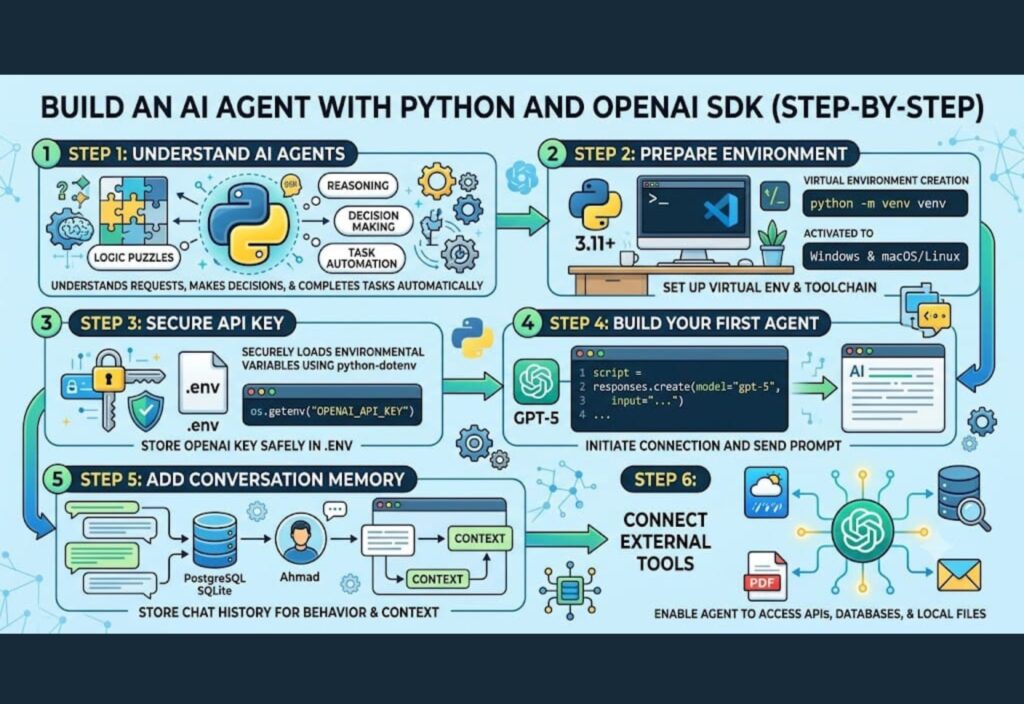
Build an AI Agent with Python is one of the most valuable skills for developers in 2026. Artificial Intelligence (AI) is changing the way developers build software, and modern AI applications can do much more than answer simple questions. They can understand instructions, solve problems, generate code, summarize documents, and automate everyday tasks. As a result, AI agents have become one of the most exciting technologies in modern software development.
Python plays a major role in this transformation. Because it is easy to learn and has a rich ecosystem of libraries, developers of all skill levels use Python to build AI-powered applications. Moreover, the official OpenAI SDK makes it simple to connect Python projects with advanced AI models.
Whether you are a beginner or an experienced programmer, learning how to build an AI agent with Python can improve your development skills. For example, you can create customer support assistants, research tools, coding helpers, document analyzers, and business automation systems. In addition, many companies now use AI agents to increase productivity and reduce repetitive work.
In this step-by-step guide, you will learn the basic concepts of AI agents, prepare your Python environment, install the required tools, and build an AI agent with Python using the OpenAI SDK. By the end of this tutorial, you will have a strong foundation for creating more advanced AI projects.
What Is an AI Agent?
An AI agent is a software program that can understand user requests, make decisions, and complete tasks automatically. Unlike a traditional chatbot, an AI agent does more than generate text. Instead, it can combine reasoning with actions to solve real problems.
For example, imagine you ask an AI agent to read a PDF, summarize the important points, create a to-do list, and write a professional email based on the document. Rather than completing only one task, the AI agent can perform the entire workflow in the correct order.
Similarly, an AI agent can connect with external tools and services. It may search a database, read files, call an API, or organize information before giving a final answer. Therefore, AI agents are becoming valuable in education, software development, healthcare, finance, marketing, and customer support.
A modern AI agent can perform tasks such as:
- Understanding natural language instructions.
- Remembering previous conversations.
- Generating Python code and documentation.
- Summarizing long articles and reports.
- Reading documents and extracting useful information.
- Connecting with APIs and external services.
- Automating repetitive business tasks.
Because of these capabilities, AI agents help users save time while improving accuracy and productivity.
Why Use Python for AI Agents?
Python is one of the most popular programming languages in the world. More importantly, it has become the first choice for AI development because it is simple, flexible, and supported by a large developer community.
One of Python’s biggest advantages is its readable syntax. Even beginners can understand Python code without spending months learning complex programming rules. Consequently, developers can focus on solving problems instead of worrying about difficult syntax.
Another advantage is the large collection of open-source libraries. These libraries allow developers to build powerful AI applications much faster. Instead of creating everything from scratch, you can use trusted tools that have already been tested by the community.
Some popular Python libraries include:
- OpenAI SDK for AI integration.
- FastAPI for building APIs.
- Pydantic for data validation.
- Requests for working with web services.
- Pandas for data analysis.
- SQLAlchemy for database management.
- BeautifulSoup for web scraping.
- Playwright for browser automation.
Furthermore, Python works well on Windows, macOS, and Linux. Therefore, you can develop your AI application on almost any operating system without making major changes.
For these reasons, Python continues to be one of the best languages for building AI agents in 2026. It combines simplicity, flexibility, and a powerful ecosystem, making it suitable for beginners as well as professional developers.
What You’ll Learn in This Guide
Before writing any code, it is helpful to understand what this tutorial covers. Throughout this guide, you will learn how to:
- Set up a Python development environment.
- Install and configure the OpenAI SDK.
- Securely manage your API key.
- Build your first AI agent.
- Improve your agent with conversation memory.
- Connect external tools and APIs.
- Follow best practices for security and performance.
With these skills, you will be ready to build practical AI applications for personal projects, business automation, or professional software development.
What You Need Before You Start
Before building your AI agent, prepare your development environment. A proper setup helps you avoid errors and makes the project easier to manage later. Fortunately, you only need a few tools to get started.
Make sure you have the following:
- Python 3.11 or later
- pip package manager
- Visual Studio Code or another code editor
- An OpenAI API key
- Basic knowledge of Python variables and functions
If you are new to Python, do not worry. The examples in this guide are simple and easy to follow.
Create Your Project Folder
A well-organized project is easier to understand and maintain. Therefore, create a separate folder for your AI agent instead of placing files in different locations.
Your project structure may look like this:
ai-agent/
│
├── main.py
├── requirements.txt
├── .env
└── README.md
Each file has a specific purpose.
- main.py contains your Python code.
- requirements.txt stores project dependencies.
- .env keeps your API key secure.
- README.md explains the project for other developers.
As your application grows, you can also add folders for prompts, utilities, tests, and custom tools.
Create a Virtual Environment
Using a virtual environment is considered a best practice for Python projects. It keeps project dependencies separate and prevents version conflicts.
For Windows, run:
python -m venv venv
venv\Scripts\activate
For macOS or Linux, use:
python3 -m venv venv
source venv/bin/activate
After activation, install the required packages.
pip install openai python-dotenvNext, save the installed packages.
pip freeze > requirements.txtAs a result, anyone can recreate the same environment by installing the dependencies listed in the file.
Store Your API Key Securely
Security is an important part of every software project. Therefore, never place your API key directly inside your Python code.
Instead, create a file named:
.envThen add your key like this:
OPENAI_API_KEY=your_api_key_hereThis method protects sensitive information and reduces the risk of accidentally sharing your credentials through Git or other version control systems.
Load Environment Variables
Before sending requests to the OpenAI API, load the environment variables stored in the .env file.
import os
from dotenv import load_dotenv

load_dotenv()

api_key = os.getenv("OPENAI_API_KEY")
This approach keeps your application secure while making it easier to switch between development and production environments.
Build Your First AI Agent
Now it is time to create your first AI-powered application. Fortunately, the OpenAI SDK makes this process simple.
Create a file named main.py and add the following code:
from openai import OpenAI
import os
from dotenv import load_dotenv

load_dotenv()

client = OpenAI(api_key=os.getenv("OPENAI_API_KEY"))

response = client.responses.create(
    model="gpt-5",
    input="Explain Python decorators in simple words."
)

print(response.output_text)
When you run this program, it sends your prompt to the AI model and prints the generated response in your terminal.
Although the example is short, it demonstrates the core workflow used by many AI applications.
Understanding the Code
Every line of the previous example has a specific purpose.
load_dotenv()loads the variables from the.envfile.OpenAI()creates a connection with the API.responses.create()sends your request to the selected model.model="gpt-5"specifies which AI model should generate the response.response.output_textreturns the final answer as plain text.
Because each step has a clear responsibility, the code is easy to read, test, and extend.
Test Different Prompts
After confirming that your AI agent works correctly, try different prompts to understand its capabilities.
For example, you can ask it to:
- Explain recursion with a simple example.
- Write a professional business email.
- Summarize a long article.
- Generate Python code for a calculator.
- Explain SQL joins for beginners.
- Create a weekly study plan.
- Suggest ideas for a software project.
Experimenting with different prompts helps you learn how wording affects the quality of AI responses. Moreover, it prepares you for building more advanced applications in the future.
Part 1 Summary
Congratulations! You have successfully completed the first stage of building an AI agent with Python and the OpenAI SDK.
So far, you have learned what tools you need, how to organize your project, create a virtual environment, install the required packages, protect your API key, and build your first working AI application. In addition, you now understand how the OpenAI SDK processes requests and returns responses.
These fundamentals provide a strong foundation for more advanced features. In the next part of this guide, you will learn how to add conversation memory, create reusable functions, connect external tools, improve error handling, and transform your simple application into a practical AI agent.
Add Conversation Memory to Your AI Agent
Your first AI agent can answer questions, but it cannot remember previous conversations. Therefore, the next step is to add conversation memory. This feature allows your AI agent to provide more natural and helpful responses.
For example, imagine a user says:
- My name is Ahmad.
- I am learning Python.
- What programming language am I learning?
Without conversation memory, the AI will treat every question as new. As a result, it may give an incorrect answer. However, if the agent remembers earlier messages, it can easily reply that the user is learning Python.
A simple way to manage conversation history is to store previous messages in a list.
conversation = [
    {"role": "user", "content": "My name is Ahmad."},
    {"role": "assistant", "content": "Nice to meet you, Ahmad."},
    {"role": "user", "content": "I am learning Python."}
]
Whenever the user sends a new message, add it to the conversation history before making another API request. Consequently, the AI understands the full context instead of only the latest prompt.
For larger applications, developers usually save conversations in a database such as PostgreSQL, SQLite, or Redis. This approach allows users to continue previous chats even after closing the application.
Create a Reusable Function
Writing the same API request repeatedly makes your code difficult to maintain. Instead, create a reusable function that handles all communication with the OpenAI API.
from openai import OpenAI

client = OpenAI()

def ask_agent(prompt):
    response = client.responses.create(
        model="gpt-5",
        input=prompt
    )

    return response.output_text
Now you only need one line of code whenever you want to ask the AI a question.
print(ask_agent("Explain machine learning in simple words."))Because the logic is stored in one function, your application becomes cleaner and easier to update.
Build a Continuous Chat Application
Most AI assistants allow users to ask multiple questions during one session. Therefore, creating a continuous chat loop is an important step.
You can use a simple while loop like this:
while True:
    question = input("You: ")

    if question.lower() == "exit":
        break

    answer = ask_agent(question)

    print("Agent:", answer)
The loop continues until the user types exit. As a result, the application behaves like a real chatbot instead of answering only one question.
Later, you can connect the same logic to a website built with FastAPI, Flask, or Django.
Give Your AI Agent a Clear Role
Every AI agent performs better when it receives clear instructions. Therefore, define its role before sending user prompts.
For example, your AI agent can act as:
- A Python programming tutor
- A technical writer
- A software architect
- A cybersecurity expert
- A customer support assistant
- A project manager
When the role is clear, the responses become more focused and consistent. Moreover, users receive answers that match their expectations.
Generate Structured Output
Many real-world applications need structured information instead of long paragraphs.
For example, an e-commerce website may need a product title, short description, and keywords. Likewise, a blog application may require headings, summaries, and SEO metadata.
Instead of requesting plain text, ask the AI to return structured data.
Example:
Return the response in JSON format with:

title
summary
keywords
Structured output is much easier to process in websites, mobile apps, and APIs.
Connect External Tools
One of the biggest advantages of AI agents is their ability to work with external tools.
Instead of relying only on the language model, your application can connect to other services and complete useful tasks.
For example, your AI agent can:
- Read PDF files
- Search a database
- Access weather APIs
- Retrieve stock prices
- Send emails
- Create calendar events
- Analyze spreadsheets
- Search company documents
Imagine a user asks:
“Show me today’s weather.”
Rather than guessing, the AI agent can call a weather API and return accurate information. Consequently, the response becomes more reliable and useful.
Read Local Files
Many AI applications work with documents instead of simple text.
Fortunately, Python makes it easy to read different file types.
Common examples include:
- PDF documents
- Word files
- CSV files
- Excel spreadsheets
- Markdown files
- Plain text documents
After reading a file, your AI agent can summarize it, answer questions, extract important details, or generate reports.
This feature is especially useful for businesses, teachers, researchers, and software teams.
Handle Errors Properly
Every application should prepare for unexpected problems. Otherwise, even a small error can stop the entire program.
For example, problems may occur because of:
- Missing API keys
- Internet connection failures
- Invalid requests
- Rate limits
- Server issues
Python provides a simple way to manage these situations.
try:
    answer = ask_agent("Hello")
    print(answer)

except Exception as error:
    print("Something went wrong:", error)
Using proper error handling makes your application more stable and easier to debug.
Optimize API Usage
Every request sent to the OpenAI API uses tokens. Therefore, efficient token management helps reduce costs and improve response speed.
Follow these best practices:
- Write clear prompts.
- Remove unnecessary conversation history.
- Avoid duplicate requests.
- Limit very long responses.
- Reuse previous results whenever possible.
- Cache frequently used information.
These small improvements can make a noticeable difference in both performance and operating costs.
Real-World AI Agent Projects
Once you understand the basics, you can build many useful AI applications.
Some popular ideas include:
- AI coding assistant
- Customer support chatbot
- Resume reviewer
- PDF question-answering system
- Email writing assistant
- Blog content generator
- Research assistant
- Meeting notes generator
- Personal finance assistant
- Travel planning assistant
Each project combines natural language understanding with automation to solve real problems.
Best Practices for AI Development
Finally, follow these best practices to build reliable AI applications:
- Store API keys securely.
- Validate user input.
- Organize your project into separate modules.
- Write reusable functions.
- Log important events.
- Test your application regularly.
- Monitor API usage.
- Update dependencies frequently.
Following these recommendations will help you create secure, scalable, and maintainable AI projects.
Deploy Your AI Agent
After testing your AI agent on your local computer, the next step is deployment. Once the application is online, other users can access it through a website, desktop application, or API.
Fortunately, several deployment options are available. You can choose the one that best matches your project size and budget.
Popular deployment platforms include:
Cloud virtual servers
Docker containers
Platform-as-a-Service (PaaS)
Serverless platforms
Kubernetes for enterprise applications
For example, if you build your project with FastAPI, you can deploy it to a cloud server and connect it to a production database. As your application grows, you can also add monitoring, backups, and automatic scaling.
Add User Authentication
Most public AI applications need user authentication. Without it, anyone could access private information or misuse your service.
Authentication allows every user to have a separate account and personal data.
Common authentication methods include:
Email and password
OAuth login
JSON Web Tokens (JWT)
Single Sign-On (SSO)
API keys for developers
In addition, authentication lets users save conversations, manage settings, and continue previous sessions. Therefore, it improves both security and user experience.
Store Data in a Database
As your AI agent becomes more advanced, you will need permanent data storage. Instead of keeping information only in memory, save it in a database.
A database can store:
User profiles
Conversation history
Uploaded documents
Generated reports
User preferences
Activity logs
Usage statistics
For structured business data, PostgreSQL is a popular choice. On the other hand, document-based projects often use NoSQL databases.
Because important information remains available after users leave the application, your AI agent can deliver a more personalized experience.
Improve Application Performance
Fast responses create a better user experience. Therefore, optimizing your AI application should be one of your priorities.
Here are several ways to improve performance:
Cache repeated responses.
Avoid duplicate API requests.
Process independent tasks asynchronously.
Remove unnecessary conversation history.
Load only the required data.
Keep prompts clear and concise.
As a result, your application becomes faster while reducing API costs.
Follow Security Best Practices
Security is essential for every AI project. Even a small mistake can expose sensitive information.
To keep your application safe, follow these recommendations:
Never expose API keys publicly.
Store secrets in environment variables.
Validate all user input.
Limit uploaded file sizes.
Encrypt sensitive user data.
Keep software dependencies updated.
Monitor logs for suspicious activity.
Create regular backups.
Moreover, review your security settings regularly to reduce future risks.
Avoid Common Beginner Mistakes
Many developers make similar mistakes during their first AI project. Fortunately, you can avoid most of them with careful planning.
Some common mistakes include:
Hard-coding API keys.
Ignoring error handling.
Writing very long prompts.
Skipping input validation.
Forgetting conversation memory.
Keeping all code in one file.
Ignoring API usage and costs.
Deploying without proper testing.
By avoiding these problems, your application will be easier to maintain and scale.
Real-World Uses of AI Agents
AI agents are already helping businesses and individuals in many industries.
Customer Support
Companies use AI agents to answer common questions, resolve basic issues, and provide support at any time of the day.
Software Development
Developers use AI assistants to explain code, generate functions, review pull requests, create documentation, and identify programming errors.
Education
Students can learn faster by asking questions, receiving personalized explanations, creating study plans, and practicing programming exercises.
Healthcare
Healthcare organizations use AI systems to organize medical records, summarize clinical documents, and assist with administrative tasks. However, qualified professionals should always review important medical decisions.
Business Automation
Businesses automate repetitive work such as report generation, document processing, email drafting, and knowledge management.
Content Creation
Writers and marketers use AI agents to brainstorm ideas, create outlines, summarize research, optimize articles for SEO, and improve writing quality.
Future of AI Agents
AI technology continues to improve every year. Therefore, AI agents are expected to become even more capable in the future.
Some important trends include:
Better long-term memory
Improved reasoning abilities
More reliable tool integration
Stronger multimodal support
Smarter workflow automation
Better collaboration between multiple AI agents
As these technologies mature, AI agents will assist with increasingly complex business and personal tasks.
Frequently Asked Questions
Is Python the best language for AI agents?
Yes. Python is one of the most popular programming languages for AI because it is easy to learn, flexible, and supported by thousands of useful libraries.
Do I need machine learning knowledge?
No. Basic Python skills are enough to start building AI agents with the OpenAI SDK. However, learning AI concepts will help you build more advanced applications over time.
Can beginners build AI agents?
Yes. Beginners can create simple AI agents by following step-by-step tutorials and practicing with small projects.
Can I connect my AI agent to external services?
Yes. Python allows you to integrate APIs, databases, cloud storage, email services, payment gateways, and many other tools.
Can AI agents work with documents?
Yes. AI agents can read PDFs, Word documents, spreadsheets, and text files. They can also summarize content, answer questions, and extract useful information.
Conclusion
Building an AI agent with Python and the OpenAI SDK is an excellent way to learn modern software development. First, you learned the basic concepts and prepared your development environment. Next, you created your first AI-powered application and improved it with conversation memory, reusable functions, structured output, and external tools.
Finally, you discovered how to deploy your application, improve security, optimize performance, and prepare your project for real users. Although your first AI agent may be simple, it provides a strong foundation for more advanced projects.
Keep experimenting with new ideas, improve your coding skills, and build practical applications that solve real-world problems. With regular practice and continuous learning, you can create AI solutions that are useful, scalable, and ready for the future.

