Modern software applications need to handle thousands of operations at the same time. Websites process multiple users, applications communicate with different APIs, and AI-powered tools continuously handle large amounts of data. Traditional programming methods often become slow when applications spend most of their time waiting for external operations.
This is where Python Asyncio becomes extremely useful.
Python Asyncio is a built-in Python framework that allows developers to write asynchronous and concurrent code. It helps programs perform multiple tasks efficiently without blocking the entire application.
In 2026, asyncio has become an important skill for Python developers because modern technologies such as AI agents, automation systems, real-time applications, APIs, and cloud services require fast and efficient task handling.
This complete guide explains what Python asyncio is, how it works, its core concepts, benefits, limitations, and practical examples.
What Is Python Asyncio?
Python Asyncio is a Python library used for writing asynchronous programs with the help of:
- Coroutines
- Event loops
- Tasks
- Futures
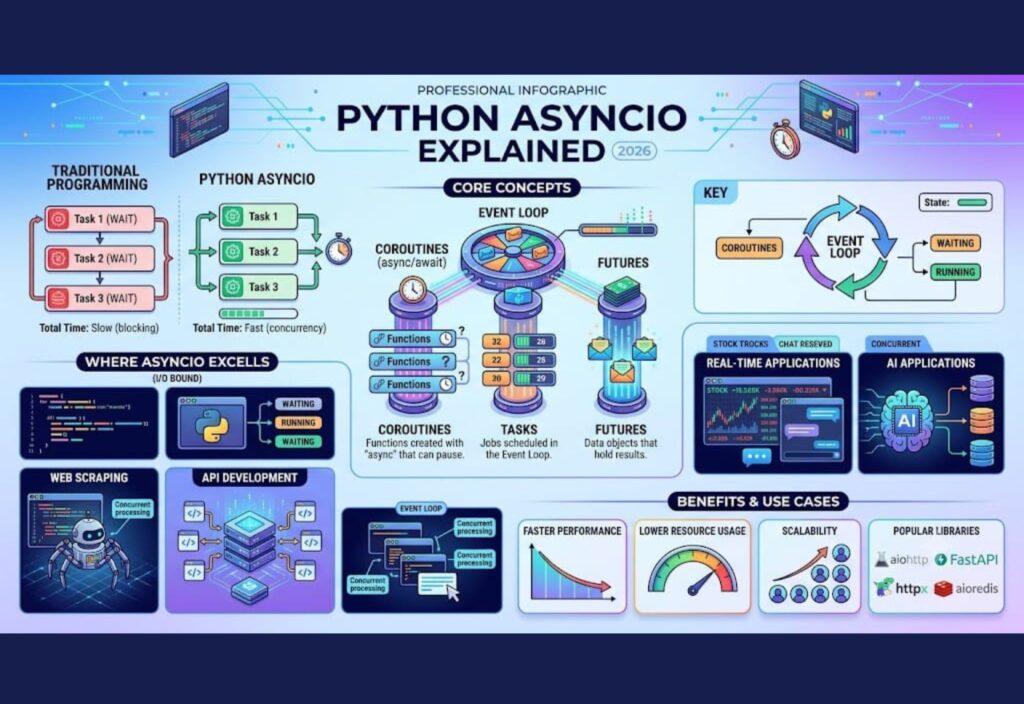
Unlike traditional programming where tasks execute one after another, asyncio allows multiple operations to progress together.
For example, imagine an application downloading data from multiple websites.
A normal program works like this:
Download Website 1
Wait for completion

Download Website 2
Wait for completion

Download Website 3
Wait for completion
This process wastes time because the program remains idle while waiting for responses.
With asyncio:
Download Website 1
Download Website 2
Download Website 3

Handle responses when available
The application can perform other work while waiting.
Synchronous vs Asynchronous Programming
Synchronous Programming
Synchronous programming executes tasks one at a time.
Example:
import time

def process_task():
    print("Task started")
    time.sleep(5)
    print("Task completed")

process_task()

print("Program finished")
Output:
Task started
(wait 5 seconds)
Task completed
Program finished
During the waiting period, Python cannot perform another task.
Asynchronous Programming
Asynchronous programming allows tasks to pause temporarily and lets other tasks continue.
Example:
import asyncio

async def process_task():
    print("Task started")
    await asyncio.sleep(5)
    print("Task completed")

asyncio.run(process_task())
The await keyword pauses only that task instead of stopping the entire program.
How Python Asyncio Works
Python asyncio mainly depends on three important concepts:
1. Event Loop
The event loop is the core component of asyncio.
It manages all asynchronous operations and decides which task should run next.
The event loop:
- Starts asynchronous tasks
- Monitors waiting operations
- Switches between tasks
- Continues completed tasks
Example:
Task A → Waiting for API response

Task B → Processing data

Task C → Downloading file

Event Loop manages everything
Instead of creating multiple threads, asyncio efficiently manages tasks inside one thread.
2. Coroutines
Coroutines are special functions created with the async keyword.
Example:
async def hello():
    print("Hello Async World")
A coroutine does not run immediately.
It needs an event loop:
import asyncio

async def hello():
    print("Hello Async World")

asyncio.run(hello())
Output:
Hello Async WorldCoroutines can stop and continue execution using await.
3. Await Keyword
The await keyword tells Python to wait for an asynchronous operation.
Example:
import asyncio

async def download():

    print("Downloading...")

    await asyncio.sleep(3)

    print("Download completed")


asyncio.run(download())
During those three seconds, other tasks can run.
Creating Multiple Async Tasks
Asyncio allows developers to run multiple tasks together.
Example:
import asyncio


async def task_one():
    print("Task One Started")
    await asyncio.sleep(2)
    print("Task One Finished")


async def task_two():
    print("Task Two Started")
    await asyncio.sleep(2)
    print("Task Two Finished")


async def main():

    await asyncio.gather(
        task_one(),
        task_two()
    )


asyncio.run(main())
Output:
Task One Started
Task Two Started
Task One Finished
Task Two Finished
Both tasks execute concurrently.
Asyncio vs Multithreading vs Multiprocessing
Python provides different ways to handle multiple tasks.
1. Asyncio
- Execution: Single thread
- Memory Usage: Low
- Best For: I/O tasks (API calls, network requests, file operations)
- Performance: Excellent for waiting tasks
- Complexity: Medium
2. Multithreading
- Execution: Multiple threads
- Memory Usage: Medium
- Best For: Mixed workloads
- Performance: Good
- Complexity: High
3. Multiprocessing
- Execution: Multiple processes
- Memory Usage: High
- Best For: CPU-heavy tasks
- Performance: Excellent for heavy calculations
- Complexity: High
Where Should You Use Python Asyncio?
Asyncio is mainly useful for I/O-bound applications.
1. Web Scraping
Large-scale web scraping requires sending thousands of requests.
Without asyncio:
Website 1 → Wait
Website 2 → Wait
Website 3 → Wait
With asyncio:
Website 1
Website 2
Website 3

All requests handled together
Popular libraries:
- aiohttp
- httpx
- BeautifulSoup with asyncio
2. API Development
Modern applications communicate with multiple APIs.
Example:
An online shopping platform may request:
- Customer data
- Product information
- Payment status
- Delivery details
Asyncio allows these requests to happen at the same time.
Popular frameworks:
- FastAPI
- Sanic
- Aiohttp
3. Real-Time Applications
Applications requiring continuous communication benefit from asyncio.
Examples:
- Chat applications
- Online games
- Live notifications
- Streaming platforms
- Cryptocurrency monitoring systems
Asyncio helps maintain thousands of connections efficiently.
4. AI Applications
Artificial Intelligence systems often communicate with multiple services:
- AI model APIs
- Vector databases
- Data processing pipelines
- External tools
Asyncio improves performance by handling multiple requests simultaneously.
For example, an AI assistant can:
- Search information
- Call APIs
- Retrieve documents
- Generate responses
at the same time.
Popular Asyncio Libraries in Python
aiohttp
Used for asynchronous HTTP requests.
Example:
import aiohttpIt is commonly used for:
- API communication
- Web scraping
- Data collection
FastAPI
FastAPI is one of the fastest Python web frameworks.
It supports async programming:
@app.get("/")
async def home():
    return {"message": "Hello"}
It is widely used for:
- APIs
- AI applications
- Backend systems
Async Database Libraries
Traditional database operations can block applications.
Async libraries allow faster database communication.
Examples:
- asyncpg (PostgreSQL)
- Motor (MongoDB)
Benefits of Python Asyncio
1. Faster Application Performance
Asyncio reduces waiting time by allowing multiple operations to progress together.
2. Lower Resource Usage
Unlike creating hundreds of threads, asyncio manages many tasks using fewer resources.
3. Better Scalability
Applications can handle more users and connections.
4. Ideal for Modern Applications
Asyncio works well with:
- Cloud applications
- AI tools
- APIs
- Automation systems
- Real-time platforms
Limitations of Asyncio
Although asyncio is powerful, it is not suitable for every situation.
1. Not Best for CPU-Heavy Tasks
Tasks like:
- Video rendering
- Complex calculations
- Machine learning training
require multiprocessing or specialized hardware.
2. Code Complexity
Async programming can be harder for beginners because developers need to understand:
- Event loops
- Coroutines
- Await behavior
3. Library Compatibility
Some older Python libraries do not support asynchronous operations.
Common Asyncio Mistakes
Blocking Async Code
Avoid using blocking functions:
Wrong:
time.sleep(5)Correct:
await asyncio.sleep(5)Creating Too Many Tasks
Thousands of unnecessary tasks can reduce performance.
Use task management techniques.
Forgetting Await
Wrong:
task()Correct:
await task()Python Asyncio Best Practices in 2026
For better performance:
✅ Use async libraries
✅ Avoid blocking functions
✅ Manage tasks properly
✅ Use connection pooling
✅ Handle exceptions carefully
✅ Test asynchronous code properly
Future of Python Asyncio
The demand for asynchronous programming will continue growing because modern software requires speed and scalability.
In 2026 and beyond, asyncio will remain important for:
- AI agent development
- Autonomous systems
- Cloud applications
- Real-time communication
- Large-scale APIs
- Automation platforms
As Python continues improving, asynchronous programming will become a standard approach for building high-performance applications.
Conclusion
Python Asyncio provides a powerful way to write faster and more efficient concurrent applications. By using coroutines, event loops, and asynchronous tasks, developers can handle thousands of operations without relying heavily on multiple threads.
For simple scripts, traditional Python programming may be enough. However, for modern applications involving APIs, AI systems, automation, and real-time communication, asyncio offers significant performance advantages.
Learning Python asyncio in 2026 is a valuable investment for developers who want to build scalable and future-ready software solutions.